

The new 2023 Fire TV Stick 4K Max is now available and is receiving tons of attention due to a few anticipated features.
It’s been two years since Amazon introduced the first Fire TV Stick 4K Max which was the most popular Firestick to date due to increased CPU performance and the addition of WiFi 6 technology.
Amazon Firesticks have been extremely popular since the first generation release in 2014 due to the ability to install 3rd party apps not available within the Amazon App Store. Many refer to this as jailbreaking.
How to Jailbreak Firestick Tutorial
The 2021 Fire TV Stick 4K Max introduced Fire OS 7 which is notable because the new 2023 Fire TV Stick 4K Max is showcasing the new Fire OS 8 operating system. Fire OS 8 is powered by Android 11 whereas Fire OS 7 was using Android 9.

I was excited to dive into this new Firestick but my excitement quickly diminished during my First Impressions Video on the TROYPOINT Insider.

Hide Your Digital Fingerprint
There are a couple big problems with this device that I will outline in this review. Hopefully Amazon will push out an update soon to address these issues.
This new Firestick 4K Max Review will tackle the main questions that TROYPOINT fans have voiced over the past month since the announcement of Amazon’s new lineup.
It’s important to note that I will not be doing a full review of the Fire TV Stick 4K that sells for $10 less as I think it’s silly that Amazon released a model like this. Whose not going to pay an additional $10 to get 8GB of extra internal storage? Stupid in my opinion.
I will however provide a few comparisons in this review of features on both new 2023 Firesticks.
Purchase New 2023 Fire TV Stick 4K Max
New Fire TV Stick 4K Max Features
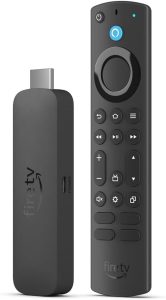
Amazon’s new Fire TV Stick 4K Max is a powerful streaming device that has vast improvements from the first iteration of this media player.
This includes support for WiFi 6E which means lower latency, faster speeds, and less interference from other devices.

Exclusive Surfshark Discount
Warning: Your online activity is currently monitored by your ISP, app/addon/IPTV developers, government agencies, and the websites you visit.
- Become 100% anonymous while streaming and downloading.
- Use on Unlimited Devices & share 1 account with the entire family.
- Save 87% with the 24-Month Plan + Get 3 FREE Months.
It has also improved to a MediaTek MT8696T quad-core 2GHz CPU which is even better than what is available in the current Fire TV Stick 4K Max.
The most notable change, however, is that this device will include 16 GB of internal storage which is something we have not seen in a Firestick device.

Memory will continue to stay the same at 2GB of LPDDR4 RAM which is available in the Firestick 4K as well.
A new feature that will only be available with the Fire TV Stick 4K Max is the Fire TV Ambient Experience also provided in Omni QLED Series Fire TVs.
This platform acts similarly to an Alexa display and will provide weather widgets, calendar, To-Do lists, artwork, and more.

Remote Controls for New Firesticks
Amazon has opted to package the “enhanced” Fire TV Alexa remote, typically reserved for Fire TV Smart TVs, with the new Fire TV Stick 4K Max.

Conversely, the Fire TV Stick 4K comes bundled with the standard Fire TV Alexa remote and the Max comes with the enhanced remote. Now, with the release of the Fire TV Stick 4K Max, it becomes the second standalone Fire TV model to feature this upgraded remote. The enhanced remote offers the same functionality as the standard remote but incorporates additional features such as channel up/down buttons, a settings button, and a recent button that conveniently displays a list of recently opened apps and content.
Purchase New 2023 Fire TV Stick 4K Max
Big Tech is Scanning Your Emails
Stop letting free providers read your private messages to build advertising profiles on you. Take back your digital privacy with a secure, ad-free inbox.
User Interface
There are no huge changes to the user interface on the new Fire TV Stick 4K Max. I thought that we may see a few UI changes due to the introduction of Fire OS 8 but not so much.
There are only two alterations that I see after quickly exploring the user interface on Fire OS 8.
There is no longer a Profiles shortcut on the Fire TV Stick 4K Max settings screen.

Not a huge deal as you can still get to this by pressing on the home button of the remote for a few seconds.

The biggest problem regarding the UI is that missing shortcuts are now present again for applications that have been side-loaded onto the device. We first saw this problem with Fire OS 7 but Amazon finally released an update that fixed it on the previous Firesticks.

More than likely Amazon will be coming out with an update that fixes this problem but the question is how long will that take?
In the meantime users can install Sideload Launcher through the free TROYPOINT Toolbox and use that to see all shortcuts on their new Firesticks.

Side-loading Apps on New Fire TV Stick 4K Max
Yes, side-loading apps does work on the new Fire TV Stick 4K Max. In this example, I’m side-loading Kodi with the free TROYPOINT Toolbox.

I highly doubt that Amazon will ever remove this capability as developers need the ability to test their apps prior to publishing to the Amazon App Store.
We have encountered a few applications not compatible with Fire OS 8 and one of the more significant ones is Mouse Toggle. Mouse Toggle allows us to navigate applications designed for phones and tablets.

Fire TV Stick 4K Max Expandable Storage & Storage Permissions
The biggest complaint in the past has been lack of internal storage on Amazon Fire TV Sticks. Now that we have 16GB of internal storage on the new Firestick 4K Max hopefully that will be enough so we don’t need to add additional storage through a USB drive.
I tested expanding internal storage on the new Fire TV Stick 4K Max and I’m happy to report that it works as it did on the 2021 Fire TV Stick 4K Max.

Expanding internal storage allows us to install apps onto a USB drive so we will never run out of space.
Unfortunately, there is also a problem with storage access permission on the new Firestick 4K Max system as well. As of this post some storage features of Kodi and other media players and file managers won’t work properly or not at all. The omission of important access permissions on Fire OS 8 makes it impossible to access certain files stored on internal storage. Again, I am sure an update will be sent that will fix this but we don’t know when that will happen.
In the following example, I’m trying to browse to /sdcard/Android/data with X-plore File Manager and I get the following prompt. Your be led to believe that this will allow access but it doesn’t. What’s needed is the “allow all the time” option which allows access to nearly all files stored under /sdcard/ internal storage. As of now, it only allows accessing its own files and photo/video files with popular media file extensions.
There is ADB code that can be used to allow for this and I will provide a tutorial soon for that.

Download/Upload Speeds
In the following Download/Upload speed tests I’m connection to my favorite WiFi 6 router, the ASUS RT-AX86U Pro (AX5700) Dual Band WiFi 6 Router. It’s important to point out that you must connect to a WiFi 6 router to take advantage of the speed boost that the new Fire TV Stick 4K Offers with its WiFi 6E compatibility. If you don’t have a WiFi 6 router, you can still connect to your standard router, you just won’t get the faster speeds.
When connecting through Surfshark VPN, I’m going through the Chicago server which provides the fastest speeds for me as this is closest to my physical location.
I’m using the free Analiti Speed Test app to measure the download & upload speeds that you will find below.
Many have questioned whether the UGREEN Gigabit Ethernet USB Adapter works with the new Fire TV Stick 4K Max and I’m happy to report that it does in conjunction with an OTG Cable!
WiFi 6E Speeds

Surfshark VPN Off: Download = 395 Mbps & Upload = 277 Mbps
Surfshark VPN On: Download = 115 Mbps & Upload = 102 Mbps
As you can see, the new Fire TV Stick 4K max offers superior download/upload speeds with the new WiFi 6E technology. But, it’s important to point out that the 2021 Fire TV Stick 4K Max was very similar in terms of speed.
Purchase New 2023 Fire TV Stick 4K Max
Fire TV Stick 4K Max Specs
Size: 99 mm x 30 mm x 14 mm (only housing) 108 mm x 30 mm x 14 mm (including the connector)
Weight: 43.5 g
Processor: Quad-core 2.0GHz
GPU: 850MHz
Storage: 16GB
WiFi: Wi-Fi 6E tri-band: 802.11 a/b/g/n/ac/ax (2.4GHz, 5GHz, and 6GHz)
Bluetooth: Bluetooth 5.2 + BLE
Voice Support: Yes, with the Alexa Voice Remote Enhanced (included) or free Fire TV app (available for download on Fire OS, Android, and iOS)
IR device control with included Alexa Voice Remote Enhanced: The included Alexa Voice Remote Enhanced can control Fire TV Stick 4K Max and certain functions (such as power and volume) on a wide range of compatible IR-enabled devices, including TVs, soundbars and A/V receivers. Note: Certain functions may not be available on some IR-enabled devices.
Cloud Storage: Free cloud storage for digital content purchased from Amazon
Ports: HDMI 2.1 output with ARC input support, micro USB
Audio Support: Dolby Atmos, 7.1 surround sound, 2-channel stereo, and HDMI audio pass through up to 5.1.
4K Support: To watch movies and TV shows in 4K Ultra HD, you need a compatible Ultra HD TV. All services may not be available in 4K/HDR. Certain services are subject to change at any time, may not be available in all areas, or in 4K/HDR, and may require separate subscriptions.
Content Formats Supported:
Video: Dolby Vision, HDR 10, HDR10+, HLG, H.265, H.264, VP9, AV1;
Audio: xHE-AAC, AAC-LC, AAC+, eAAC+, AAC-ELD, MP3, AMR-NB, FLAC, PCM/WAV, Vorbis, Dolby AC3, eAC3 (Dolby Digital Plus), Dolby Atmos (EC3_JOC), Dolby AC4, Dolby MAT, Dolby TrueHD pass-through, MPEG-H pass-through, DTS passthrough, DTS-HD passthrough (basic profile);
Photo: JPEG, PNG, GIF, BMP
Output Resolution Supported: 2160p, 1080p and 720p up to 60 fps
System Requirements: High-definition television with available high-speed HDMI input, high-speed internet connection via wifi. Wi-Fi 6E router needed for Wi-Fi 6E support. Auto-Low Latency Mode is included in the HDMI 2.1 standard.
Alexa Voice Remote Enhanced
Size: 38 mm x 157 mm x 17 mm
Weight: 51 g (without batteries)
Batteries: 2 AAA (included)
Technology: Bluetooth and infrared
Compatibility: Fire TV Stick 4K Max (2nd Gen), Fire TV 2-Series, Fire TV 4-Series, Fire TV Omni Series, Fire TV Omni QLED Series, Fire TV Cube (3rd Gen)
Pros
- 16GB internal storage
- Enhanced remote
- Supports side-loading apps
- Expanding internal storage works
- WiFi 6E support
- Fast download/upload speeds
- UGREEN Gigabit Ethernet USB Adapter is supported
- 4K videos play buffer-free with strong Internet connection
- Supports popular video/audio formats
Cons
- Missing shortcuts for side-loaded apps
- Limited customization opportunities
- Mouse toggle not working properly
- Inability to remove Amazon bloatware
- Storage permission problems
Fire TV Stick 4K Max Review – Final Thoughts
I’m disappointed with the current bugs present on the new Fire TV Stick 4K Max. It seems to me that Amazon doesn’t do a good job of testing these devices as there are a few problems that should have been found immediately upon inspection.
I’m happy to see that they added an additional 8GB of internal storage but did they do this for self-serving purposes? Will Amazon push more of their “system installed apps” our way that we can’t uninstall?
Their addition of WiFi 6E is nice but I didn’t see a big difference in download/upload speed as compared to the 2021 Fire TV Stick 4K Max. Not that we need more speed as we only need 20-30Mbps to stream 4K content. I’m making note of this because I don’t want people purchasing these new Firesticks thinking speed will increase because of this new WiFi 6E chip.
As I’ve mentioned many times, I’ve moved onto Android TV/Google TV systems as we can easily customize them to our liking. Google is less irritating when it comes to blocking various features that hobbyists within the TROYPOINT community are interested in.
Don’t worry, the TROYPOINT team will still provide many tutorials for Fire TV devices as well as Android TV/Google TV systems. We understand that personal preference exists and we will cover everything that pertains to Android-based streaming systems.
As of now I rate the new Fire TV Stick 4K Max 3.8/5. This will likely change once they provide updates that fix some of the problems that come with Fire OS 8.
Purchase New 2023 Fire TV Stick 4K Max
What Do You Think?
Please tell us your thoughts on the new Fire TV Stick 4K Max. Will you be buying one?
Discuss This Post on TROYPOINT Insider & Comments Will Be Embedded Below
The following review covers the original Fire TV Stick 4K Max that was released in October of 2021.
2021 Fire TV Stick 4K Max Review
The original Fire TV Stick 4K Max was first released on October 7th, 2021 and here is the review at that time.
This 2021 Fire TV Stick 4K Max Review was written by Troy from TROYPOINT after one day of heavy use.
In this review, I will point out both the pros and cons of this 2021 Amazon streaming device.
Amazon has released the Fire TV Stick 4K Max that is available now for purchase.
It’s priced at $54.99 which is $5 more than its sister device, the Fire TV Stick 4K.

This is the latest iteration of the most popular streaming device available on the market today.
How to Jailbreak Firestick/Fire TV
The 2021 Fire TV Stick 4K Max features built-in Wi-Fi 6 and improved processing power.
The device is running Fire OS 7 which supports expanding the internal storage. Don’t get too excited about this just yet, there is a big problem that I will get into below.
Users can also expect more memory with 2GB of RAM. (The original Fire TV Stick 4K comes with 1.5 GB of RAM).

The 2021 Fire TV Stick 4K Max features up to 40% more processing power for a quicker, sleeker experience.
This is because of its new 1.8GHz processor, increased RAM memory, and strong graphics processor.
One of the most notable features available is support for Wi-Fi 6 which is sure to improve buffering issues and more. See our speed tests below regarding this new addition.
Right now, the only other media device with Wi-Fi 6 compatibility is the Apple TV 4K priced at $179.
The Fire TV Stick 4K Max comes equipped with a MediaTek MT7921LS Wi-Fi 6 chipset that is typically seen in laptops and gaming consoles.
This device also features the all-new Alexa Remote with dedicated app buttons for Netflix, Prime Video, and more.

One thing to note about the 2021 Fire TV Stick 4K Max is the provided 8 GB of internal storage.
This is the same amount of internal storage that comes with the Fire TV Stick 4K, Fire TV Stick Lite, and other models.
Currently, the only model of Fire TV with more storage is the Fire TV Cube which includes 16 GB of internal storage.
Below, I will take you through my 2021 Fire TV Stick 4K Max Review process step-by-step.
Purchase Amazon Fire TV Stick 4K Max
Installing Apps on the 2021 Fire TV Stick 4K Max
We know that all apps within the Amazon App store are going to work properly so I’m not going to spend time on those.
I’m more interested in seeing how well the side-loaded applications work on this device such as Kodi, Syncler, TiviMate, etc.
I first installed the free TROYPOINT Application with the Rapid App Installer.
Important Note: The TROYPOINT Rapid App Installer is no longer available as it’s been replaced with the free TROYPOINT Toolbox.
This is the easiest and fastest way to install the best free streaming apps and tools. I then installed the following applications through the Rapid App Installer inside of the TROYPOINT App.
- IPVanish VPN
- TiviMate
- Syncler
- Kodi
- Unlinked
- Launcher Manager
- Wolf Launcher

Click Here for Free TROYPOINT App
Again, I really want to test the side-loaded applications that many of you use on a regular basis.
All of the above applications were installed properly and they all worked as expected.
Of course, I linked my Real-Debrid Account to Syncler and Kodi so I could enjoy buffer-free playback.
User Interface
After installing the above applications, I noticed some app shortcuts missing which is typical for Fire OS 7.

The reason some of these don’t display is that the developers didn’t properly code their shortcuts for the new Fire TV operating system which is Fire OS 7.
You also see this on the Fire TV Stick Lite, 3rd Generation Fire TV Stick, and Fire TV Cubes.
So, I activated Wolf Launcher through the Launcher Manager application and I could now see all applications without ads.
So much better!

2021 Fire TV Stick 4K Max Expandable Storage
After setting up Wolf Launcher, I wanted to test the expandable storage that everyone is so excited about.
I unplugged the device from power, connected an OTG adapter, and my UGREEN USB 3.0 Gigabit Ethernet Hub with USB 3.0 Ports. We will get to download speeds with the Gigabit adapter later in the review.

I then inserted a SanDisk 3.0 256 GB USB drive into the hub.
I went into Settings / My Fire TV / USB Drive and I formatted it as expandable storage.
I then went into my applications list as I wanted to move some apps onto the external drive.
As with past Fire TV devices that offer this ability, you can’t move most applications.
Here, you will see that Netflix doesn’t provide a move option as they don’t support this feature.

If the app developer doesn’t declare support for this feature, you can’t move them.
But, if you side-load an application, it should automatically be placed on the external drive. You should then have the ability to move it to internal storage after that.
But, once it’s on internal storage, you won’t be able to move it back unless that app provides support for moving.
Below, you will see an example of an app that can be moved, which is Kodi.

We don’t have this problem on Android TV systems such as the NVIDIA Shield TV Pro because we can force all apps to external storage through developer options.
When we set this option in Android TV, all apps installed from there forward will automatically be placed on the external drive.

So, this feature is pretty much useless as far as I’m concerned.
I’m sure you can still push apps manually to external through the ADB shell application but I haven’t tried that yet. And that entire process is less than ideal.
Download Speeds
I used the Analiti Speed test app for the following tests.
I have a one GB Fiber download speed plan through my Internet Service Provider. During the WiFi tests, I am connected to the 5Ghz band on my Asus ROG Rapture WiFi 6 Router (GT-AX11000).
This router resides in the same room as my Fire TV Stick 4K Max (approximately 20 feet away from the wireless router).
I’m using IPVanish VPN as my VPN on Chicago Server 02 (chi-a02).

WiFi
VPN On: Download = 162 Mbps & Upload = 93 Mbps
VPN Off: Download = 428 Mbps & Upload = 106 Mbps
Ethernet – via UGREEN Gigabit Adapter
VPN On: Download = 190 Mbps & Upload = 134 Mbps
VPN Off: Download = 301 Mbps & Upload = 129 Mbps
As you will see from the tests above, the new WiFi 6 chip-set makes a pretty big difference in download speeds.
Here’s what I get for wireless download speed with VPN off on the original Fire TV Stick 4K.

As you can see, I’m getting almost 100 Mbps more speed with the 2021 Firestick 4K Max on my WiFi 6 compatible router.
It’s important to point out that the Fire TV Stick 4K Max still supports the other typical wireless bands as well (802.11a/b/g/n/ac).
For those of you with WiFi reception problems, this could be the fix you’re looking for.
Purchase Amazon Fire TV Stick 4K Max
2021 Fire TV Stick 4K vs Fire TV Stick 4K Max
The most common question will be, “What’s the difference between Fire TV Stick 4K and Fire TV Stick 4K Max?”
Below are the noticeable features found on the 2021 Firestick 4K Max not available on the original 4K system.
- More powerful processor with the Quad-core 1.8GHz MT8696 (original has 1.7GHz, GPU 650MHz)
- WiFi 6 support plus traditional bands (original supports all traditional WiFi bands 802.11 b/g/n/ac)
- 2 GB memory (original has 1.5 GB)
- More powerful graphics chip with the IMG PowerVR GE9215 750 MHz (original has IMG PowerVR GE8300 650 MHz)
- Native support via USB OTG (original = unofficial support via USB OTG – some things still work but wasn’t officially supported)
- Fire OS 7 (original has Fire OS 6)
- AV1 Video Decoding (original doesn’t have this)
- Remote control includes buttons for Prime Video, Netflix, Disney+, hulu, and Channel Guide, App Shortcut (original doesn’t have these buttons)
- Live View Picture-in-Picture for apps that support it
2021 Fire TV Stick 4K Max Specs

- Size – 99 mm x 30 mm x 14 mm (only housing) | 108 mm x 30 mm x 14 mm (including the connector)
- Weight – 48.4 g
- Processor – Quad-core 1.8GHz MT8696
- GPU – IMG GE9215, 750MHz
- Storage – 8 GB
- WiFi – MT7921LS. Supports 802.11a/b/g/n/ac/ax (Wi-Fi 6) networks.
- Bluetooth – Bluetooth 5.0 + LE. Pair with compatible Bluetooth speakers, headphones, video game controllers, and more.
- Voice support – Yes, with the Alexa Voice Remote (included) or free Fire TV app (available for download on Fire OS, Android, and iOS)
- IR device control with included Alexa Voice Remote – The included Alexa Voice Remote can control Fire TV Stick 4K Max and certain functions (such as power and volume) on a wide range of compatible IR-enabled devices, including TVs, soundbars and A/V receivers. Note: Certain functions may not be available on some IR-enabled devices.
- Cloud storage – Free cloud storage for digital content purchased from Amazon
- Ports – HDMI ARC output, micro USB for power only
- Audio support – Dolby Atmos, 7.1 surround sound, 2-channel stereo, and HDMI audio pass through up to 5.1. Dolby Atmos is available on select Netflix, Prime Video, and Disney+ titles when connected to compatible equipment.
- 4K Support – To watch movies and TV shows in 4K Ultra HD, you need a compatible Ultra HD TV. All services may not be available in 4K/HDR. Certain services are subject to change at any time, may not be available in all areas, or in 4K/HDR, and may require separate subscriptions. Learn more about services.
- Content formats supported – Video: Dolby Vision, HDR 10, HDR10+, HLG, H.265, H.264, VP9, AV1 Audio: AAC-LC, AC3, eAC3 (Dolby Digital Plus), FLAC, MP3, PCM/Wave, Vorbis, Dolby Atmos (EC3_JOC), Photo: JPEG, PNG, GIF, BMP
- Output resolution supported – 2160p, 1080p and 720p up to 60 fps
- System requirements – High-definition television with available high-speed HDMI input, high-speed internet connection via Wi-Fi. Wi-Fi 6 router needed for Wi-Fi 6 support. Auto-Low Latency Mode is included in the HDMI 2.1 standard.
- TV compatibility – TV must support minimum HDCP requirements for protected content playback. Compatible with 1) 4K UHD TVs with HDMI capable of 2160p at 24/25/30/50/60 Hz and HDCP 2.2 or 2) high-definition TVs with HDMI capable of 1080p or 720p at 50/60 Hz. Learn more about high-definition.
- Warranty and service – 1-year limited warranty and service included. Optional 2-year and 3-year extended warranty available for U.S. customers sold separately. Use of Fire TV is subject to the terms found here.
- Content availability – Certain apps and services are subject to change or withdrawal at any time, may not be available in all areas and languages, and may require separate subscriptions.
- Accessibility features – VoiceView screen reader enables access to the vast majority of Fire TV features for users who are blind or visually impaired. Watch videos and TV shows with closed captioning displayed. Captions are not available for all content. You can also listen to Fire TV with compatible Bluetooth headphones. Learn more about compatibility.
- Included in the box – Fire TV Stick 4K Max, Alexa Voice Remote (3rd Gen), USB cable and power adapter, HDMI extender cable for Fire TV Stick 4K Max, 2 AAA batteries, Quick Start Guide
- Software Security Updates – This device receives guaranteed software security updates until at least four years after the device is last available for purchase as a new unit on our websites. Learn more about these software security updates. If you already own a Fire TV, visit Manage Your Content and Devices for information specific to your device.

Pros
- 40% more powerful than the original 4K device, which creates fast transitions between screens and menus
- 2 GB of RAM memory
- Excellent 4K playback
- Supports WiFi 6 – screaming fast WiFi speeds when connected to a WiFi 6 compatible router
- Supports all popular and newer formats including 4K Ultra HD, Dolby Vision, HDR, HDR10+, Dolby Atmos Audio, AV1
- Side-loading works
- OTG cable works
- Gigabit Ethernet Adapter works
- Wolf Launcher works
- Excellent remote control
Cons
- Only 8 GB internal storage
- Expanding internal storage is useless
- Bad user interface with too many ads for services never used
2021 Fire TV Stick 4K Max Review – Final Thoughts
The 2021 Fire TV Stick 4K Max brings some nice updates.
Would I suggest trading in your original Fire TV Stick 4K for the Fire TV Stick 4K Max? Probably not.
The only reason why you might want to do this is to take advantage of WiFi 6 if you have a compatible router and you currently have problems with getting a strong wireless connection.
If you are new to this, you will definitely want to spend the extra money and purchase the 2021 Firestick 4K Max. Yes, the other Firesticks are less expensive but this will be more future-proof as it’s more powerful and supports upcoming technology such as WiFi 6 and AV1 decoding.
Fire OS 7 gives us the opportunity to expand internal storage with an external USB drive but it doesn’t do much for us because most apps don’t support it.
Maybe Amazon will address this and provide us with a setting under Developer Options like previously mentioned above.
Personally, the storage thing isn’t a huge issue for me because I only use 5 applications on a regular basis.
If you use a lot of different applications, I suggest moving over to an Android TV device that does a good job of supporting expanding internal storage such as the NVIDIA Shield TV Pro.
Or, if you only use side-loaded apps and an unverified IPTV service, I would strongly suggest taking a look at the BuzzTV XRS 4900.
All in all, the Fire TV Stick 4K Max is a powerful and affordable streaming device that will provide most people with everything that they need.
Purchase Amazon Fire TV Stick 4K Max
What Do You Think?
Thanks for reading my 2021 Fire TV Stick 4K Max Review!
We want to know what you think of Amazon’s 2021 Fire TV Stick 4K Max.
Are you excited about this Firestick? Will you be purchasing this device?
Let us know your thoughts in the comment section below!
Be sure to sign up for the TROYPOINT Advisor to stay up to date on the latest Firestick news, tips, reviews, and more.
This Advisor provides all the best cord-cutting tips to get the most out of your favorite streaming devices and more.
Click the link below to join the other 800,000 Advisor subscribers.
This page includes affiliate links where TROYPOINT may receive a commission at no extra cost to you. Many times, visitors will receive a discount due to the special arrangements made for our fans. Learn more on my Affiliate Disclaimer page.


