

The following tutorial will show you How to Block Ads on Firestick and Fire TV with numerous methods for doing so.
The Amazon Firestick is one of the most popular media devices available today due to its low price point and “jailbreaking” abilities.
However, many have become irritated with various restrictions Amazon is imposing on these devices as well as the annoying bombardment of advertisements.
Recently, a new update to Firestick and Fire TV devices causes a full-screen video ad to automatically play when turned on or awoken from sleep mode.
This is extremely intrusive and yet another reason many are opting for various Firestick Alternatives to stream their favorite content.
There are numerous methods to block ads on Firestick and Fire TV which we provide below.
In this guide, we will show you how to get rid of annoying home page ads and more on Firestick as well as change the user interface entirely.
We also provide some alternative devices that you may want to consider if you are fed up with Fire TV in general.
In this guide, we are using a Fire TV Stick 4K Max. However, this will also work for any variation of Firestick including Fire TV Cube and Smart Fire TVs.
Hide Your Digital Fingerprint
How to Block Ads on Firestick/Fire TV
1. Turn Off Video Auto-Play
The first solution to block ads on your Firestick/Fire TV is to turn off Video Auto-Play within the settings.
This method will address the full-screen video ads that appear upon turning on the device or waking it up from sleep mode as pictured below.

1. From the home screen, hover over Settings and select Preferences.

2. Choose Featured Content.

3. Click Allow Video Autoplay to turn this feature to OFF.

Exclusive Surfshark Discount
Warning: Your online activity is currently monitored by your ISP, app/addon/IPTV developers, government agencies, and the websites you visit.
- Become 100% anonymous while streaming and downloading.
- Use on Unlimited Devices & share 1 account with the entire family.
- Save 85% with the 24-Month Plan + Get 3 FREE Months.
4. Click Allow Audio Autoplay to turn this feature to OFF.

5. Both Video & Audio Autoplay features should now be disabled.
NOTE: It is important to note that this will not remove the ads entirely. However, the video will no longer play and will stay as a still image and the audio for this ad will now be disabled.

2. Adjust Device Preferences
While we are in the settings of your Firestick or Fire TV device, there are a few other items you may want to disable to help eliminate various advertisements.
1. Within Preferences, select Privacy Settings.

2. Click Device Usage Data.

3. Click Turn Off.

Big Tech is Scanning Your Emails
Stop letting free providers read your private messages to build advertising profiles on you. Take back your digital privacy with a secure, ad-free inbox.
4. Choose Collect App Usage Data.

5. Choose Turn Off.

6. Click Interest-based Ads.

7. Select Turn Off again.

For more ways to Remove Ads on Firestick, continue reading the following options below.
3. Use a Custom Launcher
This may be the best method to eliminate ads entirely on the interface of any streaming device including Firestick and Fire TV.
A custom launcher will provide users with an entirely new interface that is not cluttered with ads from Amazon, sponsored content, and more.

There are numerous Custom Launchers available that all provide generally the same experience and personalization features.
This includes stripping all ads and suggested content from the home screen so that only installed applications will display.
Users can also change the background, adjust screensavers, and much more on any device including Firestick & Fire TV.
Custom Launchers are available for download within the TROYPOINT Toolbox and we provide detailed guides for some popular options below.

Use the following guides to learn how to install and use a custom launcher on your preferred device.
4. Use CleanWeb Ad Blocker
Firestick and Fire TV users oftentimes install 3rd party streaming apps and APKs that provide Movies, TV Shows, Live TV, and more.
Unfortunately, just like verified streaming services, many of these are riddled with annoying advertisements that are difficult to remove.
We see this in popular APKs such as BeeTV & TeaTV where video ads pop up after streaming a Movie or TV Show.
Even the main interface of these applications have banner ads that are extremely intrusive which you can see below.

Luckily, Surfshark VPN offers a CleanWeb feature that will block ads on these popular streaming apps once and for all!
CleanWeb from Surfshark is an ad and malware blocker that works on nearly any device including Firestick and Fire TV.
This is a fabulous feature that sets Surfshark apart from other VPN Providers that do not offer a built-in Ad Blocker, especially for streaming devices.
You can find this within the Surfshark App to block Ads on Firestick, Fire TV, or any other device you prefer.

For more information on CleanWeb from Surfshark, check out our resource guide below.
Surfshark CleanWeb: Block Ads & Malware on Any Device
5. Use an Alternative Device
If you are looking to move away from the Firestick/Fire TV completely, then a bonus tip for blocking ads on Firestick is to check out popular Firestick Alternatives.
This includes Android TV Boxers such as the NVIDIA Shield, MECOOL Box, and Chromecast with Google TV.
NVIDIA Shield
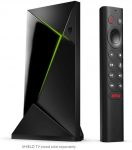
The NVIDIA Shield has been touted as the most powerful streaming device for years.
Yes, it comes with a higher price tag but is perfect for those who want the best Android TV Box that the market has to offer.
MECOOL Boxes
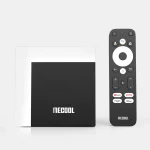
If you want a Firestick alternative similar to the NVIDIA Shield but don’t want to spend that much money, MECOOL Boxes are a great choice.
There are several variations of the MECOOL Box including the KM7 which provides 16 GB of internal storage, 2 USB Ports, and an ethernet port for high-speed connection.
Best of all, the MECOOL KM7 is Netflix Certified for all your streaming favorites.
onn. Google TV Box
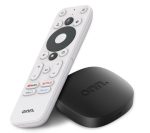
If you are looking for a high-powered device with an affordable price tag, the onn. Google TV Box from Walmart is a perfect choice.
For under $20, you will get 4K streaming with built-in Google TV technology for a flawless viewing experience.
Learn more about the onn. Google TV Box at our detailed review guide below.
6. Ad-Free Streaming Apps
In addition to altering the user interface of a Firestick/Fire TV device, you may also want to explore ad-free Streaming Apps.
You will find that most free streaming apps are filled with ads during playback and navigation.
We have listed some of the most popular ad-free applications below for your reference. These are also available within our list of Best APKs for Movies & TV Shows.

Kodi
Kodi has been a cord-cutting staple for several years now, as this application comes ad-free and is still used by thousands.
This powerful media center is best known for the hundreds of free addons and Builds that can be installed from external repositories.

See our Kodi on Firestick tutorial for more information and how to install this app.
How to Install Kodi on Firestick/Fire TV

Syncler
Syncler is a newer streaming app and a clone of the once-popular TVZion application.
This app comes ad-free with the premium version and uses outside providers with Real-Debrid to populate links.

Visit our Syncler guide for more information and how to install this app.
How to Install Syncler on Firestick

Stremio
Stremio is a well-known app that works well on Firestick/Fire TV devices.
Similar to Kodi, Stremio is ad-free and also requires external add-ons/providers for accessing content.

Refer to the Stremio tutorial below for more details and how to install this app.
How to Install Stremio on Firestick
For more helpful Firestick/Fire TV tutorials like this, check out our popular guides below.
- How to Stop Buffering on Firestick
- Best VPN on Firestick/Android TV
- Firestick Remote Not Working? How to Fix
- How to Set Up Amazon Firestick
Be sure to stay up-to-date with the latest streaming news, reviews, tips, and more by following the TROYPOINT Advisor with updates weekly.
This Advisor provides all the best cord-cutting tips to get the most out of your favorite streaming devices and more.
Click the link below to join the other 800,000 Advisor subscribers.
How to Block Ads on Firestick FAQ
Can you Block Ads on the Firestick?
Yes. In this guide, we provide numerous methods to block ads on Firestick, Fire TV, and Fire TV Cube.
Can you Change the New Fire TV interface?
While it is still possible to change the Fire TV interface with custom launchers, Amazon is forcing new updates that will soon make this impossible.
Is Blocking Ads on the Firestick Legal?
Yes. Blocking ads on the Firestick/Fire TV is 100% legal and can be done within the device settings.
Is Blocking Ads on the Firestick Safe?
Blocking ads on the Firestick/Fire TV is not only safe but recommended to help with user privacy, less data usage, more customization options, and other reasons in this guide.
This page includes affiliate links where TROYPOINT may receive a commission at no extra cost to you. Many times, visitors will receive a discount due to the special arrangements made for our fans. Learn more on my Affiliate Disclaimer page.


