
This tutorial will show you How to Increase VPN Speed on Firestick, Fire TV, and Android TV Boxes.

We frequently receive questions regarding VPN speed and how to increase download speeds, reduce buffering, and improve overall VPN performance.
Prior to diving into the tutorial, it is important for you to know how a VPN functions so you understand some of the methods outlined below.
Why Your VPN Slows Down Connection
Most cord-cutters use a VPN so that their Internet Service Provider, government, developers, and hackers can’t log what they are accessing online.
When we connect to the Internet through a VPN, we are first establishing a secure connection to the provider’s server.
When this happens, our Internet connection is assigned a new IP address, and data is encrypted. By doing this, it decreases our Internet connection naturally.

Running a VPN on a Firestick or any device requires processing power which could also diminish download speed as well.
Cheaper or free VPNs are another problem. Many of them throttle bandwidth or log your activity, which is exactly what a VPN is supposed to prevent. If you’re serious about performance and privacy, stick to a trusted provider like Surfshark.
Hide Your Digital Fingerprint
Below you will find some helpful tips to get the most out of your VPN for ultimate security and speed.
VPN Speed Video Guide
Get Surfshark VPN With Huge Discount
How to Increase VPN Speed
Listed below are the best methods to increase VPN speed on your preferred device.
1. Change Your VPN Protocol
Most VPN services come with a choice of multiple protocols that may be accessed through the settings menu of the application.
VPN Protocols have different uses and features that can help users get the most out of their connection. We have found that you will likely see a VPN speed increase by using WireGuard.
In the Surfshark application, Wireguard is pre-selected as the Protocol connection type. However, many find that changing the VPN Protocol to a different option can increase VPN Speeds on Firestick, Android, and more.

With OpenVPN/UDP selected, we can now test our Internet Speed and adjust the server settings to find the fastest choice.
You can also try other Protocol connections and test your internet speed to find the fastest Protocol for your device.
2. Connect to a Nearby VPN Server
It only makes sense that connecting to a VPN server closer to your location will provide faster download speeds since there is less distance for the data to travel.
Exclusive Surfshark Discount
Warning: Your online activity is currently monitored by your ISP, app/addon/IPTV developers, government agencies, and the websites you visit.
- Become 100% anonymous while streaming and downloading.
- Use on Unlimited Devices & share 1 account with the entire family.
- Save 85% with the 24-Month Plan + Get 3 FREE Months.
Most VPN applications come with an auto-connect button that attempts to connect to the fastest server. We have found that this approach does not work well for most VPN services.
We suggest manually connecting to a server within your VPN connection panel that is close to where you are currently located.

3. Split Tunneling
Most VPN Applications offer a Split Tunneling feature that allow users the ability to choose applications that won’t connect through the VPN.
This is a fabulous way to increase speeds by disabling your VPN for various apps that don’t work well when connected.
Surfshark has a fabulous split tunneling option labeled ‘Bypass VPN’ that lets you choose apps that will not be routed through your VPN Connection. You can find this within Settings of the Surfshark application.

4. Restart Your Device
The first solution I always suggest for anything computer-related is to restart your device. It’s amazing how this solves so many problems with computers and media streaming devices.
Check out our Firestick restart tutorial for instructions and more information. If a device restart doesn’t help then a factory reset is recommended.

5. Upgrade to Ethernet Connection
Oftentimes your home wireless connection can become unreliable due to distance from the router, low bandwidth, and other reasons.
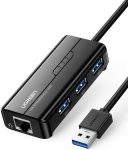
I suggest looking into a Firestick Ethernet Adapter, which will likely increase your VPN speeds. If your home does not have ethernet jacks in the walls, then we recommend a Powerline Adapter.
6. Restart Your Wireless Router & Modem
Another solution to increase VPN speed is to restart your wireless router and Internet modem.
Big Tech is Scanning Your Emails
Stop letting free providers read your private messages to build advertising profiles on you. Take back your digital privacy with a secure, ad-free inbox.
When doing this, I suggest unplugging both devices from the power outlet, letting them sit for ten minutes, and then plugging back in.
You usually want to first plug your modem back in and once that has started, plug your wireless router back in.

If you find the steps listed above do not improve your speed when connected to a VPN, your Internet speed may not be strong enough.
Most Internet providers offer speed upgrades and this is usually a minimal increase to your monthly price but well worth it. Using a VPN router may also be beneficial for improving VPN speed over time.
7. Keep Your VPN Updated
Old versions of your VPN app or operating system can slow you down. Unfortunately, app stores don’t always offer the newest releases. I always recommend installing the latest version directly when possible.

Troy’s Final Thoughts on VPN Speed
There’s no single fix for VPN speed issues, but by understanding how VPNs work and how to fine-tune your setup, you can easily improve performance.
If you’re using a VPN and notice lag or buffering, try the steps above and measure your results. And if you’re still stuck with a slow VPN, it may be time to switch providers. Surfshark remains my top pick, but ExpressVPN is a solid backup worth testing too.
Did any of these tips help improve your VPN speed? Let us know your results in the comments below!
This page includes affiliate links where TROYPOINT may receive a commission at no extra cost to you. Many times, visitors will receive a discount due to the special arrangements made for our fans. Learn more on my Affiliate Disclaimer page.


