

The step-by-step guide below will show you how to install Titanium TV on Firestick/Fire TV and Android TV Box.
Titanium TV is a working fork/clone of the popular streaming APK, Terrarium TV. Titanium features the same layout, settings, interface, and more.
It also has the ability to use MX Player as your video player and offers tons of source options for an awesome streaming experience. This application also provides subtitle support.
The following steps will show you how to install Titanium TV APK on the Amazon Firestick 4K.
These same steps also work for those using the Firestick Lite, 3rd Gen Fire TV Stick, Fire TVs, Fire TV Cube, and any Fire TV device.
This process also applies to those using Android devices such as the NVIDIA SHIELD, MECOOL Boxes, Chromecast, Android TV Boxes, phones, tablets, and more.
Use the steps below to install Titanium TV on your preferred Streaming Device.
Titanium TV Installation Guide
1. Install the Downloader app from your respective App Store (Amazon App Store or Google Play) and turn on Apps from Unknown sources in the settings of your streaming device.
Hide Your Digital Fingerprint
If you haven’t done this yet please refer to the following screenshot tutorial that demonstrates this simple process.
How to Install Downloader & Enable Unknown Sources
2. Launch Downloader.

3. Click Allow.

4. Click OK.

5. Select the Browser tab within the left menu.

Exclusive Surfshark Discount
Your online activity is currently monitored by your ISP, app/addon/IPTV developers, government agencies, and the websites you visit.
- Become 100% anonymous while streaming and downloading.
- Use on Unlimited Devices & share 1 account with the entire family.
- Save 85% with the 24-Month Plan + Get 3 FREE Months.
6. Click the Search box and type the following URL exactly as it is listed here – titaniumtv-app.com/download and click Go

7. Scroll down and click Download Titanium TV APK.
Important Note: If using an Android TV device or Chromecast with Google TV, you must first install the Downloader Browser Plugin.
You can do this by typing in “http://browser.aftvnews.com” within the URL box, or viewing that section in our Downloader Tutorial.

8. Wait for the file download to finish.

9. Click Install

10. Click Done

11. This will return you to Downloader. Click Delete

12. Click Delete Again

Installation is now complete!
If Titanium does not appear on your home screen, you can find it by clicking “See All” under Your Apps & Channels List. To move to the front, long click and drag to the top of apps lists.
Titanium TV Features, Description, and More
As a clone of Terrarium TV, you will notice the same layout/design Titanium features.
The main menu will provide you with the option to choose from Movies and TV Shows. Within each is numerous sub-categories including Trending, Most Popular, Top Rated, Genre, and more.
After making your Movie/TV Show selection, you will be provided with tons of source options for streaming. Oftentimes these are available in High Definition including 1080p. Currently, 4k Category is not available.
If you are looking for the best quality streams, I highly recommend integrating a real-debrid account within Titanium TV. Real-Debrid will provide you with the best streams for little to no buffering on your device.
Another great feature available within Titanium is the ability to add a Trakt.tv account as well. Using Trakt is a great way to sync and scrobble all your favorite content across numerous apps and platforms.
Titanium is a great Terrarium replacement and should work consistently with the use of real-debrid. Give it a try today and let us know what you think in the comment section below!
Real-Debrid Integration
As mentioned earlier, Titanium TV doesn’t work very well unless you are using Real-Debrid.
The following screenshot tutorial will show you how to setup Real-Debrid in Titanium TV.
Real-Debrid is an unrestricted downloader that will add new video sources within Titanium TV that you can choose from. These new sources should provide better playback with less buffering.
Real-Debrid is a premium service that costs approximately $5 per month which is less than a large bucket of popcorn at the theater.
Important: You must disconnect VPN on your streaming device prior to following the steps below. Once Real-Debrid pairing and setup is complete, you may activate your VPN.
Step 1 – Register for Real-Debrid Account
Step 2 – Click settings toggle within Titanium TV

Step 3 – Click Settings

Step 4 – Click Login to Real-Debrid

Step 5 – Write down code provided on the screen

Step 6 – Open Internet browser on any device and go to https://real-debrid.com/device and type in code from above & click Continue button

Step 7 – Real-Debrid authorized message appears within Titanium TV

Step 8 – You will now have access to additional video sources identified in green font with the abbreviation [DEB] – these should provide buffer-free playback
Integrate MX Player
Titanium TV gives you the ability to use external media players. In the example below we will show you how to use MX Player within the application.
1. Install MX Player on your streaming device using URL: troypoint.com/mx in Downloader or follow the guide below:
2. Once on the Home screen of Titanium TV, click the drop down menu on the upper left (three horizontal lines).

3. Scroll down and click Settings.

4. Scroll down and select Choose default video player.
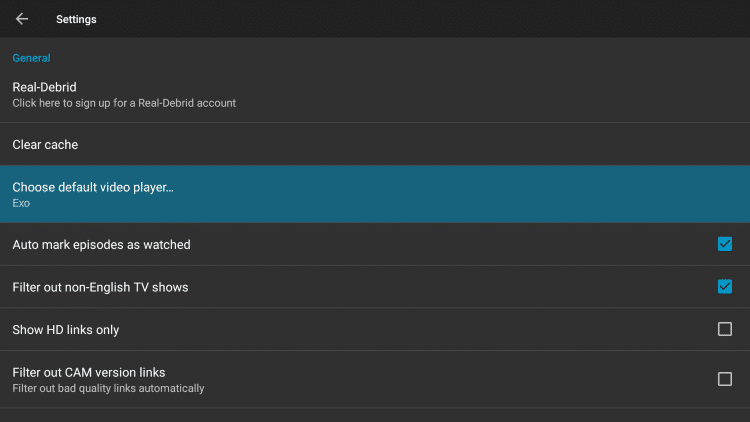
5. Choose MX Player.

6. After enabling MX Player, search for the content you want to play.
7. Click on your preferred streaming source, then scroll down and click Play with.
8. Under Choose Application, select MX Player.
9. That’s it! You can now enjoy MX Player as your default media player.
Integrate Trakt on Titanium TV
1. Scroll down on the menu and click Settings.

2. Scroll down and select Login to Trakt.tv.
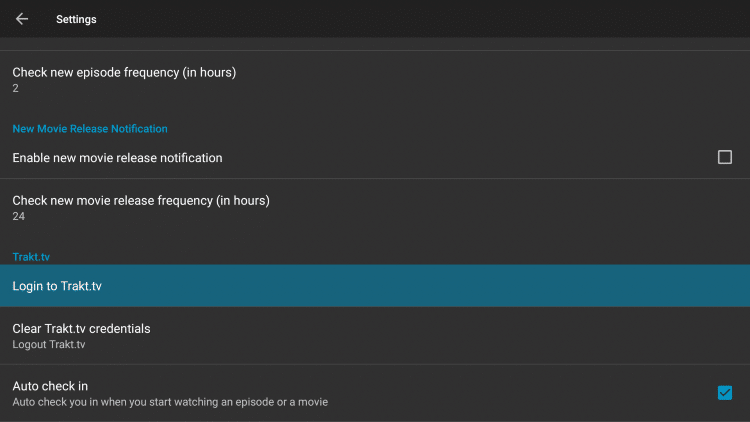
3. Write down the code provided on the screen.
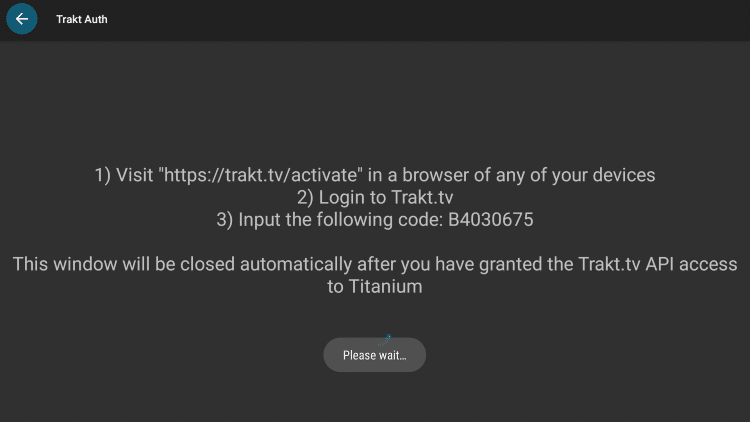
4. Go to trakt.tv/activate to enter the code from the previous step and click Continue.

5. Click Yes

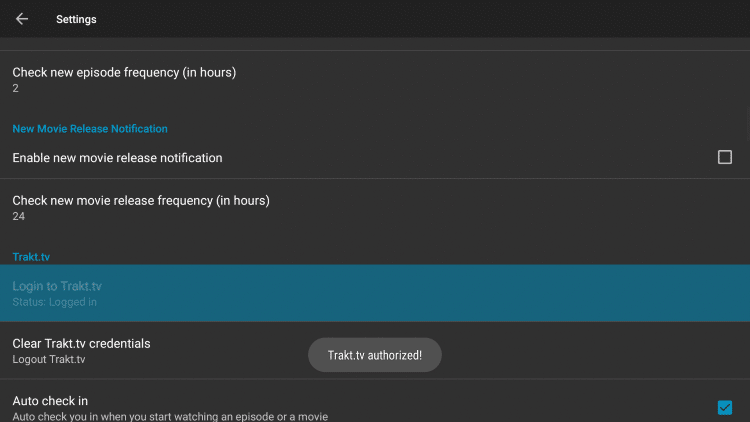
6. Trakt integration is now complete!

7. Return back to Titanium TV and click on Settings. Scroll down and you should now be logged in to Trakt.
Is Titanium TV Legal?
It’s impossible for TROYPOINT to determine whether these unverified applications hold the proper licensing.
If and when an application is deemed illegal, we notify our users immediately and update reports on our Website to reflect that information.
At first glance, it would appear that Nova TV is distributing copyrighted works without consent.
Users can always access content available within the public domain.
Works such as this are not protected by copyright laws and may be downloaded, streamed, and shared without any legal ramifications.
In conclusion, the end-user is responsible for all content accessed through apps such as Titanium TV.
For 100% legal and verified free streaming options, we suggest our list of free movie/TV show apps below.
Titanium TV FAQ
What is Titanium TV?
Titanium TV is an app available for installation on streaming devices to watch movies and TV shows for free.
Is Titanium TV Legal?
Yes. Titanium TV is 100% legal to install and use. However, some content provided may be illegal. To ensure you are not illegally streaming, make sure to only watch movies and TV shows in the public domain.
How Do I Download Movies from Titanium TV?
To download movies on a Firestick, simply choose your preferred content and select the download option. If downloading, make sure you are using a VPN to encrypt your IP Address.
What Devices can Titanium TV be Installed on?
Titanium TV is available for installation on tons of devices including the Amazon Firestick which is the most popular streaming device available. Users can also download on Android and more.
This page includes affiliate links where TROYPOINT may receive a commission at no extra cost to you. Many times, visitors will receive a discount due to the special arrangements made for our fans. Learn more on my Affiliate Disclaimer page.


