
Follow along using our instructional guide that details FilmPlus APK with a step-by-step tutorial for installing this application on your favorite device.

FilmPlus is a popular 3rd Party Streaming app that viewers use to watch high-definition VOD (Video on Demand) including Movies and Shows.
Unfortunately, Amazon has disabled the installation of 3rd party applications and FilmPlus is one the apps that is currently blocked on Firestick and Fire TV devices.
Luckily, popular Android and Google TV Boxes do not have these types of restrictions and users can freely download third-party APKs including FilmPlus as we show in our tutorial.
We have provided a step-by-step screenshot guide that will walk you through the entire installation & setup process. We also provide instructions to remove ads by using the CleanWeb Feature within the Surfshark VPN Application.
Below the tutorial, you will also find important legal information, virus/malware status, and a quick review of what FilmPlus has to offer.
FilmPlus Update 2026
FilmPlus was once one of the most widely used applications in the cord-cutting space. Unfortunately, it does not provide the same functionality and performance it once did.
While most APKs have compatibility for popular Debrid Services, FilmPlus currently doesn’t accept integration for TorBox and other outlets.
Hide Your Digital Fingerprint
In fact, the latest release does not provide any resolved links, even when paired with Real-Debrid, Premiumize, etc.
If you want a reliable streaming platform with configuration options, personalization features, and more, we suggest using an alternative from our list of Best APKs for Films & Shows.
What is FilmPlus APK?
FilmPlus is a streaming app (APK) that offers access to free movies and TV shows. It is a fork of Terrarium TV which is known as the most popular APK of all time in the cord-cutting space. Terrarium was shut down years ago but duplicates such as this still exist.
It provides high-quality links for Movies and Shows and has added features which we discuss in detail below. This powerful Movie APK has continued to provide users with a fabulous media experience and we expect it to continue.

You can easily enable this within the permission settings of your device.


Sick of Slow, Rural Internet?
Whether you live out in the country or take your RV off the grid, Starlink delivers blazing-fast internet to areas that traditional providers ignore.
Check Availability & PricingContinue below to learn how to download the app on your media device.
How to Install FilmPlus APK on Firestick/Google/Android TV
In this guide, we are using an Onn 4K Pro to install FilmPlus but these instructions will also work on any other type of Google/Android TV or Firestick devices.
Exclusive Surfshark Discount
Warning: Your online activity is currently monitored by your ISP, app/addon/IPTV developers, government agencies, and the websites you visit.
- Become 100% anonymous while streaming and downloading.
- Use on Unlimited Devices & share 1 account with the entire family.
- Save 85% with the 24-Month Plan + Get 3 FREE Months.
1. Install the Downloader Application and enable Unknown Sources for it within Settings. Launch the Downloader App.

2. Click the Hashtag icon in the upper right hand corner.

3. Input the Downloader Code (3300326) and click Load.

4. Wait for the app to download.

5. Select Install.

6. If you receive this Google Play Protect message, click More details and then Install anyway.

Big Tech is Scanning Your Emails
Stop letting free providers read your private messages to build advertising profiles on you. Take back your digital privacy with a secure, ad-free inbox.
7. Click Done.

8. Choose Delete (delete installation file).

11. Select Delete again.

9. Installation is now complete and you can access FilmPlus from Your Apps list.

10. Before streaming movies/TV within FilmPlus, we strongly recommend connecting to Surfshark VPN to hide your online activity and protect yourself from unverified APK developers.
See our VPN on Firestick/Android TV tutorial for more details and security tips.

How to Remove Ads
While there are other “modded” versions of this available that provide ad-free content, we often suggest avoiding these.
They may contain malware and oftentimes provide various features that do not work properly. Your best bet is to opt for the official version and eliminate ads using the guide below.
To set up FilmPlus we will use Surfshark VPN which will remove all ads within the application. Upon launching the app, you will likely notice banner ads at the bottom of the screen.
You will also encounter video ads that play after exiting playback of any Movie or TV Show.
Luckily, the CleanWeb feature within the Surfshark VPN Application will remove these for good.
1. If you see ads at the bottom of your screen, you can easily get rid of this with Surfshark.

2. Launch the Surfshark App and select Features.

3. Enable the CleanWeb feature to remove ads.

4. Return to the application to see that your ads are instantly removed.

Enjoy!
Screenshots
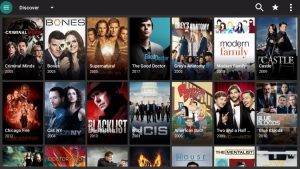
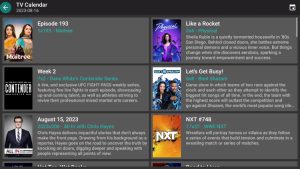
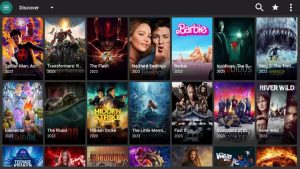
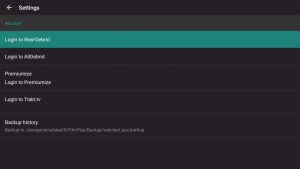
FilmPlus APK Review

FilmPlus has been around for years as a Terrarium TV clone, offering free movies and TV shows through a familiar interface. Here’s what our testing revealed about this popular APK.
What We Like
- Passed VirusTotal scan with no malicious files detected
- Supports Real-Debrid, AllDebrid, Premiumize, and Trakt integration
- Built-in subtitle support in multiple languages
- Developers push frequent updates to maintain functionality
- TV Calendar shows upcoming episode release dates
What We Don’t Like
- Contains banner ads and video ads after exiting playback
- Real-Debrid links do not populate well despite integration
- External video players like MX Player are not supported
- Modded “ad-free” versions carry malware risks
Features, Details, & More
Using FilmPlus on a Firestick, Android TV/Google TV system is simple and offers tons of categories and streaming selections to choose from.
Currently, this application provides both Free and Paid links with premium links not populating very well.
This is why we suggest this free app for those who do not have a premium service and those who do will likely want to opt for an alternative APK for Movies and TV Shows.
One great feature this app provides is its simplicity with only a few settings to choose from.
This includes:
- Real Debrid Login
- AllDebrid Login
- Premiumize Login
- Trakt Login
- Backup History

Within the options menu are selections for Movies, TV Shows, History, Favorites, TV Calendar, Downloads, and Settings.
After selecting either Movies or TV Shows, there are various categories including:
- Discover
- Favorite
- Trending
- Popular
- Top Rated
- Airing Today
- Action/Adventure
- Comedy
- Crime
- Documentary
- Drama
- Family
- Kids
- Mystery
- News
- Reality
- Soap
- and more
We tested the app strenuously to determine important app factors such as speed, links available, integration options, and other various settings.
While Real-Debrid capabilities are available, we noticed that there were not many RD links provided after making a content selection.
In the future, we would like to see it work better when paired with a premium resolver service.
Once installed, you can choose your streaming link and view media instantly.
Users can access the TV Calendar to see upcoming content daily.

There is a download feature available that allows you to download movies and TV shows directly to your Firestick or Android TV/Google TV device.
When launching the Downloader Manager, you will see the following warning message:

FilmPlus also has the ability to play Movies and TV Shows with subtitles which you can opt for after making a content selection.
You can also easily add content to the Favorites section to store your Favorite Movie & TV Shows.

You can also filter categories by Year, See Recommended streaming options, and much more.
Best of all, the app is frequently updated with bug fixes and more to stay relevant in the streaming community.
Overall, FilmPlus has plenty of options to keep all cord-cutters occupied with high-quality content for both Movies and TV Shows.
Is FilmPlus Legal?
It’s impossible for TROYPOINT to determine whether unverified apps like ‘FilmPlus’ hold the proper licensing.
TROYPOINT recommends only accessing media not protected by copyright such as those that fall under Public Domain status.
The end-user is responsible for all content accessed through unverified apps. For verified options, see our list of legal streaming apps.
Is This App Safe to Use?
It’s important to scan these free streaming APKs for viruses since these aren’t vetted by a reputable 3rd party such as Amazon App Store or Google Play.
Here is the screenshot of what that scan found:

VirusTotal did not find any suspicious files or malware within the APK file. However, this does not mean we shouldn’t protect ourselves when streaming content from this unverified app.
The best way to do this is with a VPN that will secure your identity and anonymity when using FilmPlus or other applications.
Install Best VPN on Firestick/Android
Wrapping Up
Many consider FilmPlus as one of the top applications today for those looking to watch HD series and films.
Seemingly a fork of the once mega popular Terrarium app, it seems to continue as a high level APK with tons of options.
We want to know what you think about it, so let us know in the comments below!
This page includes affiliate links where TROYPOINT may receive a commission at no extra cost to you. Many times, visitors will receive a discount due to the special arrangements made for our fans. Learn more on my Affiliate Disclaimer page.


