
Amazon is now actively blocking 3rd party applications that they deem as piracy apps on Firestick and Fire TV devices.

3rd Party apps are applications that are not available within the Amazon App Store and must be “sideloaded” for use on these devices. These can be installed via the Downloader App which has become one of the most popular apps available today.
Many prefer to use 3rd party apps so they are not restricted to just the applications provided in the Amazon App Store. This is also the same for those who use Google/Android TV Boxes and want to install apps not available in Google Play.
However, it seems as though Amazon is putting a halt to the use of these applications as many are now blocked and unable to be used after installation.
We have known for quite some time that this change was coming and it now appears to be rolling out to various devices across the world.
Firestick Warning Message
Amazon has launched a major global effort to stop piracy apps from working on Fire TV devices. For the first time, the company is blocking sideloaded apps that offer access to illegal content.
This includes apps that aren’t downloaded from the Amazon Appstore but are installed manually by users.
If you install an application that Amazon sees as a piracy threat, you will likely encounter one of two “Warning” messages.
Hide Your Digital Fingerprint
The first one, pictured below, states “Harmful app disabled”. If you see this message, the app you are attempting to use has been flagged by Amazon as potentially harmful due to malware.

Users are then given the ability to Dismiss the message or click Uninstall to remove the application.
The second message displays a “Warning” page when you attempt to open the app.

As you can see, the Warning message notes that the app will be disabled even though it provides a “Launch Anyway” button.
One of more apps on your device have been identified as using or providing access to unlicensed content, including this app, and will be disabled. To remove this app now, select “Uninstall” below.
To learn more, go to www.amazon.com/firetv/unlicensedcontent
If you attempt to click the “Launch anyway” button, nothing happens and you are still unable to use the app.
The website listed appears to be a new page that provides FAQs on Amazon’s app blocking program.
You can find this list of Frequently Asked Questions and Answers by visiting the Official FAQ Page.
List of Disabled Firestick Apps
Provided below are the applications currently blocked on Firestick/Fire TV Devices that we are aware of.
Exclusive Surfshark Discount
Warning: Your online activity is currently monitored by your ISP, app/addon/IPTV developers, government agencies, and the websites you visit.
- Become 100% anonymous while streaming and downloading.
- Use on Unlimited Devices & share 1 account with the entire family.
- Save 85% with the 24-Month Plan + Get 3 FREE Months.
- BeeTV (some versions)
- Flix Vision
- FilmPlus
- Cinema HD (in some locations)
- Movie HD
If you have found another application that you cannot install/access, let us know what it is in the comments below!
The Bigger Problem: Locked Ecosystem and Rising Streaming Costs
While Amazon claims this is about protecting users and creators, there’s another side to the story. Rising streaming prices from services like Netflix, Disney+, and Apple TV+ are pushing many people to look for cheaper alternatives.
Tech expert Paolo Pescatore told The Sun that people are tired of high monthly bills and a messy streaming experience. Sports and entertainment packages cost more each year, and many users just can’t keep up.
Broadcasters are spending more to secure live sports rights and passing these costs onto consumers who can’t afford them, leading to a messy, fragmented experience.
This crackdown is coming at a time when people are already frustrated. And while piracy isn’t the answer, many are now stuck with fewer options and higher costs.
Why Android TV & Google TV Are a Better Option
TROYPOINT has been pushing alternatives to Firestick/Fire TV for many years with the best options being those with the Android/Google TV Operating System.
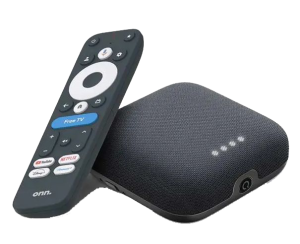
Right now, the most popular Fire TV alternative is one of the Onn Android TV Boxes sold through Walmart. Here’s a new video on how to unleash the true power of these devices.
Unleash Onn 4K Plus or Onn 4K Pro & Remove Google Restrictions
Free Ultimate Stremio Setup Video
Surfshark VPN Exclusive Discount
Big Tech is Scanning Your Emails
Stop letting free providers read your private messages to build advertising profiles on you. Take back your digital privacy with a secure, ad-free inbox.
If you’re ready to move away from restrictions, Android TV and Google TV boxes offer the flexibility Amazon just took away.
Here’s why they’re the best alternatives right now:
True App Freedom
Unlike Firestick, Android TV/Google TV doesn’t block sideloaded apps — even those that aren’t in the Play Store. You can install what you want without waiting for corporate approval.
- No Forced Ecosystem – Amazon pushes its own content and ads on every screen. Android TV gives users a cleaner experience without constant promotion for Prime Video or other Amazon services.
- Regular Security Updates – While sideloading is open, Google still maintains strong security protocols and app scanning for Play Store downloads. That balance gives you power without losing protection.
- Better Hardware Options – From budget-friendly models like the onn 4K Pro to premium boxes like NVIDIA SHIELD there’s a wide range of choices depending on your needs and budget.
NOTE: Make sure to check out our list of Best Android/Google TV Boxes that is updated with both affordable and premier options that do not block 3rd party apps of any kind.
- VPN Compatibility – Android TV boxes allow full VPN support, with access to apps like Surfshark — ideal for secure and private streaming.
Amazon’s Warning Is a Wake-Up Call
This isn’t just about piracy apps. It’s about the future of device ownership. Amazon is making it clear: you don’t fully control your Firestick — they do. And now they’re showing just how far they’re willing to go to enforce that.
If you value choice, security, and freedom to install your favorite apps, now is the time to make the switch.
Troy’s Take
Amazon’s latest crackdown shows a growing trend: tech giants are locking down their platforms to protect themselves, not users. While protecting content rights is fair, blocking access at the device level goes too far.
Android TV and Google TV offer a better path for those who want to sideload apps and avoid current or upcoming Fire TV restrictions.
One thing is for certain, and we’ve seen this play out over the past twenty years. These big tech outfits will never stop access to 3rd party applications, IPTV, etc. New solutions to use these apps and services will evolve and the “hackers” will always be one step ahead of the “suits” who control the money in these large corporations.
We want to know what you think of Amazon putting a halt to what they deem as “piracy apps”. Drop a comment in the comment section below!
Be sure to stay up-to-date with the latest streaming news, reviews, tips, and more by following the TROYPOINT Advisor with updates weekly.
This Advisor provides all the best cord-cutting tips to get the most out of your favorite streaming devices and more.
This page includes affiliate links where TROYPOINT may receive a commission at no extra cost to you. Many times, visitors will receive a discount due to the special arrangements made for our fans. Learn more on my Affiliate Disclaimer page.


