
The Onn 4K Plus Streaming Device is the latest budget-friendly offering from Walmart, aiming to provide a premium streaming experience without breaking the bank. Running on Google TV, it supports high-end video and audio formats, and boasts surprisingly strong performance for its price.
At the time of this review, the Onn 4K Plus is selling for only $29.88 which is significantly less than its Amazon Fire TV counterpart.
This review aims to cover aspects important to TROYPOINT fans.

Onn 4K Plus Features
- 4K Ultra HD Resolution
- Dolby Vision and HDR10/10+ Support
- Dolby Atmos
- Android TV 14
- Built-in Chromecast
- Google Assistant
- Wi-Fi 6 Support
- Fast Quad-Core Processor
- 16GB Internal Storage
- USB Type-C Port
- Find My Remote Feature
- Free Live TV Channels
- Benchmark Performance: Early benchmarks indicate performance exceeding more expensive devices like the Onn 4K Pro & Google TV Streamer 4K
Supercharge Onn 4K Plus Video by Troy
In this video I cover complete setup and offer tips and tricks that will allow you to supercharge your new Onn 4K Plus Streaming Device.
Note: In the video I incorrectly indicate that this box doesn’t allow for devices connected to OTG-C adapter and that’s incorrect. You will see an additional video below where I show how to properly do this.
Hide Your Digital Fingerprint
Get Free TROYPOINT Secret App Guide
Get Surfshark VPN Exclusive Discount + Free Months
Buy New Onn 4K Plus Android TV Box
tvQuickActions Pro
Onn 4K Plus Review

This review was conducted by Troy over a 2-week period. This is an unbiased review where he points out the pros and cons while also examining important features.
Onn 4K Plus Benchmarks
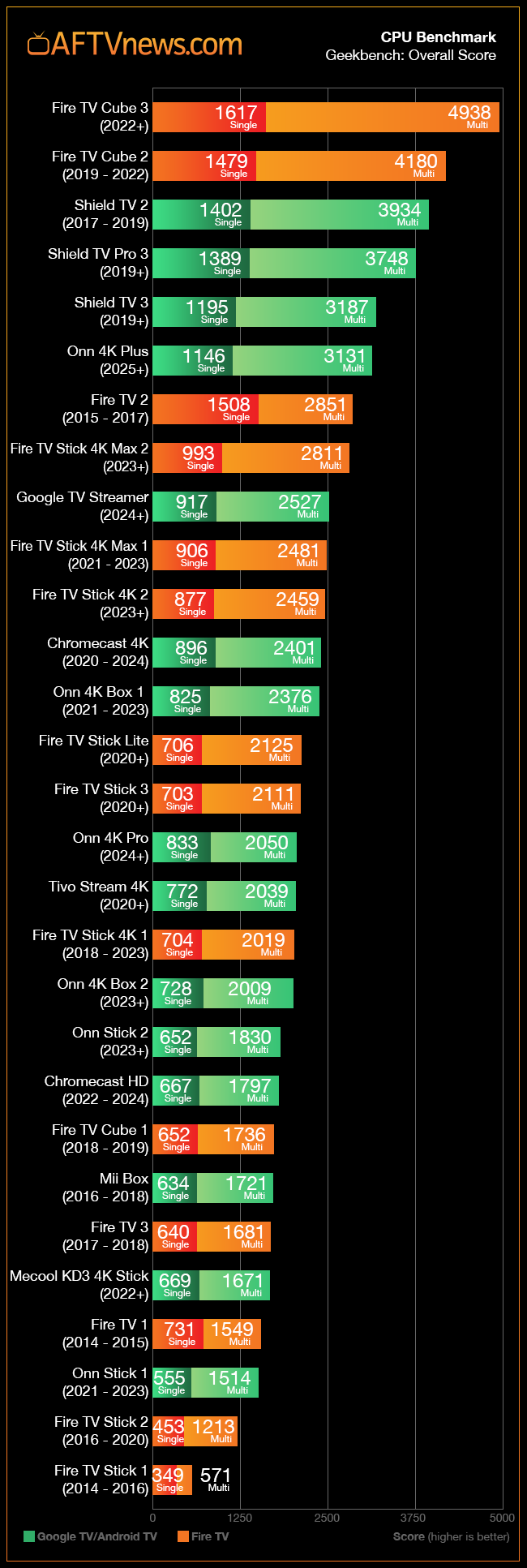
The Onn 4K Plus comes with impressive benchmark scores considering its low price of only $29.88. Benchmarks measure the overall processing power and performance of a streaming device with a numeric value. There are two popular benchmarks, Geekbench and Antutu.
Geekbench
Special thanks to Elias at AFTVNews for providing the following graphic that displays how well this Android TV box compares with other streaming devices.
Surprisingly, it outperforms both the Onn 4K Pro and Google TV Streamer!

Sick of Slow, Rural Internet?
Whether you live out in the country or take your RV off the grid, Starlink delivers blazing-fast internet to areas that traditional providers ignore.
Check Availability & PricingImage Source – 2025 Onn 4K Plus Benchmark Scores – Shockingly powerful for the price
Antutu
Another popular benchmark is through the Antutu application.
Exclusive Surfshark Discount
Warning: Your online activity is currently monitored by your ISP, app/addon/IPTV developers, government agencies, and the websites you visit.
- Become 100% anonymous while streaming and downloading.
- Use on Unlimited Devices & share 1 account with the entire family.
- Save 85% with the 24-Month Plan + Get 3 FREE Months.
The Onn 4K Plus Antutu benchmark score is 185,289.
In comparison, here are the Antutu scores of other popular streaming devices.
- BuzzTV PowerStation 6 – 677,763
- NVIDIA SHIELD TV Pro – 238,323
- Ugoos SK1 – 215,121
- Onn 4K Plus – 185,289
- Google TV Streamer 4K – 135,174
- Fire TV Stick 4K Max – 122,030
- Onn 4K Pro – 115,547

App Side-loading
I’m happy to report that Side-loading works as it should on the new Onn 4K Plus.
I installed the free Downloader app, fired up the free TROYPOINT Toolbox and installed all of my favorite apps that aren’t available in Google Play.
Android TV 14
Android TV 14 is a new operating system and unfortunately some apps that I side-loaded didn’t work properly.
Mouse for Android TV doesn’t seem to work with the Onn 4K Plus but this app also has issues with other streaming boxes as well. It hasn’t been updated since 2021. In the Supercharge Video above, I show how to setup mouse toggle in a different manner.
I also get a warning message that SmartTube may not function properly because it was developed for older versions of Android TV. However, I found that this app works just fine.
I won’t be deducting points in this review due to apps not being compatible with Android TV 14 as this falls on the various developers. Let’s hope that the developers of our favorite 3rd party apps stay on top of things and keep their apps updated for future Android TV releases.
3rd Party Launchers
I installed my favorite launcher, Projectivy. The great thing about this launcher is that you usually don’t need Launcher Manager but with the Onn 4K Plus, you do.
Launcher Manager is an application that sets a default launcher on Android TV. Again, I show how to setup Projectivy with Launcher Manager in the Supercharge Video above.

Big Tech is Scanning Your Emails
Stop letting free providers read your private messages to build advertising profiles on you. Take back your digital privacy with a secure, ad-free inbox.
AI Upscaling on Onn 4K Plus
The Amlogic S905X5M CPU supports AI up-scaling but unfortunately there’s no setting to enable this within the Onn 4K Plus.
Projectivy to the rescue!
You will see within Projectivy settings that there is an option for AmLogic additional settings. Within this area you will find the ability to turn on AI upscaling along with screen calibration which is also missing from default settings.

Within the AI-PQ/AI-SR menu, you can also enable a demo which splits the screen in half and shows upscaling on one side and normal video ouput on the other. Personally, I don’t see much change with this enabled and there’s a bug that doesn’t save changes made to the AI SR menu.
Mouse Toggle for Android TV
As mentioned earlier, the Mouse Toggle app doesn’t work properly on this device.
I installed tvQuickActions Pro and successfully enabled the mouse feature through that application and it works great!

Map Remote Control Buttons
The Onn 4K Plus remote comes with a star button that allows us to map a favorite application. This is a nice feature that I wish all remote controls had.

You can take it a step further and map additional buttons such as the big blue “Free TV” button with tvQuickActions Pro as well. I mapped that button to TiviMate which is extremely handy since I use that app on a regular basis. See my video above for how to set this up.

tvQuickActions Pro is a must-have application for anyone using an Android TV/Google TV streaming device.
Onn 4K Plus USB-C Performance
Here’s a video that shows how to use peripheral devices with an OTG-C Cable.
Get Free TROYPOINT Secret App Guide
USB-C OTG Adapter
UGREEN USB Gigabit Ethernet Adapter
SanDisk USB 3.0 256GB Flash Drive
The power adapter that connects to the Onn 4K Plus is USB-C. This means that we are able to connect an OTG-C cable to the box and run peripheral devices such as external storage, Ethernet adapter, etc.

You will see in the video above that during my testing, sometimes this works and sometimes it doesn’t. I’m not a big fan of using external storage or other devices with streaming systems that don’t come with USB ports such as the Onn 4K Plus. It does work but I don’t recommend it.
Download/Upload Speeds

The following download/upload tests were done with the Onn 4K Plus being connected to my ASUS RT-AX86U WiFi 6 Router. I’m using Surfshark for the VPN tests.
VPN Off: 468 Mbps Download & 329 Mbps Upload
Surfshark VPN On: 167 Mbps Download & 93 Mbps Upload
The Onn 4K Plus has a great WiFi chipset which is evident of these strong download/upload speeds.
Onn 4K Plus Specs

- Operating System: Anroid TV 14 with Google TV Interface
- SoC (System on a Chip): Amlogic S905X5M
- CPU: Quad-core ARM Cortex-A55 @ 2.5 GHz
- GPU: ARM Mali-G310 V2
- RAM: 2GB DDR4
- Internal Storage: 16GB eMMC
- Maximum Resolution: 4K Ultra HD (3840 x 2160)
- HDR Support: Dolby Vision, HDR10, HDR10+
- Video Codecs: AV1, VP9, H.264, H.265 (HEVC)
- Audio Support: Dolby Atmos passthrough
- Wi-Fi: Wi-Fi 6 (802.11 ax), Dual-band (2.4GHz/5GHz)
- Bluetooth: Version not explicitly specified (likely Bluetooth 5.x)
- Ethernet: None (relies on Wi-Fi)
- USB Ports: 1 x USB Type-C (for power and potential peripheral connectivity)
- HDMI: 1 x HDMI 2.1 (cable included)
- Voice Control: Google Assistant via dedicated button and hands-free voice control
- Dedicated Buttons: Power, Volume Up/Down, Mute, Google Assistant, likely several preset app buttons (subject to variation).
- Battery: Requires 2 x AAA batteries (included)
- Features: Find My Remote
What’s In The Box

- Onn 4K Plus Streaming Device
- Voice Remote Control
- 2 x AAA Batteries
- HDMI Cable (1 meter / 3.28 feet)
- USB Power Adapter with Cable (1.49 meters / 4.88 feet)
- Adhesive Tape
- Quick Start Guide
Pros
- Strong performance with new Amlogic S905X5M processor for only $29.88
- Supports Dolby Vison & Dolby Atmos
- 16GB internal storage
- Fast WiFi 6
- Android TV/Google TV
- 3rd Party Launchers Work
- Fast Download speeds
- TVQuickActions works
- Responsive Bluetooth remote control
- Voice control with Google Assistant
- Compact design
- Great price
Cons
- Some side-loaded apps not compatible with Android TV 14
- USB-C connected peripheral devices not working
- Only 2GB RAM
- Less internal storage as compared to Onn 4K Pro
- AI upscaling not working yet
- No Ethernet port
Summary
The new Onn 4K Plus Streaming Device is a surprisingly powerful Android TV box at an affordable price. It offers excellent picture and sound quality with Dolby Vision and Atmos support, a smooth Google TV experience, and strong performance that rivals more expensive devices. While it has a few minor drawbacks such as the lack of an Ethernet port and only 2GB of RAM, they need to cut expenses somewhere.
For users looking for a capable 4K streaming device on a budget, the Onn 4K Plus is a great choice! It’s particularly appealing for those who prioritize performance and picture quality without wanting to spend a lot.
Yes, there are some negatives which most seem to stem from new Android TV 14. I’m optimistic that the various app developers update their code so it’s compatible with this new operating system. It’s important to note that most 3rd party apps that I tested in this review work perfectly fine.
It may also sadden some that peripheral devices aren’t currently working when connecting to a USB-C OTG cable. Not a deal-breaker for me as I mention in the review above but I hope that Onn fixes this with an update for those who do use external devices.
The Onn 4K Plus is extremely snappy and benchmark scores are better than more expensive streaming systems on the market today.
I really like this Android TV box, especially at the current price of only $29.88!
I rate the Onn 4K Plus 4.5 stars out of 5.
Be sure to watch my Supercharge Video above!
Have you used the new Onn 4K Plus yet? Tell us your thoughts in the comments below!
This page includes affiliate links where TROYPOINT may receive a commission at no extra cost to you. Many times, visitors will receive a discount due to the special arrangements made for our fans. Learn more on my Affiliate Disclaimer page.


