

The following step-by-step instructional guide will show you How to Install DB TV Assistant on Firestick, Fire TV, and Android.
DB TV is a cleaning app that works on tons of devices including the Amazon Firestick and more.
The Firestick is the most popular media device available due to its low price point and “jailbreaking” abilities.
DB TV or Dangbei Assistant is a performance app that helps clean up your Firestick, Fire TV, or Android.
This is a great way to reduce or eliminate Firestick Buffering and get the most out of your streaming device.
DB TV has numerous features to remove files, apps, test speeds, and more.
For these reasons, we have included in our list of Best Firestick Apps that stays updated with all the best apps and tools.
In the guide below, we are installing DB TV Assistant on a Fire TV Stick Lite.
Hide Your Digital Fingerprint
However, this will also work for any variation of Firestick as well as Android TV Boxes such as NVIDIA SHIELD, MECOOL, and more.
How to Install DB TV Assistant on Firestick/Android
1. Install the Downloader app from your respective App Store (Amazon App Store or Google Play) and turn on Apps from Unknown Sources in the settings of your streaming device.
If you haven’t done this yet please refer to the following screenshot tutorial that demonstrates this simple process.
How to Install Downloader & Enable Unknown Sources
2. Launch Downloader.

3. Click Allow.
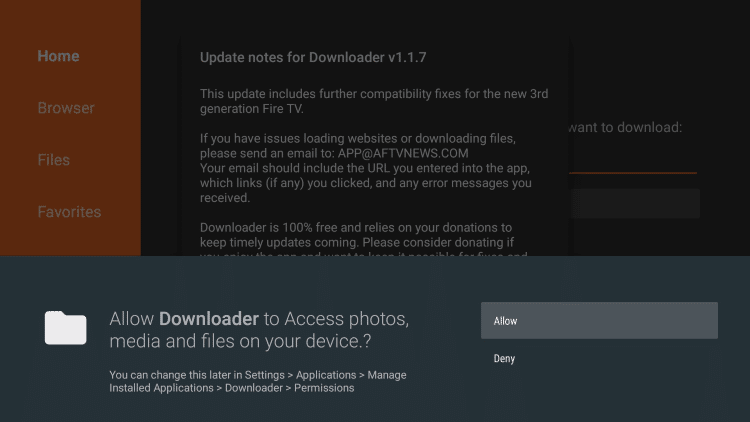
4. Click OK.
Exclusive Surfshark Discount
Warning: Your online activity is currently monitored by your ISP, app/addon/IPTV developers, government agencies, and the websites you visit.
- Become 100% anonymous while streaming and downloading.
- Use on Unlimited Devices & share 1 account with the entire family.
- Save 87% with the 24-Month Plan + Get 3 FREE Months.

5. Select the search box to enter a URL.

6. Type the following URL exactly as it is listed here – troypoint.com/dbtv and click Go
Note: The referenced link is the official URL of this app/addon. TROYPOINT does not own or operate any streaming website, service, app, or addon, and has no affiliation with any developers.

7. Wait for the app to download.

8. Click Install.

9. Click Done.

Big Tech is Scanning Your Emails
Stop letting free providers read your private messages to build advertising profiles on you. Take back your digital privacy with a secure, ad-free inbox.
That’s it! Installation of DB TV Assistant is now complete.
DB TV (Dangbei) Assistant Features & More
DB TV Assistant has numerous features that will help “clean up” your Firestick or Android device.
Launching the app prompts you with the following screen. Click Start to analyze your device.

This will show you what is available for removal to clean up your device.

You can also manage your apps and uninstall multiple at once which is much easier than using the Firestick home page.
This screen shows the available storage on your device with the option to uninstall unused apps.

The other options within the DB TV Assistant include Network Test, Autorun Killer, and Device Info.
Choosing Device Info will show you various features about your device:

Overall, Dangbei Assistant is a fabulous Firestick/Android tool that will help you maximize your streaming experience.
For more helpful tools and apps, check out our popular resource guides below:
- How to Increase Storage on Firestick/Fire TV
- Best Streaming Apps
- Firestick Tricks & Tips
- Best Kodi Addons
Frequently Asked Questions
[sc_fs_multi_faq headline-0=”h2″ question-0=”What is DB TV Assistant?” answer-0=”This app works to remove files and clean your Firestick or Android device.” image-0=”” headline-1=”h2″ question-1=”Is DB TV Free?” answer-1=”Yes. This app is absolutely free and available for installation on nearly any streaming device.” image-1=”” headline-2=”h2″ question-2=”Is DB TV the same as DanBei?” answer-2=”Yes. DangBei Assistant is the same as DB TV Assistant and is available as an APK for use on your preferred device.” image-2=”” headline-3=”h2″ question-3=”How do I install DB TV?” answer-3=”This guide will provide you with step-by-step instructions for installation.” image-3=”” count=”4″ html=”true” css_class=””]
This page includes affiliate links where TROYPOINT may receive a commission at no extra cost to you. Many times, visitors will receive a discount due to the special arrangements made for our fans. Learn more on my Affiliate Disclaimer page.


