
The following tutorial will provide a detailed list of the Best Netflix VPNs for accessing geo-restricted content.

Netflix is undeniably the most popular streaming service available with users spanning across the globe.
Unfortunately, there is tons of “restricted” content that many users are unable to access due to geographic restrictions.
This includes popular TV Series, Movies, and more that Netflix blocks subscribers from streaming.
However, with a quality VPN enabled, users can access all content including items that have been “geo-blocked” by Netflix.
TROYPOINT has tested and used numerous VPN providers and found a handful that work with Netflix.
Listed below are the Best Netflix VPNs for any device including the Firestick and Fire TV which are the most popular media devices available today.
Why Do You Need a Netflix VPN?
A VPN is a great tool for cord-cutters, businessmen and businesswomen, and others. In fact, some companies require their employees to use a VPN to ensure their data is not breached when traveling!
Hide Your Digital Fingerprint
One of the most valuable assets a VPN provides is the ability to mask or alter your “geo-location” or device IP Address.

Enabling a VPN on any device will automatically change your IP address which does two things:
- Makes it impossible for your Internet Service Provider (ISP) to view your online activity
- Changes your “geo-location” to a selected Surfshark Server
By using a VPN, you can make it appear that you are at a different location by connecting to a server in a different area. With Surfshark, users can select from 3200 servers in over 95 countries across the world.
Since some of Netflix’s content is location restricted, using a VPN will allow you to access content available anywhere.
Shown below is a list of Surfshark’s Server locations that span across the globe.


Sick of Slow, Rural Internet?
Whether you live out in the country or take your RV off the grid, Starlink delivers blazing-fast internet to areas that traditional providers ignore.
Check Availability & PricingHistory of Netflix and Geo-Blocking
If you have ever tried watching Netflix with a VPN on, you know that it is not always a possibility. Netflix blocks VPNs from being in use while streaming. Therefore, most VPNs aren’t compatible with Netflix.
Luckily, some VPNs are able to get past the Netflix VPN block and get you access to all of its video content.

The reason Netflix enabled a VPN blockade is due to copyright restrictions in various countries and regions. While most of Netflix’s content is available wherever you are, some Movies and TV Shows are only available in specific areas.
One example is a licensing deal to stream Game of Thrones via Netflix but only for users in Australia.
While this is no longer the case, users across the world could stream this by accessing the Australia Server via Surfshark VPN.
If you want to know what content is available in other countries, use the link below to access Netflix libraries across the world.
Best VPNs for Netflix
Surfshark VPN

When using Netflix, you’re streaming large High Definition files across the Internet and this requires good download speed.
Running a VPN on your device will always decrease download speed due to the traffic being routed through a different server. So, it’s important to use a VPN that invests in fast servers so you don’t encounter any buffering.
Surfshark is the most popular VPN among cord-cutters due to its blazing-fast speeds.
You will not experience any buffering or lag when using the Surfshark Netflix VPN which is important for a quality streaming experience.
Surfshark has a strict no-log retention policy which means they will not track or monitor any of your online activity whatsoever.
Some other important features Surfshark provides include:
Big Tech is Scanning Your Emails
Stop letting free providers read your private messages to build advertising profiles on you. Take back your digital privacy with a secure, ad-free inbox.
- Unlimited Device Connections
- Ad/Malware Blocker
- Kill Switch Capabilities
- 3200 Servers in 65 Countries
- User-Friendly App on Any Device
- 30-Day Money-Back Guarantee
We tested Surfhark with the official Netflix App which you can see in action by viewing our video below.
Watch Troy Access His Favorite TV Show Through Netflix UK Library
Important: Surfshark offers a 30-day no-risk money-back guarantee which is like a free trial. If it doesn’t work simply ask for a refund.
Get Surfshark VPN with Discount
How to Use Surfshark with Netflix
How to Install Surfshark on Firestick
NordVPN
NordVPN is another popular Netflix VPN that works with the service to unlock tons of streaming content.
One notable highlight that NordVPN provides is their Obfuscated Servers that we do not find with many other VPN Services
Obfuscated Servers hide the fact that you’re using a VPN which means users are able to get around services and websites that block VPN usage like Netflix.
In addition, the Nord App features Threat Protection technology that will block ads, malware, and trackers when you are connected.
Other notable features NordVPN provides include:
- No-Log Retention Policy
- Over 5200 Servers in 60+ Countries
- Ultra-fast VPN Connection Speeds
- Kill Switch Capabilities
- Dedicated IP Address
- Double VPN for Extra Security
Shown below is a screenshot of NordVPN working with Netflix to access The Office by connecting to a UK Server.

Get NordVPN with Special Discount
How to Install NordVPN on Firestick
ExpressVPN

ExpressVPN is well-known as one of the fastest VPNs available today.
It features various popular Protocols on all VPN Apps so users can find one that best suits their preferences.
They also provide shared IP Address technology which will ensure 100% anonymity when streaming content such as Movies and TV Shows.
For those who wish to protect all devices at once, Express offers Firmware to install on your router that will protect all of your internet-connected devices.
Some other popular features Express offers include:
- Lightway VPN Protocol developed by ExpressVPN
- User-Friendly App for all devices
- TrustedServer Technology
- 160 Servers in 94 countries
- No Activity or Connection Logs
- Based in British Virgin Islands
Pictured below is ExpressVPN connected to a UK Server that allows access to titles such as The Office.

Get ExpressVPN with Special Discount
How to Install ExpressVPN on Firestick
Netflix VPN Alternative
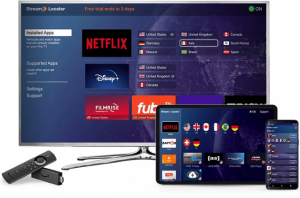
While using a Netflix VPN is the best way to evade geo-blocks and stream Movies and Shows, there is another option.
Many Netflix users have slower internet speeds which can be frustrating with the use of a VPN.
Because accessing a VPN will typically decrease your download speeds, using a Netflix VPN to stream content may not always be the best choice.
Luckily, there is an alternative in the form of an easy-to-use application that will still allow you to unlock all of Netflix’s content and evade geo-restrictions.
StreamLocator acts as a proxy to unblock Streaming Apps and Services such as Netflix, Peacock TV, HBO Max, Disney Plus, and more.
This will allow you to access the full libraries of these services without the use of a VPN.
Best of all, StreamLocator will not decrease download speeds which means no buffering or lag when streaming.
This service is available via the StreamLocator Hub or with the official StreamLocator application.
Connecting to the StreamLocator application will allow you to change your virtual location and unlock tons of hidden content on Netflix and many other services.

Learn more about StreamLocator at our detailed review guide below that includes a special StreamLocator Free Trial with future discount.
Get StreamLocator with Special Discount
Install the Best Netflix VPN on any Device
Netflix is an app that must typically be installed on a streaming device prior to use. Currently, the most popular streaming device is the Amazon Fire TV Stick 4K Max.
The following screenshot guide illustrates how easy it is to set up a Netflix VPN on the Firestick.
However, the same process below applies to other devices running Netflix.
Simply register for a Surfshark VPN account, install the Surfshark app, and click the Connect button!
1 – Register for an account at Surfshark by clicking HERE.
2 – From the home screen, hover over and select the Search option.

3 – Search for and select Surfshark.

4 – Choose the Surfshark VPN App.

5 – Click Get or Download.

6 – Wait for the app to download.

7 – You will then encounter the “Surfshark Ready to Launch!” message. Click to Open.

8 – Log In to your Surfshark account with your email address and password.

9 – Connect to the VPN Server of your choice.

10 – Launch the Netflix App.

11 – Play a Netflix movie or TV show.

Best Netflix VPN Details
Because Netflix is used on a streaming device such as Firestick, users need a VPN application that can be installed on the same device.
Luckily, Surfshark is compatible with just about every device imaginable. This includes the following operating systems:
- Windows
- macOS
- iOS
- Android
- Fire TV
- Windows Phone
- Linux
- Chrome OS
- Routers

With an easy-to-install application, you can use your Netflix VPN no matter where you are.
The most popular VPN tutorial is the Firestick VPN Tutorial which takes less than 2 minutes to install.
Use the links below for various VPN Device Installation Guides:
- Android TV Box VPN Tutorial
- NVIDIA SHIELD VPN Tutorial
- Xbox One VPN Tutorial
- Roku VPN Tutorial
- Windows VPN Tutorial
- iPhone & iPad iOS VPN Tutorial
- Chromebook VPN Tutorial
- Mi Box VPN Tutorial
Or, you can install Surfshark onto a Router using the instructional guide below:
Surfshark Features & Special Discount

If you use one or multiple of the above devices to stream Netflix, you are in luck. Surfshark allows access from one account on unlimited devices simultaneously.
This means you can always stay connected to Surfshark from numerous devices at the same time!
One of the most beneficial features of Surfshark is its lightning-fast download speeds that make sure your content will not buffer.
While a VPN app will always reduce your download speeds, Surfshark Servers continue to be the fastest when connected.
If you want to determine your Speed, use the TROYPOINT Internet Speed Test and see both download and upload speeds.
Money-Back Guarantee

Surfshark provides a 30-day money-back guarantee that will grant you full access to the app.
If you are not pleased with the service for any reason, simply contact their 24/7 Customer Support department and ask for a full refund.
CLICK HERE FOR SURFSHARK VPN DISCOUNT
Best Free VPN for Netflix
You may be tempted to seek out a free VPN for Netflix.
Been there, done that! Here are the problems.
- The free Netflix VPNs don’t run on quality servers and are overloaded with traffic which means non-stop buffering.
- Most of these free services get discovered quickly by Netflix and are not allowed to work properly with the service.
- These free services are making money somewhere and more than likely, they are selling your data and streaming logs to third parties.
TROYPOINT always suggests staying away from Free VPNs for the reasons listed above and more.
This page includes affiliate links where TROYPOINT may receive a commission at no extra cost to you. Many times, visitors will receive a discount due to the special arrangements made for our fans. Learn more on my Affiliate Disclaimer page.


Will this work with IPVanish?
Hello Carm, as of today IPVanish does not work with Netflix.
This may be too specific, but I have Surfshark and it works great on Netflix. However, on Prime Video, they have geo restricted Yankee baseball games that you can only watch if you are located in New York City. I log into to the New York servers (both the regular and the dedicated ISP ones) but I can’t watch the game. I clear the cache and reboot on both surfshark and Prime video, yet I still can not watch. I even go so far as to change the time and time zone on the firestick. This is all on a firestick TV. Any suggestions or is just too specific because it’s for New York City only?
Can I use all these features on a Android TV??