The following tutorial will show you how to watch Samsung TV Plus on Firestick/Android TV/Google TV.
Samsung TV Plus is a popular free live TV service that carries hundreds of live channels for streaming.
Unfortunately, it is currently not available for installation on Amazon Firestick & Fire TV devices. Luckily, we can still access these channels with a Video Player or IPTV Player.
The Amazon Firestick provides tons of features including the ability to side-load apps that are not available in the Amazon App Store. You can follow along with this in our guide below.
Users can also watch Samsung TV Plus on a Firestick via a web browser such as Google Chrome. We provide step-by-step instructions for both methods which you can find below.
Oftentimes, Firestick owners can access applications not available in the Amazon App Store by side-loading the APK.
However, Samsung has blocked access to its APK on Firestick and Fire TV devices which means we must use a workaround. In the guide below, we are using a Fire TV Stick 4K Max.
However, this will also work for any variation of Fire TV including Firestick Lite and Fire TV Cube as well as Android TV Devices including NVIDIA SHIELD, MECOOL, onn. Google TV, and more.
How to Watch Samsung TV Plus on Firestick/Android TV/Google TV
Install IPTV Smarters Pro
In this guide, we will use IPTV Smarters to watch Samsung TV Pus on Firestick.
However, other Players such as TiviMate, Smart IPTV, and more will also work for this tutorial.
1. Install the Downloader app from your respective App Store (Amazon App Store or Google Play) and enable Unknown Sources within the settings of your streaming device.
Install Downloader & Enable Unknown Sources
2. Launch Downloader.
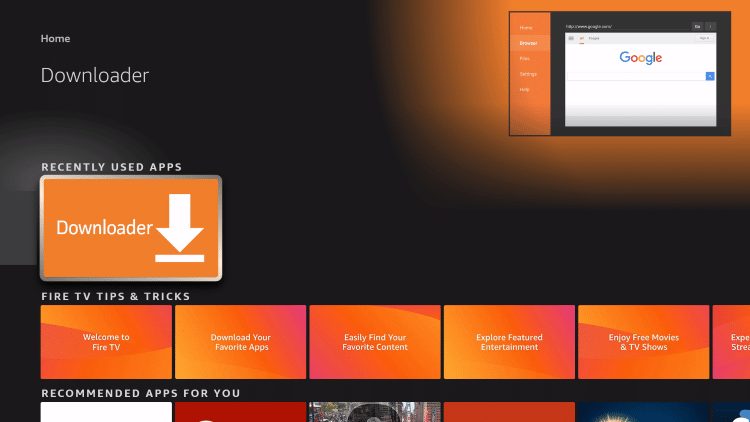
3. Hover over the URL bar and click the select button on your remote to open the keyboard.

4. Type the Downloader Code for the TROYPOINT Toolbox which is 250931 and click Go.

Exclusive Surfshark Discount
Warning: Your online activity is currently monitored by your ISP, app/addon/IPTV developers, government agencies, and the websites you visit.
- Become 100% anonymous while streaming and downloading.
- Use on Unlimited Devices & share 1 account with the entire family.
- Save 85% with the 24-Month Plan + Get 3 FREE Months.
5. You will then see a redirect page.

6. This brings you to the TROYPOINT Toolbox home screen.

7. Scroll down to find IPTV Smarters Pro and click Download.

8. Wait for the application to download.

9. Click Install.

10. You will then encounter IPTV Smarters Pro Ready to launch! message.

Big Tech is Scanning Your Emails
Stop letting free providers read your private messages to build advertising profiles on you. Take back your digital privacy with a secure, ad-free inbox.
11. Click Open.

Integrate Samsung TV Plus M3U URL
With IPTV Smarters now installed on our device, we can integrate the Samsung TV Plus M3U for live channels.
1. After opening IPTV Smarters, select TV and click Save.

2. Choose Load your Playlist or File/URL.

3. Click Allow.

4. Click to select Playlist Name.

5. Type STVPlus or other name of your choice and click Next.

6. Select M3U URL for Playlist Type.

7. Click Input m3u line.

8. Type the following URL Address exactly as it is shown here: https://i.mjh.nz/SamsungTVPlus/all.m3u8 and click Next.

9. Click Add User.

10. You will then encounter User added successfully! message.

11. Select Live TV.

12. You can now access Samsung TV Plus Channels on Firestick or Fire TV. Enjoy!

Enjoy!
Users can also access Samsung TV Plus on Firestick using a Web Browser.
Follow the guide below if you prefer to access Samsung TV Plus on Firestick via browser.
Samsung TV Plus on Firestick via Web Browser
Using a web browser on Firestick is a fabulous way to access Free Movie Websites, Sports Streaming Sites, and more.
These devices come with Amazon Silk Browser pre-installed which works perfectly for tons of web browsing.
Unfortunately, it does not work with the Samsung TV Plus Official Website.
We suggest installing another browser such as Google Chrome to stream these live channels on your device.
NOTE: Some browsers may require Mouse Toggle on Firestick for full navigation features.
1. Launch Google Chrome or other Web Browser and go to samsungtvplus.com.

2. Click Agree.

3. You can now access Samsung TV Plus on Firestick for live streaming.

Enjoy!
Samsung TV Plus Channels
There are tons of channel options available via Samsung TV Plus and are absolutely free. These are available in numerous categories including News & Opinion, Entertainment, Crime, Sports, Reality, Movies, and more. Some of the most popular options include:
- PBS Kids
- ChiveTV
- Kitchen Nightmares
- MTV Pluto TV
- Tastemade
- Outdoor America
- Pac 12 Insider
- bein Sports Xtra
- Stadium
- Court TV
- VICE
- ET Live
- Cheddar
- ABC News Live
- CBS News
- and more
Kodi users can install the Samsung TV Plus Kodi Addon for access to these channels on any Kodi device.
Do you use Samsung TV Plus? Let us know what you think in the comments section!
Frequently Asked Questions
Can I watch Samsung TV Plus on Firestick?
Yes. The guide above shows how to watch Samsung TV Plus on Firestick using IPTV Smarters.
Is Samsung TV Plus available in the Amazon App Store?
No. Users must access Samsung TV via video player or IPTV player on Firestick.
What Channels are available on Samsung TV Plus?
There are tons of channels available including CBS News, ABC News Live, ChiveTV, and more.
Is Samsung TV Plus free?
Yes. This app is absolutely free to install and use.
This page includes affiliate links where TROYPOINT may receive a commission at no extra cost to you. Many times, visitors will receive a discount due to the special arrangements made for our fans. Learn more on my Affiliate Disclaimer page.