
This comprehensive guide shows you exactly how to install IPTV Smarters Pro on Firestick, Android TV/Google TV, Apple TV, iOS, and other popular streaming devices in 2026.
The IPTV Smarters Pro application continues to be one of the most popular live TV players on the market because it is completely free to download, performs exceptionally well, and is packed with advanced features.
Unlike other media players that lock essential features behind a monthly subscription paywall, the core player application remains 100% free, which is why it has become a staple for cord-cutters worldwide.
The developers continually update the software to ensure a flawless streaming experience on just about any hardware platform. The current stable version is v3.1.5.

It is crucial to note that the app itself does not host, provide, or sell any live channels or video-on-demand content. Users must input an Xtream Codes API login or an M3U Playlist URL typically provided by an independent IPTV service provider.
Because the official mobile/TV APK is no longer listed in standard app stores like Amazon or Google Play, users must sideload the application onto their streaming devices. Google famously removed the app from the Play Store back in 2019 due to policy disputes.
Currently, IPTV Smarters can be installed on almost any modern device, including:
- Amazon Firestick & Fire TV Cube
- Android TV & Google TV Boxes (NVIDIA Shield, Onn 4K Pro, etc.)
- Apple TV 4K
- iOS Devices (iPhone, iPad)
- Windows PC & Mac
- Android Phones & Tablets
The following list was last updated on Fri, Oct, 30, 2026
IPTV Smarters Pro Video Tutorial
The video tutorial below offers important setup details and visual walkthroughs not fully covered in the screenshot guide.
Get Free IPTV Smarters Bonus Video
Get Surfshark VPN Discount + Extra Months

What is IPTV Smarters Pro?
Users who are new to the cord-cutting community often hear about Smarters Pro but remain unsure of how an IPTV player actually operates.
As referenced above, IPTV subscribers integrate their subscription service into Smarters Pro to access their provider’s full library of media, including live television networks, electronic program guides, and VOD movies/series.
Most independent providers do not develop their own standalone streaming applications for every television platform, which is exactly why universal IPTV players like IPTV Smarters Pro are required.
You simply input the specialized playlist URL or API credentials provided in your welcome email, and the player instantly builds a customized television guide. Continue reading for comprehensive installation guides across all platforms.
Features at a Glance
There are plenty of notable features worth highlighting that make IPTV Smarters one of the best applications available to stream live TV:
Exclusive Surfshark Discount
Warning: Your online activity is currently monitored by your ISP, app/addon/IPTV developers, government agencies, and the websites you visit.
- Become 100% anonymous while streaming and downloading.
- Use on Unlimited Devices & share 1 account with the entire family.
- Save 87% with the 24-Month Plan + Get 3 FREE Months.
- 100% Free Core Player
- Accepts M3U URLs, Xtream Codes API, & Local Playlist Files
- Fully Functional Electronic Program Guide (EPG)
- Multiple Playlist Capabilities (Manage multiple providers at once)
- Advanced Hardware Decoding Settings
- Live TV Recording Capabilities
- Robust Parental Controls & PIN Locking
- Multi-Screen View (Watch up to 4 channels simultaneously)
- External Video Player Integration (MX Player, VLC)
- Browser-Based Web Player Access
How to Install IPTV Smarters Pro on Firestick & Google/Android TV
NOTE: We are using an Amazon Fire TV Stick 4K Max in the screenshots below. However, this exact sideloading method works identically on Google/Android TV Boxes (like the Onn 4K Pro and NVIDIA Shield), all variations of Fire TV, and Android Smart TVs.
1. You must first install the Downloader app on your device. If you haven’t done this, refer to our dedicated guide below.
Downloader on Firestick Installation Guide

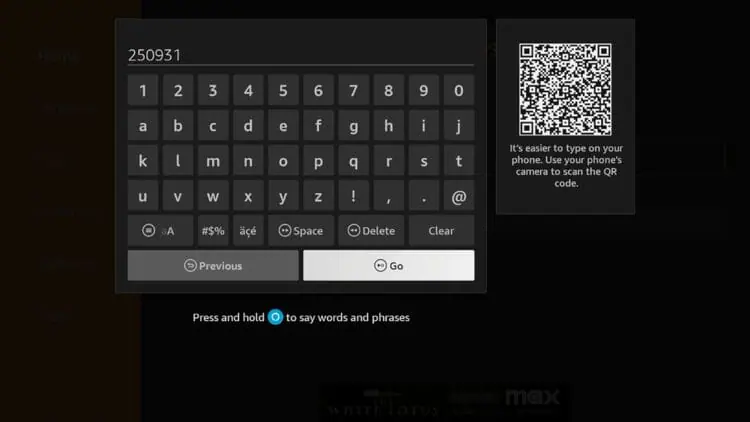
2. Launch Downloader, place your cursor in the URL box, and click the OK button on your remote to bring up the on-screen keyboard.

3. Type the quick-code 250931 and click Go. This is the official shorthand code for the TROYPOINT Toolbox.
4. You are now presented with the main home screen of the TROYPOINT Toolbox.

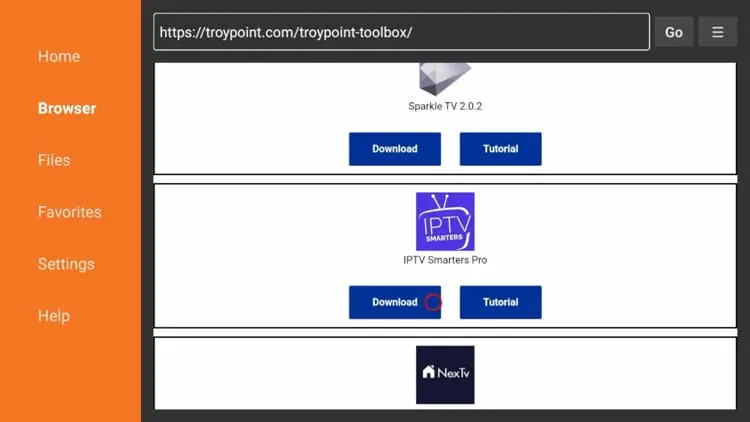
5. Scroll down the list to find IPTV Smarters Pro and click Download.
Big Tech is Scanning Your Emails
Stop letting free providers read your private messages to build advertising profiles on you. Take back your digital privacy with a secure, ad-free inbox.
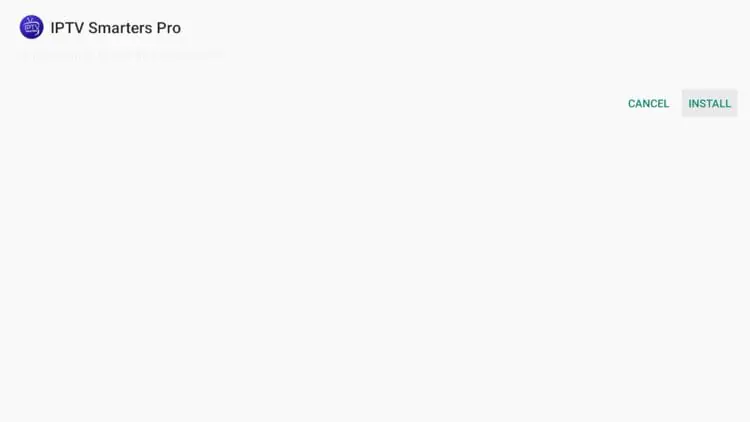
6. Wait for the APK file to finish downloading, then click Install.
This page includes affiliate links where TROYPOINT may receive a commission at no extra cost to you. Many times, visitors will receive a discount due to the special arrangements made for our fans. Learn more on my Affiliate Disclaimer page.


