

This article will answer an age-old question among cord-cutters: What is Good Internet Speed?
Nothing spoils streaming your favorite TV show quite like constant buffering.
When your internet connection slows down, it affects not just your on-demand TV experience but also the quality of your video calls, file sharing, online gaming, and more.
This leads us to the important question – what internet speed is good enough to support your activities?
Internet service providers (ISP) now offer different connection types to meet consumer demand.
You can opt for cable internet service, satellite, DSL, or fiber-optic connections — a far cry from the dial-up service that made screeches every time folks in the ’90s attempted to connect at 56 Kpbs.
Looking at your bandwidth requirements is a great way to determine the internet speeds you will need.
In addition, there are several other factors that can affect your network performance, which I’ll be discussing in detail later.
What is Good Internet Speed – Terminology
These are important terms that will help you answer the question – What is a Good Internet Speed?
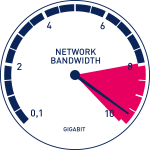
Internet speed is all about your allocated bandwidth or the amount of data you receive from your ISP so you can upload and download data. The time that it would take you to upload or download depends on file size and your network bandwidth.
Bandwidth is measured in terms of bits per second. When measuring internet connection speeds, we use Mbps (megabits per second) to indicate how much of the file is downloaded or uploaded. That is, 10 Mbps means 10 megabits of data per second.
A megabit is often confused with a megabyte (which is equal to eight megabits). A megabyte is used to describe the size of a file rather than the internet speed. Therefore, in order to download a 1MB document, it would take 8 Mbps of connection in one second.
Downloading is retrieving any information from a website or another device while uploading is sending your data from your device to the internet. You consume a certain amount of bandwidth every time you perform this activity.
For example, when you stream on YouTube, you need around 2.5 Mbps to download a non-HD quality video.

When you upload, on the other hand, you also consume data based on the size of the video that you’re uploading.
When streaming, you’re only transmitting content over the internet but not saving files on your device. That is why Streaming Apps have become so popular. Because we are not downloading files to our device, less bandwidth is required.
Exclusive Surfshark Discount
Warning: Your online activity is currently monitored by your ISP, app/addon/IPTV developers, government agencies, and the websites you visit.
- Become 100% anonymous while streaming and downloading.
- Use on Unlimited Devices & share 1 account with the entire family.
- Save 87% with the 24-Month Plan + Get 3 FREE Months.
You may also notice that you have various options on the quality of image resolution when streaming a video. Video resolution refers to the number of pixels that are displayed in a device’s dimension.
It is quoted in terms of width and height. A “640 x 480” dimension means that the video is 640 pixels wide by 480 pixels high.
In other words, there are 480 lines (each being 852 pixels wide) stacked on top of each other. The more horizontal lines stacked, the better the video quality.
Some of the common types of video resolutions are:
Pixel Size |
Resolution |
Quality |
Recommended For |
|---|---|---|---|
| 480 x 360 (360p) | Low Definition (LD) | Blurry on larger display devices | Mobile Devices, Smartphones |
| 640 x 480 (480p) | Standard Definition (SD) | Clearer on smaller screens | Laptops & Desktop Computers |
| 1280 x 720 (720p) | High Definition (HD) | Sharp and crisp | Laptops, Computers, and TV |
| 1920 x 1080 (1080p) | Full High Definition (Full HD) | Detailed and highly sharp | Smart TV’s and Large Screen Devices |
| 4K | Ultra High Definition (UHD) | Extremely Sharp with realistic color and texture | Smart TV’s and Large Screen Devices |
What is Good Internet Speed – Determining Your Speeds
The best way to determine your internet speed is by using an Internet Speed Test.
You can test your current internet speed by typing troypoint.com/st into your browser on any device including iPhone, iPad, PC, and more.
Then click the Start Test button and wait for the speed test results.
If you’re going to test the internet speed on Fire TV or Firestick, TROYPOINT has created a quick guide on how to do it. Or, use the screenshot guide below:
How to Test Internet Speed on Firestick/Fire TV
1. From the main menu of your Fire TV Device, scroll the left to search and select Firefox

2. Choose Firefox under Apps & Games

Big Tech is Scanning Your Emails
Stop letting free providers read your private messages to build advertising profiles on you. Take back your digital privacy with a secure, ad-free inbox.
3. Click Download

4. Click Open

5. Select Keep Turbo Mode enabled

6. In the address bar type the following address exactly as it is listed here and Click Next: troypoint.com/st

7. Scroll down and Click Start Test

8. Wait for Test to finish

9. View your Speed Test Results

Millions of cord-cutters across the globe choose the Amazon Firestick as their preferred media device.
This is because of its low price point and side-loading capabilities which make your streaming options endless.
Many who purchase the Firestick do so in hopes of “jailbreaking” this device for Movies, TV Shows, Live TV, and more.
TROYPOINT has created the most in-depth jailbreak tutorial which will provide access to endless content all for FREE.
What is Good Internet Speed for Me?
Once we determine our internet speed, we can start to take a closer look at the type of service package that will be required to support our network needs.
The choice of what internet package to pay for will depend on numerous factors. If you’re a serious gamer, expect higher bandwidth if you choose to download games.
Streaming movies, sharing large files, and long conference calls also require a faster connection.
But if your activities only involve general web surfing and email, then you don’t need blazing speeds and a basic internet package should be enough to sustain your activity.
Some of the online ventures that you may want to consider when selecting the best internet speed include:
- General web browsing and email use
- File, music, and game downloads
- File sharing
- Streaming movies using Cinema APK and Kodi
- Online gaming
- Video conferencing
Below is a comprehensive internet download speed guide:
Download Speed |
Ideal for Resolution Type |
Great for |
Ideal for streaming |
Also best for |
|---|---|---|---|---|
| 1 Mbps | LD to SD | Standard web surfing
Emailing without large attachments Social media browsing |
Mobile audio and music streaming on Spotify, iTunes and Amazon Music
SD video on Xbox, Vudu |
Standard voice and HD video calling on Skype |
| 2.5 Mbps to 3 Mbps | 480 SD | File sharing
Playing online games on Xbox, Playstation 4, Nintendo Switch |
SD video on Netflix
HD video on Hulu, YouTube, Xbox |
Group video calling on Skype for a maximum of 3 participants |
| 6 Mbps | 720p HD | Online gaming | HD video on Netflix, Hulu, Vudu | Video conferencing |
| 8 Mbps | 1080p HD | Instructor-led online classes
Playing games on Fortnite |
HD video on Netflix
Live streaming on Hulu |
Group video calling on Skype for a maximum of 3 participants |
| 25 Mbps | 4K Ultra HD | Downloading HD movies and Torrents
Long web conferencing |
Ultra HD video on Netflix | Cloud file-sharing for very large files |
What is Good Internet Speed – Estimated Download Times
If you’re downloading a document, movie, or Torrent file, the download time can vary depending on your internet speed.
Below is an estimate of download time given various internet speeds assuming no other factors listed above can affect network connection.
IMPORTANT NOTE: If you are using a torrent website or application to download content, installing a VPN is a must. Without it, your IP address will be broadcast to the public which is extremely dangerous. Be sure to protect yourself with a VPN.
For those who prefer downloading torrents rather than streaming, TROYPOINT has created a list of the Top Torrent Sites to get you started.
Estimated Download Time |
||||||
|---|---|---|---|---|---|---|
| Type of File | File Size | 1 MB | 3 Mbps | 6 Mbps | 8 Mbps | 25 Mbps |
| Basic Webpage | 1 MB | 5 seconds | 2 seconds | 1 second | 1 second | 1 second |
| Spotify song | 4 MB | 22 seconds | 11 seconds | 5 seconds | 4 seconds | 1 second |
| SD movie | 1.75 GB | 2 hours and 47 minutes | 3 hours and 34 minutes | 41 minutes and 45 seconds | 31 minutes and 19 seconds | 10 minutes |
| 720p HD movie | 4.5 GB | 7 hours and 9 minutes | hours and minutes | 1 hour and 47 minutes | 1 hour and 20 minutes | 25 minutes and 46 seconds |
| 1080 HD movie | 15 GB | 23 hours and 51 minutes | 11 hours and 55 minutes | 5 hours and 57 minutes | 4 hours and 28 minutes | 1 hour and 25 minutes |
The image below shows the average download speeds needed for streaming.
NOTE: This image only shows estimates for required download speeds. Other factors will determine the speed needed to stream your preferred content and will vary across different devices, ISP’s, and more.

What is Good Internet Speed – Upload Speeds
Another important factor in determining What is a Good Internet Speed is Upload Speeds. There are nearly as important as download speeds.
When saving files on Cloud or doing video calls on Skype, Facebook Messenger, or WhatsApp, it is important to sustain a reliable network connection.
After all, you don’t want to wait hours for your documents to be saved on Dropbox or appear “grainy” to your friends on a Google Hangouts video call.
Below is an internet upload speed guide:
Upload Speed |
Great for |
|---|---|
| 0.1 Mbps | Skype audio calls Pandora radio |
| 0.3 Mbps | Standard Skype video calls and screen sharing |
| 0.5 Mbps | Online gaming on Xbox |
| 1 Mbps | Online gaming on Playstation 4, Nintendo Switch and Nintendo Wii |
| 1.5 Mbps | Minimum upload speed for Netflix Skype HD video calls |
| 2 Mbps | Basic gaming SD video streaming |
| 4 Mbps | HD video streaming Online gaming |
| 6.5 Mbps | YouTube Standard Frame Rate for 720p |
| 10 Mbps | YouTube Standard Frame Rate for 1080p Long video conferences |
Take note that for online gaming, latency (the period it takes for a computer to send data to a server) is also considered as a gamer’s need to reduce it below 20 ms to avoid noticeable lags.
Given this information, if you are someone who will only use the Internet for browsing social media and other web-related content, high internet speed will not be required.
For those taking online classes that need to upload papers, download videos, chat with classmates, and more, 8 Mbps is enough download speed to keep you happy.
However, if you are a cord-cutting fanatic that can’t get enough of the newest movies and TV Shows in High Definition and 4k UHD, you may need an internet service that serves up 25 Mbps in download speed.
Check with your local ISP to see the different internet packages and services you can purchase for your household.
What is Good Internet Speed – Factors

When your ISP promises speeds of up to 25 Mbps in your home, this isn’t guaranteed to be sustained 24/7, which can be verified by testing your internet speed.
Many factors can contribute to poor network performance such as:
Internet Service Provider (ISP)
Most ISPs only include connection speeds between them and the subscriber but not the limitations of their connection quality.
The phrase, “speeds of up to” in the listed speed ad is the maximum speed a subscriber can get without the impact of other factors such as other users’ network demand and more.
Number of Devices Connected
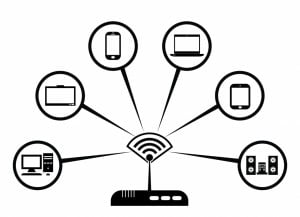
Too many devices simultaneously connected to your Wi-Fi router can create interference because of undistributed network load which can lead to poor router performance.
If you want the most network power when streaming, make sure you are not using other devices on the same connection to ensure it is buffer-free.
Network traffic
When too many subscribers share the same connection provided by the ISP, a slowdown occurs.
Time of day
The average internet speed may drop during certain periods of the day (usually peak hours in the evening).
This is due to servers being overloaded with users accessing websites and other services after work.
Internet server location
Data that travels through many servers before the destination server can use more bandwidth causing slower download speeds.
Router placement
When the router is located in an area blocked by walls, this makes it hard for the wireless signal to reach devices.
Appliances that use radio signals also affect router performance.
TROYPOINT always suggests having your main streaming device located as close to your router as possible for a buffer-free experience.
Network equipment
A weak computer processor, outdated device, poor equipment configuration, incorrect cabling, and low-quality cords can reduce internet speed.
If you are experiencing slow download speeds due to outdated equipment, you may want to look into a Firestick Ethernet Adapter.
Type of Connection
A fiber broadband connection provides the fastest and most consistent service for home use compared to DSL broadband or satellite connection.
Mobile broadband, however, has also improved in recent years. Talk to your ISP to see what type of options they provide that will suit your internet needs.
VPN Connection
When connecting to a VPN such as IPVanish, your online traffic gets to be secured in an encrypted tunnel.
This may affect the variations in your internet speed given the distance between your location and the VPN server and server bandwidth limits.
For those who use a VPN when streaming, there are a few tips that can help boost performance.
Follow the links below to learn how to improve your VPN speed on any device.
How to Improve VPN Speed
VPN Protocols Guide
In addition, some of the apps that you would want to download are restricted by the Amazon App Store since they are unverified.
However, you can side-load them into your device without using the official app distribution method with the help of a VPN for Firestick, Fire TV, Fire TV Cube.
Bandwidth Needs of Online Activities
Doing simultaneous online activities such as video calls, movie sharing, and online games can affect both download and upload speeds as they take much bandwidth at the same time.
TV Receivers, Game Consoles, Smart Appliances
Devices and appliances that require high-speed internet can compete for available bandwidth.
For example, with a jailbroken Firestick, you can install more applications that aren’t available within the Amazon App Store.
This means that you’ll be needing higher bandwidth to run the apps.
What is Good Internet Speed? Deciding on Speed That Fits Your Needs
Internet speeds can be an issue when it takes you longer periods to download a file, upload an image, or stream another episode of your favorite series.
Worse, when your online gaming lags or your video call starts to lag, this can be very frustrating.
Remember that your internet speed can be affected by other factors in the network connection.
By knowing what your online activities are and the factors that may affect your internet speed, you can select the best offer from your ISP to fit your needs.
This page includes affiliate links where TROYPOINT may receive a commission at no extra cost to you. Many times, visitors will receive a discount due to the special arrangements made for our fans. Learn more on my Affiliate Disclaimer page.


