

IMPORTANT: It appears the repository URL for the Venom Kodi Addon is offline. We suggest using viewing the link below for alternatives in the meantime. Check back for updates.
This in-depth report of the Venom Kodi Addon will provide you with everything you need to know about this add-on on Firestick, Fire TV, Android TV Box, or any other device.
Is Venom Kodi safe to use? Is Venom Kodi Addon legal? How do I install Venom Kodi Addon? We will answer those questions and more in this article.
The reason why we ask legal questions is due to the fact that Venom isn’t available in Kodi’s official repository. This is oftentimes a warning sign.
Since this add-on can’t be installed through the official Kodi repository, it must be installed from an external provider which we display in the screenshot guide below.
Venom is a Kodi add-on that features movies and TV shows across a variety of genres.
This add-on has a great interface with tons of quality links. For these reasons and more, it is considered one of the Best Kodi Addons by TROYPOINT.
IMPORTANT: Venom is now compatible with Kodi 19! You can use the same steps below for installing on Kodi 19 Matrix.
Hide Your Digital Fingerprint
The Venom Addon is for Real-Debrid Users Only. You can find our Real-Debrid Setup Guide below the installation tutorial.
Note: If you do not have Kodi on your device, you can install the latest release using our guides below:
Install Kodi on Firestick/Fire TV
Install Kodi on Android TV Box
Below you will find a screenshot guide to install Venom on your Kodi device. We are using an Amazon Fire TV Stick 4K.
These same steps also work for those using the Firestick Lite, 3rd Gen Fire TV Stick, Fire TVs, Fire TV Cube, and any Fire TV device.
This process also applies to those using Android devices such as the NVIDIA SHIELD, MECOOL Boxes, Chromecast, Android TV Boxes, phones, tablets, and more.
Is Venom Kodi Addon Safe to Use?
Before I install this, I first want to scan their repository URL with VirusTotal.
Here is the screenshot of the scan results.

Exclusive Surfshark Discount
Warning: Your online activity is currently monitored by your ISP, app/addon/IPTV developers, government agencies, and the websites you visit.
- Become 100% anonymous while streaming and downloading.
- Use on Unlimited Devices & share 1 account with the entire family.
- Save 85% with the 24-Month Plan + Get 3 FREE Months.
VirusTotal did not find any suspicious files or malware within the Venom Kodi repository URL.
However, this does not mean we shouldn’t protect ourselves when streaming content from this unverified 3rd party add-on.
Kodi even alerts us during setup that these 3rd party Add-ons will be given access to personal data stored on our device.

The best way to protect yourself when using Venom is with IPVanish VPN.
IPVanish will provide you with an anonymous connection while streaming or downloading while using questionable add-ons such as this.
How to Install Best VPN on Firestick/Android
Now, here are the steps we went through to install the Venom Kodi Addon through their repository.
Venom Kodi Addon Installation Guide
- Launch Kodi
- Click the settings icon


- Click System

- Hover over Add-ons menu item and turn on Unknown sources if not already on

- Read this important Warning prior to proceeding.
Add-ons will be given access to personal data stored on your device!
Big Tech is Scanning Your Emails
Stop letting free providers read your private messages to build advertising profiles on you. Take back your digital privacy with a secure, ad-free inbox.
This is why it is so important running IPVanish VPN if you’re going to use a 3rd party addon such as Venom.
IPVanish VPN won’t allow these 3rd party addons to gain access to your personal data.

- Click back on remote to go back to the System page
- Select File Manager

- Click Add source

- Click <None>

- Type the following URL exactly how it is listed here – https://123venom.github.io and click OK
- GitHub is the official website that hosts this repository URL
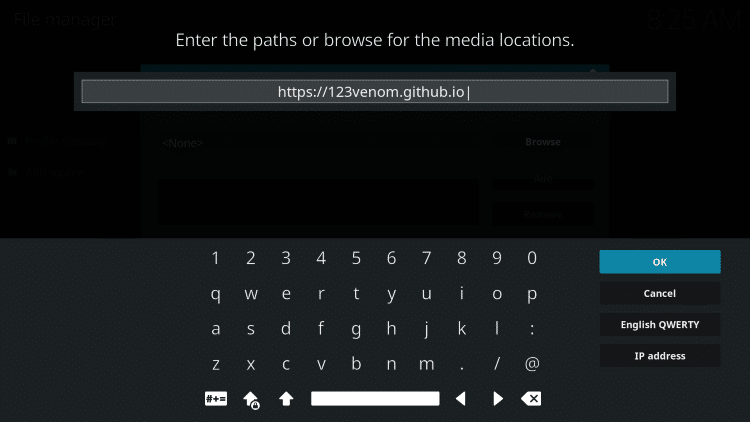
- Highlight the box under the source that you just typed in and enter a name for this media source, type venom or any other name you would like to identify this source as and click OK

- Click your back button on remote or keyboard until you are back on the System screen
- Choose Add-ons

- Click Install from zip file

- Choose venom or another name you assigned the media source in the previous step

- Click repository.venom.zip

- Wait for Venom Repo Add-on installed message to appear

- Click Install From repository

- Choose Venom Repo

- Click Video Add-Ons

- Choose Venom

- Click Install

- Kodi will then prompt the message below stating “The following additional add-ons will be installed”, Click OK

- Wait for Venom Add-on installed message to appear

Installation is now complete. Enjoy!
Venom Kodi Addon Description & Features

Venom provides an easy-to-use interface with only a few simple choices.
These include Movies, TV Shows, My Movies, My TV Shows, New Movies, New Episodes, Recently aired, Search, Tools, News and Info, and ChangeLog.
Many cord-cutters jailbreak their Fire TV Sticks & Fire TVs and this is one of the most popular Kodi addons used.
As mentioned previously, the Venom Kodi Addon is now for Real-Debrid users only, which populates the highest quality links for a buffer-free experience.
How to Setup Real-Debrid on Kodi
If you are a Trakt user, you can also integrate your account within Venom which will keep all your content in sync.
Overall, Venom is an awesome Kodi addon that works fabulously on all devices including the Amazon Fire TV Stick 4k.
Is Venom Kodi Addon Legal?
It’s impossible for TROYPOINT to determine whether these unverified addons/apps hold the proper licensing.
If and when an add-on is deemed illegal, we notify our users immediately and update reports on our Website to reflect that information.
At first glance, it would appear that Venom is distributing copyrighted works without consent.
Users can always access titles that are available for free in the public domain.
Works such as this are not protected by copyright laws and may be downloaded, streamed, and shared without any legal ramifications.
In conclusion, the end-user is responsible for all content accessed through add-ons such as the Venom Kodi Addon.
For 100% legal and verified free streaming options, we suggest our list of free movie/TV show apps below.
Frequently Asked Questions
Is the Venom Kodi Add-on legal?
Yes. It is not illegal to install and use this Kodi add-on. However, what you access after you have installed this add-on may be illegal.
Should I use a VPN with the Venom Kodi Addon?
A VPN such as IPVanish is always encouraged when installing any 3rd party Kodi addons and repositories. This will ensure your privacy and anonymity when streaming.
Can Venom Kodi Addon be Installed on Firestick?
Yes. Follow the step-by-step instructions above. This tutorial was done using an Amazon Firestick 4K.
What’s the Difference between a Kodi Addon and a Kodi Repository?
A repository is a file that stores numerous Kodi addons and more for installation. Usually, you are required to install a repository to install a Kodi addon or build.
What’s the Difference between a Kodi Addon and a Kodi Build?
You can think of a Kodi build as a bundle of the best add-ons, repositories, and a customized skin that you can install with one click.
This page includes affiliate links where TROYPOINT may receive a commission at no extra cost to you. Many times, visitors will receive a discount due to the special arrangements made for our fans. Learn more on my Affiliate Disclaimer page.


That link for the zip file doesn’t work.
Hi Jessica, this is likely playing a factor – https://troypoint.com/3-popular-kodi-addons-no-longer-be-working/
Heeelllllppppp!
I mean, may I please ask for guidance as I’ve been trying to install Venom for MONTHS now and just can’t do it!
I’ve tried to install Venom again and again to absolutely no avail. It continually says “the dependency on xbmc.python version 3.0.0 could not be satisfied”.
I am using FireTV and have used Venom before and LOVED it. I’m absolutely clueless on what the problem could be as I’ve meticulously checked my character input to ensure accuracy and have checked any and all possible reasons that I’m able to think of.
Notes (that might be relevant to inability to install):
? I’ve 3 FireTVs from generation 2 (my favorite) to 4 and Venom will not install on ANY of them;
? I recently changed VPNs from ExpressVPN to SurfShark as I was starting to have a lot of issues with ExpressVPN (very few streams, buffering, etc.) but originally had Venom installed and working fine with ExpressVPN and IPVanish (BTW, SurfShark returns most streams and is faster than either prior provider ?);
? I use RealDebrid and TraktTV (though can’t see relevant to inability to install Venom);
? All the fundamentals are in check (i.e.: allow outside sources, enough room on device, etc ).
I sit totally baffled. I MUST have this add-on!
While I like Seren and Exodus Redux quite well, they have their days and can be very frustrating. Venom never was. The ONLY reason I uninstalled it (and wiped the devices) was because a virus came sailing in on something (I’m 99.9% certain Exodus as it forced a most bizarre add-on down my throat called ExodusVPN, which never worked well and I’ve still not figured out the reason for it’s existence).
Thank you very much in advance for any assistance that you can provide!
Hi there,
What version of Kodi are you using?
My qwerty does not have ( : ) on my TV screen . cannot properly type in source . thoughts
Donald,
Read this: https://troypoint.com/colon-key-in-kodi-missing/
Trust me it does. You need to hit either a shift key or function key. Sometimes it a numbers button.