
This instructional guide will show you how to install and set up Smart IPTV (SIPTV) on any Firestick, Fire TV, or Android TV/Google TV box.

Smart IPTV is a lightweight, dedicated IPTV player that allows users to stream live channels, view electronic program guides (EPGs), and manage external playlists across a wide range of devices. Unlike recurring software subscriptions, SIPTV requires a one-time activation fee of approximately $6 USD (5.49 EUR) for a lifetime device license following a 7-day free trial.
To use Smart IPTV, you must supply your own stream sources via an M3U playlist URL or an Xtream Codes API link provided by your service. Once you have your playlist ready, registration and playlist uploads are handled remotely via the official portal at siptv.app.
Privacy Consideration: Registering Smart IPTV requires submitting your hardware MAC address to their external servers. Because a MAC address uniquely identifies your physical device and can be tied back to your network traffic, privacy-conscious users often prefer player alternatives like TiviMate or IPTV Smarters.
Regardless of which player you choose, your Internet Service Provider (ISP) can still monitor unencrypted streaming connections. ISPs frequently utilize Deep Packet Inspection (DPI) to identify live IPTV streams and intentionally throttle bandwidth, resulting in severe buffering during peak hours. Running a verified VPN for IPTV encrypts your traffic with AES-256 encryption, bypasses ISP throttling, and masks your physical IP address.
In this guide, we demonstrate the installation on a Fire TV Stick 4K Max. These exact steps also apply to all Fire TV models (including Fire TV Cube and Fire TV Edition smart TVs) as well as certified Android TV and Google TV boxes such as the Onn 4K Pro, NVIDIA Shield Pro, and MECOOL devices.
How to Install Smart IPTV on Firestick (Step-by-Step)
Step 1: Prepare Your Device for Sideloading
1. From the home screen of your device, hover over the Search icon.

Hide Your Digital Fingerprint
2. Type Downloader using the on-screen keyboard.

3. Select the orange Downloader by AFTVnews icon from the Apps & Games section.

4. Click Download or Get to begin the installation.

5. Wait for the download to finish.

6. Once finished, you will see a banner confirming Downloader Ready to launch!

Exclusive Surfshark Discount
Warning: Your online activity is currently monitored by your ISP, app/addon/IPTV developers, government agencies, and the websites you visit.
- Become 100% anonymous while streaming and downloading.
- Use on Unlimited Devices & share 1 account with the entire family.
- Save 87% with the 24-Month Plan + Get 3 FREE Months.
7. Press the Home button on your remote, go into Settings (the gear icon), and open My Fire TV.

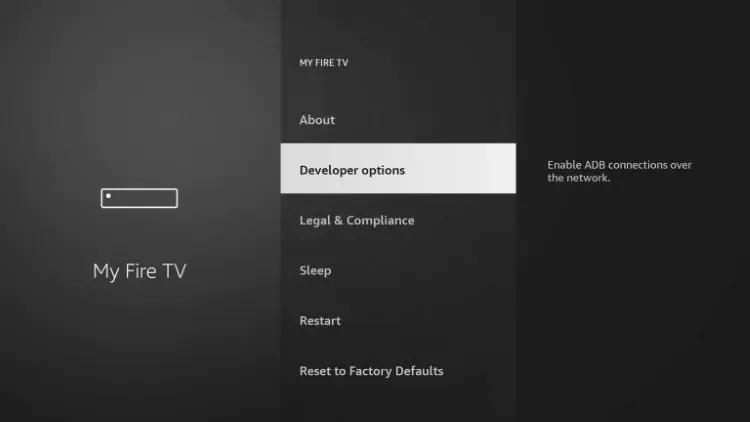
8. Choose Developer Options.

9. Select Install unknown apps.

10. Locate Downloader in the list and click it.

11. Verify that the status for Downloader is set to ON. This allows the installation of third-party APKs not hosted on the default Amazon App Store.

How to Unhide Developer Options (If Missing)
If your device runs newer Fire OS firmware where Developer Options is hidden by default, use these steps to restore the menu:
1. Navigate to Settings > My Fire TV.
Big Tech is Scanning Your Emails
Stop letting free providers read your private messages to build advertising profiles on you. Take back your digital privacy with a secure, ad-free inbox.
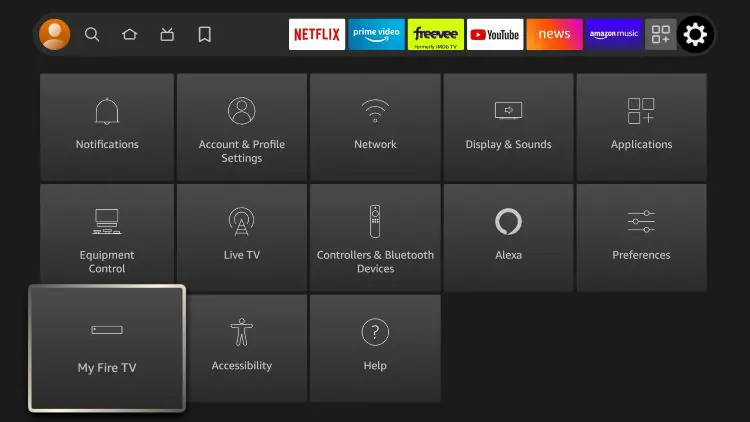
2. Click on About.
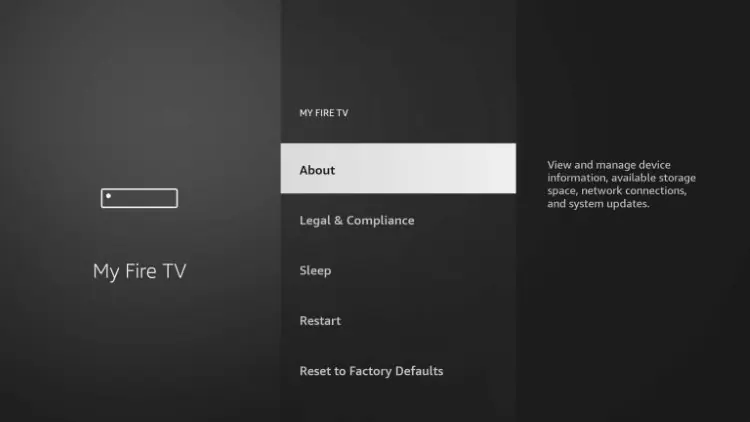
3. Highlight your device name (e.g., Fire TV Stick 4K Max) and click the Select button on your remote 7 times until you see the notification: “No need, you are already a developer.”
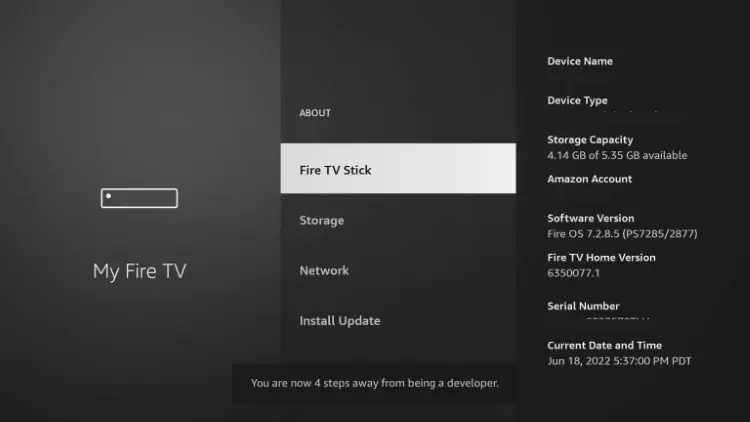
4. Press the Back button once. Developer Options will now appear inside the My Fire TV menu.
Step 2: Download and Install Smart IPTV
1. Launch the Downloader app from your home screen.

2. Select the central URL bar to bring up the on-screen keypad.

3. Enter the verified Smart IPTV Downloader Code: 26604 and click Go.

4. Wait a few seconds for the short link to redirect to the official APK source.

5. When the installation prompt appears, click Install.

6. Once installed, click Done rather than Open so you can clean up the temporary installer file.

7. Click Delete to remove the installation APK package.

8. Confirm by clicking Delete a second time to free up local storage space.

How to Set Up & Activate Smart IPTV
Smart IPTV operates on an external management system where playlist links are bound to your hardware MAC address through their web dashboard.
1. Open Smart IPTV from your Apps & Channels list.

2. If prompted for storage permissions, select Allow so the player can cache channel guides and artwork locally.

3. The home screen displays your device-specific MAC address (formatted as six pairs of alphanumeric characters separated by colons). Note down this address.

4. On a computer, tablet, or phone browser, navigate to my.siptv.app. Enter your device MAC address, paste your provider’s M3U playlist URL into the URL field, check “Save online”, and click Send.

5. Return to your TV screen and click Restart (or press the Blue button on your remote). Smart IPTV will sync with the web server and populate your live channel list.
Smart IPTV Features & Capabilities
- Universal Format Compatibility: Accepts raw M3U, M3U8, and XMLTV EPG formats across all compliant providers.
- Multi-Platform Support: Beyond Fire TV and Android TV/Google TV, native SIPTV builds are available for LG webOS and Samsung Tizen Smart TVs.
- Built-in Channel Sorting: Groups channels automatically into country, genre, or custom bouquet folders based on your playlist tags.
- Electronic Program Guide (EPG): Supports automatic time-shift corrections and integrated program descriptions.
- Low Resource Footprint: Highly optimized code runs efficiently on low-RAM streaming sticks without interface stutter.
Frequently Asked Questions
What is Smart IPTV (SIPTV)?
Smart IPTV is a dedicated IPTV media player designed to parse external streaming playlists (such as M3U files). It does not host, curate, or distribute any media content itself; users must supply their own streams.
Is Smart IPTV Legal?
Yes. Smart IPTV is 100% legal software because it functions strictly as a playback tool. However, the legal status of the channels you watch depends entirely on the provider and whether the service holds appropriate broadcast licenses for the content delivered.
What Devices Support Smart IPTV?
Smart IPTV can be installed on Amazon Fire TV sticks, Fire TV Cube, certified Google TV and Android TV set-top boxes (such as NVIDIA Shield and Onn 4K Pro), as well as LG and Samsung Smart TVs through their respective native app stores.
Is Smart IPTV Free?
No. While Smart IPTV offers a free 7-day trial period upon initial installation, continuing to use the software requires a one-time activation payment of 5.49 EUR (approximately $6 USD) per MAC address via siptv.app.
Why Does Smart IPTV Require a MAC Address?
SIPTV links software licenses and cloud playlist configurations directly to the hardware MAC address of the host device rather than utilizing an email/password account system.
This page includes affiliate links where TROYPOINT may receive a commission at no extra cost to you. Many times, visitors will receive a discount due to the special arrangements made for our fans. Learn more on my Affiliate Disclaimer page.


Is there a way ti put siptv on firestick if I don’t have a Mac code?
Hi I lost the tutorial on how watch local channels on the firestick will please send info
thanks
https://troypoint.com/stream-local-channels-without-cable/