

This in-depth PureVPN Review covers everything you need to know about this VPN provider.
We will include important factors such as PureVPN features, price, device compatibility, and much more.
How does PureVPN compare to our top recommended VPN? We explain in this review.
PureVPN is one of the most well-known VPN services available today.
Users can access over 6,500 servers across 140 various countries around the world.
The PureVPN app is also available for installation on tons of devices including streaming devices, mobile phones, and more.
PureVPN has numerous pricing options with various provided features which we will discuss below.
We have also tested PureVPN’s speed and compared it with our preferred VPN Provider.
Continue reading for our full PureVPN Review where we include pricing options, speed tests, and more.
Hide Your Digital Fingerprint

PureVPN Review – Highlights
- Zero Log Policy
- Up to 10 simultaneous connections with one account
- Over 6,500 VPN servers in 140 countries across the world
- Easy to use VPN apps for Fire TV, Android, Windows, macOS, Linux, and more
- Security on public Wi-Fi networks
- Various protocols including OpenVPN and IKEv2
- Kill Switch available
- Split Tunneling available
- Compatible with popular Streaming APKs
- 31-day money-back guarantee
- Customer Support
- Accepts PayPal, Credit/Debit, and Google Pay
PureVPN Download

PureVPN has apps that are available on numerous devices including Fire TV, Android, Windows, Linux, macOS, iOS, and more.
You can also find applications for streaming devices including Android TV Box via the Google Play Store.
Unlike various free VPNs that don’t always provide compatible applications, PureVPN has an app for nearly any device you prefer.
This includes the Amazon Firestick which is the most popular streaming device available today.

Sick of Slow, Rural Internet?
Whether you live out in the country or take your RV off the grid, Starlink delivers blazing-fast internet to areas that traditional providers ignore.
Check Availability & PricingTROYPOINT always recommends IPVanish because of its optimized application specifically designed for the Fire TV Stick and Fire TV.
Unlike IPVanish which provides unlimited connections at once, PureVPN only allows for 10 simultaneous connections on your internet-connected devices.
Exclusive Surfshark Discount
Warning: Your online activity is currently monitored by your ISP, app/addon/IPTV developers, government agencies, and the websites you visit.
- Become 100% anonymous while streaming and downloading.
- Use on Unlimited Devices & share 1 account with the entire family.
- Save 85% with the 24-Month Plan + Get 3 FREE Months.
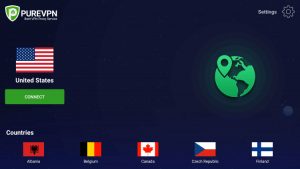
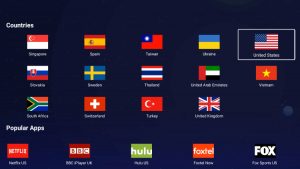
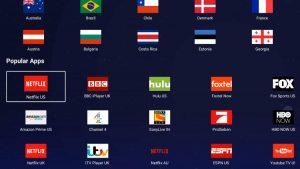
PureVPN’s application on Firestick/Fire TV is shown in the screenshots below:

PureVPN Review – Free Trial

PureVPN offers a 31-day money-back guarantee if you purchase the service and don’t like it for any reason.
While other services offer a completely “free trial”, PureVPN still requires you to purchase the service for testing.
If you are unhappy with PureVPN, you can cancel anytime up to 31 days and receive a full refund.
Why You Should Use a VPN
Register for VPN with Best Discount
Using a VPN such as PureVPN is a must for Kodi users who prefer to stream with various Kodi Addons and Kodi Builds.
For those who use Real-Debrid with Streaming Apps and APK’s, you will have no problems with PureVPN.
PureVPN is listed as a Cooperative VPN Provider by Real-Debrid and will work with this service.
If you prefer to use Torrent Websites to watch/download streams, you must ensure you are connected to a VPN to protect your privacy.

PureVPN does allow for P2P file-sharing that lets you connect with other users from around the world.
Big Tech is Scanning Your Emails
Stop letting free providers read your private messages to build advertising profiles on you. Take back your digital privacy with a secure, ad-free inbox.
This is a feature for torrent users who are trying to remain anonymous online.
ISP’s and more are cracking down on torrent website visitors who download content via the internet.
A recent example of this involved the popular site YTS:
YTS Torrent Site Handing Over User Data to Authorities.
Another reason to use a VPN on your devices is to avoid “geo-blocking” in various parts of the country and the world.
This is often referred to as “unblocking websites” which is very popular among users of Netflix, Amazon Prime Video, Hulu, and sports fans who are often geo-restricted in certain locations.

PureVPN works with Netflix, Amazon Prime Video, BBC, Hulu, and other popular Streaming Services to help access content unavailable in your area.
However, PureVPN does not allow you to choose a specific server or location when using the app on Firestick/Fire TV.
This means users who are trying to “unblock websites” can only access the country location and not various cities/regions.
One other item of importance is the number of connections you can establish with your VPN.

PureVPN only allows users to connect 10 devices to their VPN account at a time.
Many of us have up to 12 internet-connected devices at any given moment in our household.
This means you will likely be missing out on security and privacy for numerous devices if using PureVPN.
PureVPN Review: Pros and Cons

Prior to going into the details of this review, let’s get a quick overview and evaluate the pros and cons of PureVPN.
What We Like
- Zero Log Policy
- Unblocks Netflix, Amazon Prime, Hulu, BBC, YouTube, and other services
- Works with Real-Debrid
- 31 Day money-back guarantee
- Kill Switch available
- Split Tunneling available
- World-Wide Servers
What We Don’t Like
- Lack of Settings & Customizations options
- Slower VPN speeds when compared to IPVanish
- Can’t select a specific server within the designated location
- Higher prices vs other services such as IPVanish
- No SOCKS5 Proxy
- Only 10 Simultaneous Device Connections
- Fewer protocols to choose from compared to other VPN providers
PureVPN Price
When it comes to pricing structure, PureVPN offers three options for purchasing.
Like other VPN providers, they offer various discounts if you sign up for a one or two-year subscription instead of the month-to-month option.
Listed below are the current subscription options available for PureVPN:

Important Note: Be aware if you choose their “7-day trial” you will automatically be charged $69.95 for their annual plan if you don’t cancel.
If you choose to sign up for their service, PureVPN offers numerous ways to pay.
This includes PayPal, Credit/Debit Card, and Google Pay.
When comparing to other VPN Services such as IPVanish, PureVPN carries a heavier price tag.
Plus, these providers have various other features that users cannot find within PureVPN including Unlimited Device Connections at the same time.
We will dive more into this comparison below.
PureVPN on Firestick
You can download PureVPN on your Firestick via the Amazon App Store.
After installation, we can launch the app to sign in to our account.
1. Enter your credentials and click Login.

2. After logging in you be directed to the PureVPN main screen. Click Connect to establish a VPN connection.

3. That’s it, you are now connected to PureVPN on your Firestick/Fire TV.

4. When clicking the Settings option you will notice there are only two adjustable settings – split tunneling and auto-connect.

You will also notice the various countries you can connect to.

Continue reading below for PureVPN speed tests.
PureVPN Review – Speed Tests
Speed is arguably the most important feature to consider when comparing VPN providers.
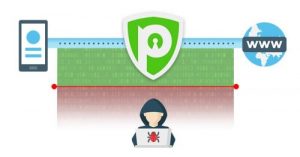
No matter which VPN service you use, you will experience a slight drop in download speeds because your traffic is routed through a separate VPN server and your connection is encrypted.
This is important when using Streaming Apps and live TV services on your device, as download speeds play a huge factor in buffering and playback.
We conducted several speed tests for our PureVPN review to see where this VPN ranks among the other popular services like IPVanish VPN.
Below you will find speed test results on a Fire TV Stick Lite.
Although there are hundreds of Internet speed tools available, for this example I am using the Analiti Speed Test App.
Analiti is available on Firestick/Android devices which you can install through both Amazon App Store and Google Play.
The following speed test was conducted on 100 Mbps max Internet plan.
Wireless tests were conducted through ASUS AC3100 Router which is approximately 20 feet away from the device.
PureVPN Review – Firestick Speed Tests
After installing the PureVPN app on our Firestick, we ran a few speed tests for comparison purposes.
As mentioned previously, we used Analitit Speed Test and quick-connected to the server located within the USA by default.
PureVPN US Server

Wi-Fi: 26 Mbps down & 21 Mbps up
Below is the same speed test while using IPVanish with their Chicago-based Server.
IPVanish VPN Chicago Server

Wi-Fi: 59 Mbps down & 16 Mbps up
As you can see from our results shown above, our internet speed is over 3x faster when using IPVanish vs. PureVPN.
You can see our extensive speed tests and more at our complete review link below:
IPVanish Review – World’s Fastest & Most Secure VPN
PureVPN vs. IPVanish VPN

Many TROYPOINT visitors will be wondering how we rank PureVPN in comparison to IPVanish, which has been our top recommended VPN for five years.
PureVPN is an easy-to-use VPN service that is suitable for basic VPN needs.
For those who use Real-Debrid with apps and APK’s, PureVPN works great and ensures a secure connection on tons of devices.
However, with customers able to only connect 10 devices at once, some of your gadgets may not always be protected.
With IPVanish, you can use their service on as many gadgets as you would like at the same time.
Internet Speed is a vital aspect of our everyday lives and most of us hate suffering any loss of connection speed.
Most VPNs will typically decrease your internet speed but when compared to IPVanish, PureVPN was much slower in download speeds.
IPVanish recently announced a network upgrade that improves its VPN speeds by 2.5 times which makes it the fastest VPN service available.
IPVanish Boasts Major VPN Speed Improvement
Pricing is also another key factor when determining a VPN Provider and while comparable, it is a bit more expensive than IPVanish.
IPVanish also has a special offer that will provide you with all of IPVanish’s features for a small monthly fee.
CLICK HERE FOR IPVANISH DISCOUNT
This includes:
- Unlimited connections with one account
- Unblocks Netflix, YouTube, and other services
- Cooperative with Real-Debrid and other debrid services
- Easy to install apps for all of the popular devices (Including Firestick)
- Over 1,600 VPN servers in 75 countries across the world
- Over 40,000 encrypted IP addresses to choose from
- Blazing fast download speeds worldwide
- and more
It’s important to point out that some VPNs perform better than others based on network setup, Internet service provider, etc.
IPVanish offers 24/7 support through their Website if you have questions about your account, billing, or need technical support.
You will notice a Help button on the bottom of the IPVanish VPN Website for live chat. Customer support via email is also available.
Both PureVPN and IPVanish offer a 30-day money-back guarantee so you can try both and have the option for a refund if one doesn’t work properly.
For our full IPVanish VPN review where we analyze speeds, features, settings, pricing, and more, click the link below.
PureVPN Review – Final Verdict

In conclusion, PureVPN is an easy-to-use VPN service that many find works great for their basic VPN needs.
It will provide you with a secure connection in several countries across the world.
However, it lacks major features that other VPN services such as IPVanish provide.
For our overall PureVPN Review, TROYPOINT gives this VPN service 3.5/5 stars.
3.5 out of 5 Stars
This page includes affiliate links where TROYPOINT may receive a commission at no extra cost to you. Many times, visitors will receive a discount due to the special arrangements made for our fans. Learn more on my Affiliate Disclaimer page.


