
Have you heard of the NewPipe APK and are wondering how you can install it on your media or streaming device? We have you covered with this guide that offers step by step instructions for quick installation and important information you should know.

This instructional guide will show you How to Install NewPipe on nearly any device you prefer including streaming devices such as Firestick, Fire TV, Android TV, Google TV, and more.
Make sure to follow along closely and check out our important information guide below the screenshots so that you will get all of the details and aspects of this unique platform.
Before we dive into the download process, we should first explain exactly what New Pipe is.
What is NewPipe?
NewPipe is an easy-to-use Ad-Free YouTube application that eliminates all ads and questionable permissions but still provides an original YouTube experience. Users can install and use the APK on just about any device including both streaming devices as well as Android mobile phones/tablets.
Many prefer to install the app on popular media boxes such as Firestick or Android TV/Google TV. This is because most of these don’t have compatible
NewPipe is one of several YouTube alternatives that work to provide videos for streaming without ad interruptions. It is completely free and open-source with full details available on the designated GitHub page.
On the official website, the developers of the app describe it in detail:
Hide Your Digital Fingerprint
NewPipe is an Open Source streaming client for Android. Our goal is to provide privacy-friendly access to existing streaming services like YouTube. The app is designed in such a way that it only transports information necessary for playing the media to external servers and thus protects the privacy of its users.
It is currently supported by the following services that you can download on your preferred device:
- YouTube
- PeerTube
- SoundCloud
- Bandcamp
- media.ccc.de
NewPipe varies a little from other ad-free YouTube options such as SmartTube which is only available for streaming devices. NewPipe is also available for such devices as we show in the guide below, however, users can also install it on Android mobile phones and tablets.
In this tutorial, we are using a Fire TV Stick 4K Max but this will work for any variation of Firestick or Fire TV including Fire TV Cube and Smart Fire TV televisions.
This process also applies to those using Android TV/Google TV devices such as the NVIDIA SHIELD, MECOOL Boxes, Chromecast with Google TV, onn. Google TV, BuzzTV, and Android phones/tablets.
Follow the step-by-step instructions below to install NewPipe on your preferred device.
How to Install NewPipe APK
Step 1: Install Downloader by AFTVNews
1. Open the Search bar.

2. Input Downloader.

3. Choose the Downloader app as pictured below.
Exclusive Surfshark Discount
Warning: Your online activity is currently monitored by your ISP, app/addon/IPTV developers, government agencies, and the websites you visit.
- Become 100% anonymous while streaming and downloading.
- Use on Unlimited Devices & share 1 account with the entire family.
- Save 85% with the 24-Month Plan + Get 3 FREE Months.

4. Click Get/Download.

5. Wait for the app to install.

6. You will then see Downloader installed message.

Step 2: Turn on Unknown Sources for Downloader
Within the Settings, find Developer Options and enable Unknown Sources for Downloader. It should say ON.

Step 3: Sideload NewPipe APK
1. Open Downloader.

2. Click the URL bar to open the keyboard.
Big Tech is Scanning Your Emails
Stop letting free providers read your private messages to build advertising profiles on you. Take back your digital privacy with a secure, ad-free inbox.

3. Type newpipe.net and click Go.

4. Click Get NewPipe.

5. Select the latest release of NewPipe APK.

6. Wait for the app to install.

7. Click Install.

8. You will see NewPipe installed message in the lower right-hand corner. Click Done.

9. Click Delete.

10. Choose Delete again.

Step 4 – Optional: Move NewPipe to Front of Your Apps List
After installing, those who prefer can move the application to the front of your apps list.
1. From the home screen, hover over Settings and select Apps.

2. Scroll down to find NewPipe and click the menu button on your remote.

3. Choose Move.

4. Drag the app to the top of your apps list and drop it in place for quick access.

Installation is now complete! For more details and information regarding this app, continue reading below.
NewPipe Features & Description
After installing NewPipe you are presented with the home screen shown above which is simple to navigate.

Within the menu bar are various categories to choose from which include:
- Trending
- Subscriptions
- What’s new
- Bookmarked Playlists
- Downloads
- History
- Settings
- About & FAQ

The GitHub page for NewPipe provides a little bit of insight into exactly how this application functions. Information below is pulled directly from the official GitHub page.
NewPipe works by fetching the required data from the official API (e.g. PeerTube) of the service you’re using. If the official API is restricted (e.g. YouTube) for our purposes, or is proprietary, the app parses the website or uses an internal API instead. This means that you don’t need an account on any service to use NewPipe.
Features include:
- Watch videos at resolutions up to 4K
- Listen to audio in the background, only loading the audio stream to save data
- Popup mode (floating player, aka Picture-in-Picture)
- Watch live streams
- Show/hide subtitles/closed captions
- Search videos and audios (on YouTube, you can specify the content language as well)
- Enqueue videos (and optionally save them as local playlists)
- Show/hide general information about videos (such as description and tags)
- Show/hide next/related videos
- Show/hide comments
- Search videos, audios, channels, playlists and albums
- Subscribe to channels (yes, without logging into any account!)
- Download videos/audios/subtitles (closed captions)
- Open in Kodi
- Watch/Block age-restricted material
- and more
Because there is no log-in required, signing into your YouTube account is not provided. However, NewPipe does provide the ability to “Import” your YouTube subscriptions via the Google takeout manager. Instructions for this are provided under the Subscriptions tab.
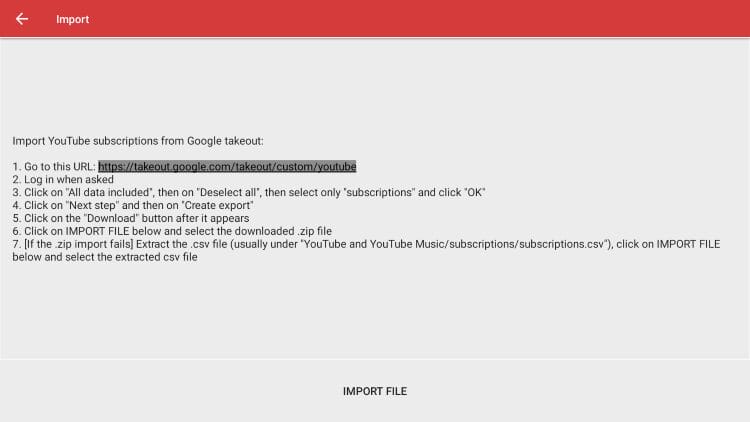

Doing this will provide you with access to all of your YouTube subscriptions so you never miss out on any of your favorites!

You can learn more about this app at the NewPipe Official Website including the ability to support the developers with a Donate option as pictured below.

For more YouTube-related tutorials, be sure to check out the links below.
Final Thoughts
With many of the world’s most popular media platforms hosting endless ads and popups, most users are looking for ways to reduce/eliminate these and improve their overall streaming experience.
NewPipe is one of the best ways to stream YouTube content without advertisements, especially for those who prefer to access the app on popular streaming boxes.
One of the most important features of this APK is that it is frequently updated and users can find the release highlights on their official website. You can also add the F-Droid repo to your client to get even faster updates.
Overall, NewPipe is highly recommended and definitely worth checking out/adding to your streaming repertoire. Let us know if you have tried this app in the past and what you think of it in the comments below!
This page includes affiliate links where TROYPOINT may receive a commission at no extra cost to you. Many times, visitors will receive a discount due to the special arrangements made for our fans. Learn more on my Affiliate Disclaimer page.


