

This guide will show you how to fix, “This audio format AC3 is not supported” error.
Most people are encountering this error when using MX Player in conjunction with free streaming applications such as Terrarium TV. They will try playing a movie or TV show within the application and notice that the video plays fine but there is no sound.
This doesn’t occur for all videos, only the ones using AC3 audio.
The reason why this error occurs is that MX Player does not support AC3 audio in the codec that comes installed with the application. A codec is a computer program that compresses and decompresses digital audio for a specific audio file.
To fix this problem, you need to install a different codec that supports AC3 audio in MX Player.
If the following tutorial doesn’t work for you, more than likely you are using an older version of MX Player.
I have created a shortcut on my server which points to the most recent stable release and you can get that here https://troypoint.com/mx. You can use this shortcut to install MX Player through popular apps such as Downloader and ES File Explorer.
How to Fix This Audio Format AC3 is Not Supported Error in MX Player
Video Tutorial
|
Screenshot Guide
TROYPOINT Tip: Watch the above video tutorial for step-by-step instructions and important details that aren’t displayed in the screenshot guide below.
Hide Your Digital Fingerprint
1 – Open MX Player, go into Settings and click Decoder.

2 – Scroll to the bottom and write down the codec type that is being used – in this example it is Neon.
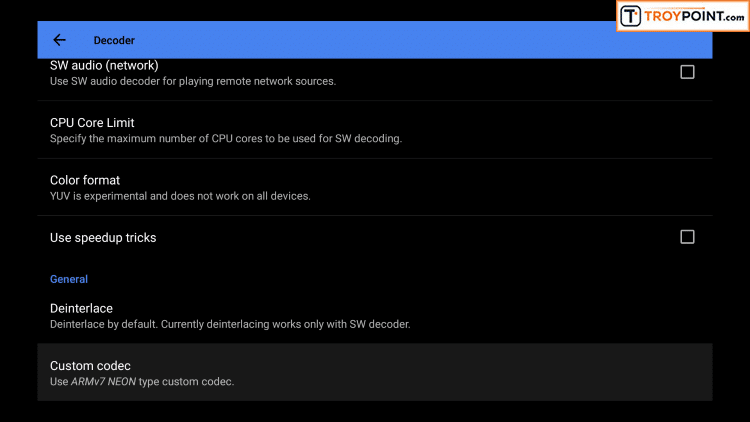
3 – Open ES File Explorer and launch Download Manager which can be found under the “Tools” category.
Note: ES File Explorer now charges for their app. Learn how to get the modded free premium app through our ES File Explorer Firestick tutorial.

4 – Download the new codec by adding a new source by clicking the “+ New” icon toward the bottom and input the following url based on your respective codec type that you wrote down in Step 2.
Neon – https://troypoint.com/neon
Neon 64 bit – https://troypoint.com/neon64
Exclusive Surfshark Discount
Warning: Your online activity is currently monitored by your ISP, app/addon/IPTV developers, government agencies, and the websites you visit.
- Become 100% anonymous while streaming and downloading.
- Use on Unlimited Devices & share 1 account with the entire family.
- Save 85% with the 24-Month Plan + Get 3 FREE Months.
X86 – https://troypoint.com/x86
X86 64 bit – https://troypoint.com/x8664

5 – Open MX Player, go back into Settings / Decoder, scroll to the bottom and click Custom Codec. Next choose the codec that you downloaded in Step 4. You may also notice that MX Player automatically recognizes the new codec when you launch the application and you can also choose it from that prompt as well

You will now be able to play AC3 audio files through MX Player and enjoy the sound.
This page includes affiliate links where TROYPOINT may receive a commission at no extra cost to you. Many times, visitors will receive a discount due to the special arrangements made for our fans. Learn more on my Affiliate Disclaimer page.


MX Player doesn’t install??
hi why can’t I now watch football on my live net tv it has been working okay up until recently I think it might be something to do with mx player thanks eric