
The following guide covers the Best Jellyfin Alternatives for streaming your personal media library in 2026.

Jellyfin built its reputation on a simple promise. Free forever, fully open source, no subscription, and no company deciding what you can do with the movies sitting on your own hard drive.
That promise still holds. The people who kept it are another story.
In July 2026, three of the project’s most recognizable names walked away within 48 hours of each other. Project leader Joshua Boniface resigned on July 19 after more than seven years, writing that “my personality is not the sort of personality really suited to running a large project” and that he “could not hold on any longer.”
Core team member Anthony Lavado, who handled community, finances, and social accounts, stepped back the same day. Founding contributor Andrew Rabert had already left two days earlier and moved his desktop client outside the project under a new name, Jellium Desktop.
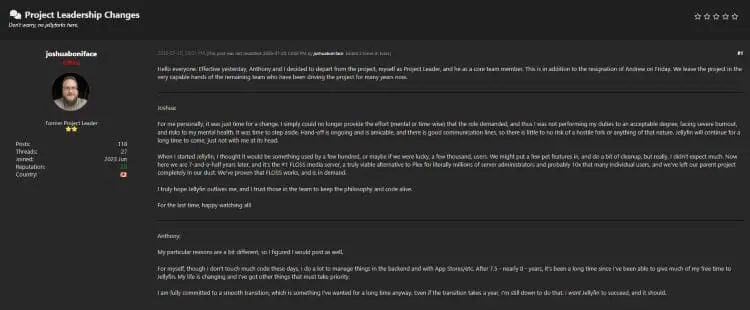
Burnout was the reason each of them gave. A separate dispute over AI-assisted code contributions ran underneath it all, though Boniface called that one more straw rather than the cause, and he stayed on to manage infrastructure.
We covered the full story in our report on the Jellyfin founders stepping down.
The following list was last updated on Thu, Oct, 15, 2026
Should You Actually Leave Jellyfin?
For most people reading this, no. Here is the honest read before you go shopping.
Jellyfin did not get acquired, shut down, or go closed-source. Three volunteers burned out and stepped away from roles they had held for years, which happens constantly in open-source software and rarely kills a project. Dozens of contributors still push code, the constitution handles succession, and Boniface said himself there is little risk of a hostile fork.

The real concern is timeline. Version 10.11.x is still the stable branch, and 12.0 had not reached a release candidate as of the project’s May 2026 update. Leadership churn slows a roadmap that was already behind.
Stay on Jellyfin if your setup works, you are on stable hardware, and free and open source is the whole reason you are there. Nothing about July changes what is already running in your house. We even have a setup video for Jellyfin for those still interested in using the software.
Start looking if you were waiting on 12.0 for a specific feature, you need commercial support or somebody to call, you run this for family members who cannot troubleshoot, or you simply do not want your library sitting on a project going through a leadership transition.
If you fall in that second group, the options below are sorted by how closely they match what Jellyfin actually does. Every entry notes how it is governed and funded, because that is the part that just bit everybody.

Sick of Slow, Rural Internet?
Whether you live out in the country or take your RV off the grid, Starlink delivers blazing-fast internet to areas that traditional providers ignore.
Check Availability & PricingBest Jellyfin Alternatives in 2026
These first four are true Jellyfin replacements. You install a server, point it at your files, and client apps connect to it. If you are migrating a library, your answer is in this group.
1. Plex

Exclusive Surfshark Discount
Warning: Your online activity is currently monitored by your ISP, app/addon/IPTV developers, government agencies, and the websites you visit.
- Become 100% anonymous while streaming and downloading.
- Use on Unlimited Devices & share 1 account with the entire family.
- Save 85% with the 24-Month Plan + Get 3 FREE Months.
Official Website: Plex
Plex is the most polished media server available and the one Jellyfin traces its roots back to. Install the server software on a computer or NAS, and client apps on your Firestick, Android TV box, phone, or tablet connect to it for playback. It pulls cover art, plot summaries, and cast info without any manual tagging, and a free ad-supported tier throws in thousands of on-demand movies plus live channels before you upload a single file.
Now the part that sends people to Jellyfin in the first place. Plex removed free remote playback in April 2025, so streaming your own library away from home requires a paid plan.
Then on July 1, 2026, the lifetime Plex Pass jumped from $249.99 to $749.99, having already climbed from $119.99 the year before. A five-year plan was introduced at $249.99, and a Remote Watch Pass covers just the away-from-home piece at $2.99 per month.
Who runs it: a venture-funded private company. Somebody answers the phone and the apps get updated, and the pricing above can change again whenever the board wants it to. Jellyfin exists because people got tired of that tradeoff.
2. Emby

Official Website: Emby
Emby is the platform Jellyfin split away from back in 2018, when the code stopped being fully open. Structurally it works like Plex. A server holds your files, client apps connect to it, and everything gets sorted into movies, shows, and music automatically.
The basic server is free. Emby Premiere unlocks hardware transcoding, DVR recording, offline sync, and parental controls at $4.99 per month, $54 per year, or $119 for a lifetime pass. Against what Plex now charges for lifetime access, that last number looks very different than it did a year ago. Worth knowing before you commit: Emby is source-available rather than open source, and Premiere covers a single household across 30 devices.
Who runs it: a small commercial team funded by Premiere sales. Anyone who left Jellyfin over licensing philosophy will not find what they want here, but if you just want a stable server with a company behind it, Emby does the job well.
3. Universal Media Server

Big Tech is Scanning Your Emails
Stop letting free providers read your private messages to build advertising profiles on you. Take back your digital privacy with a secure, ad-free inbox.
Official Website: Universal Media Server
Universal Media Server is the closest match to Jellyfin’s original pitch. Free, open source, no account required, and no premium tier waiting to appear later. Version 15.7.0 landed in June 2026 and the project ships updates on a steady schedule.
It streams over DLNA, UPnP, and HTTPS to smart TVs, game consoles, Blu-ray players, and phones, so plenty of older living room hardware that never got a Jellyfin app can still find it on the network. Transcoding runs through FFmpeg and VLC, so odd file formats rarely stop playback. The interface is plainer than Plex or Emby and setup asks more of you upfront, but what you get back is a server nobody can put behind a paywall.
Who runs it: volunteer contributors on GPL, with early builds funded through Patreon. Same structural risk that just hit Jellyfin, but the license means a fork stays possible no matter who quits.

Official Website: Navidrome
Navidrome is the one server here that only does music, and it belongs on this list because plenty of Jellyfin setups are carrying a music collection that deserves better than a video app’s audio tab.
It is a self-hosted music server, free and open source, and it runs on almost nothing. A Raspberry Pi handles it fine. Because it speaks the Subsonic API, dozens of existing mobile and desktop players connect to it without anybody writing a new app, which is a useful hedge against a single client project going quiet.
Multi-user support, on-the-fly transcoding, and browser access are included. If your Jellyfin box is mostly serving music, this replaces that half of the job outright and pairs with any video server above.
Who runs it: an open-source project on GPL with an active contributor base and no paid tier.
Streaming Apps Worth Running Alongside a Server
The next four are not media servers and will not host your library. They are players and streaming apps, and they are here because a lot of people who run Jellyfin also want something that just plays a movie on the Firestick without a server involved. Judge them on that, not as a like-for-like swap.
5. Stremio

Official Website: Stremio
Stremio is a different animal from a media server. Rather than hosting files you already own, it pulls content in through an add-on system and puts it all behind one interface. It runs on Windows, Mac, Linux, Fire TV, Android TV, and mobile, and a free account keeps your library in sync across devices.
Setup is where it wins. Stremio add-ons install with a single click, update on their own, and never ask you to hunt down a repository. Content discovery is built in too.
Keep in mind the app carries no content by itself, so everything depends on which add-ons you install. It was also pulled from the Apple App Store in January 2026 and has not returned, so iPhone and iPad users are out of luck for now.
TROYPOINT Tip: Use our Ultimate Stremio Setup Guide that will show you how to configure Stremio and personalize the application for the best streaming experience.
Who runs it: a private company. The core app is free and the add-ons come from the community, so the parts you rely on most are maintained by people with no obligation to keep going.
How To Install & Setup Stremio
6. Kodi

Official Website: Kodi
Kodi has been around since 2002 and remains free and open source under a non-profit foundation, which is the governance model Jellyfin users tend to care about.
Version 21.3 “Omega” is the current stable build, and Kodi 22 “Piers” hit its first beta in late June 2026. As a local library manager it is excellent. Point it at a folder of movies or shows, let it scrape metadata, and you get a full media center on Windows, Mac, Linux, Android, Fire TV, and Raspberry Pi.
The tradeoff is maintenance. Third-party add-ons and builds break often, and the learning curve is steeper than anything else here. Our Stremio vs Kodi comparison covers how the two stack up.
Who runs it: the non-profit XBMC Foundation, the most durable governance model on this page. Note that Kodi pairs well as a front end for a Jellyfin or Emby server rather than replacing one.
7. Nuvio

Official Website: Nuvio
Nuvio is a newer media hub built by Tapframe that reads Stremio add-on manifest URLs unmodified while running its own native plugin system on top, giving you two ways to pull sources inside one app.
User profiles, cross-device syncing, and an account dashboard for managing add-ons and watch progress are all there. Android, Android TV, and Fire TV are the main targets, and iPhone owners can check our guide on running Nuvio on iPhone and iPad.
Windows and Mac builds showed up in June 2026, though those are still labeled alpha and the developers say so plainly. Either way you are testing software that has not hit a stable release, so expect rough edges.
Who runs it: a small independent developer team on GPL. Fast-moving and open, with the bus factor you would expect from a young project.
8. OSMC

Official Website: OSMC
OSMC (Open Source Media Center) is a free Debian-based operating system built around Kodi 21.3. It turns inexpensive hardware like a Raspberry Pi into a dedicated media box for the living room, and an update shipped in May 2026 for every supported device.
What separates it from a plain Kodi install is that the operating system handles updates on its own and includes an app store for adding features. Getting started asks no Linux knowledge, since the on-screen interface covers setup through daily use. The team also sells its own hardware, the Vero V, built from the ground up for the job.
Who runs it: a small team funded by Vero hardware sales, on open-source Kodi underneath. Selling hardware gives the project a revenue source that donation-driven efforts do not have.
Final Thoughts on Jellyfin Alternatives
Watching three longtime contributors burn out in the same week is a reminder of how much free software rests on a handful of people doing unpaid work, and how little most of us think about that until they leave.
Most Jellyfin users should stay put and watch the next few releases. If you do need to move, here is the short version.
Pick Emby for the closest thing to a drop-in replacement with a company behind it, and pick Plex if polish and client support matter more than the price.
For anyone who mostly wanted an easy way to watch something on a streaming device without running a server at all, Stremio remains the fastest path there.
Are you sticking with Jellyfin or moving to something else? Let us know which alternative you picked in the comments below.
This page includes affiliate links where TROYPOINT may receive a commission at no extra cost to you. Many times, visitors will receive a discount due to the special arrangements made for our fans. Learn more on my Affiliate Disclaimer page.


