

This comprehensive ProtonVPN Review will tell you everything you need to know about the service and whether it is right for you.
We will include important factors such as ProtonVPN Free features, price, device compatibility, and much more.
We tested this service for 2 weeks on various devices including the popular streaming device the Amazon Firestick.
Proton is one of the most well-known VPN providers available.
One of the main reasons ProtonVPN has gained traction is because its Free Version users can install on various devices.
This review focuses on the paid option for ProtonVPN which has tons of additional features.
TROYPOINT never recommends using a Free VPN because these services always come with a catch.
The most popular option from Proton is the free version but users will miss out on security and other important features with this version.
Proton’s Free VPN comes with only one connection and will have slower speeds than their premium choice.
Hide Your Digital Fingerprint
Speed is extremely important when using a VPN because we are streaming large HD media files. Slow download speed equals buffering and lag.
Proton has numerous pricing options with various provided features which we will discuss below.
We have also tested ProtonVPN’s speed on numerous devices including the Amazon Fire TV Stick which we provide results for.
ProtonVPN is a subsidiary of ProtonMail which is a popular anonymous e-mail provider that we recommend.
We include ProtonMail in our comprehensive guide below:
How to Create an Anonymous E-Mail Account

ProtonVPN Highlights
- Free for various uses
- Zero Log Policy
- Easy to use VPN apps for, Android, Windows, macOS, and Linux
- Up to 10 simultaneous connections with one account (Premium version only)
- Over 1,700 VPN servers in 60+ countries across the world
- Fast download speeds
- Works with real-debrid
- Secure Core
- Adblocker via NetShield
- VPN Accelerator
- Kill Switch available
- Split Tunneling available
- Compatible with popular Streaming APKs
- 30-day money-back guarantee
- Customer Support
- Accepts Credit Card, PayPal, and Bitcoin
CLICK HERE for Official ProtonVPN Website
ProtonVPN Features
ProtonVPN includes extensive features that make it one of the best VPN choices available today.
Exclusive Surfshark Discount
Warning: Your online activity is currently monitored by your ISP, app/addon/IPTV developers, government agencies, and the websites you visit.
- Become 100% anonymous while streaming and downloading.
- Use on Unlimited Devices & share 1 account with the entire family.
- Save 85% with the 24-Month Plan + Get 3 FREE Months.
Many of the features below are only available with a paid subscription to Proton and do not come with the free package.
Secure Core Servers

ProtonVPN uses Secure Core Servers which means you never have to worry about your information being vulnerable or insecure.
These servers are owned and operated by Proton in countries with strong data privacy laws.
All traffic on your device is routed through these hardened servers where you are connected to a second VPN Server.
This means you are always protected and can ensure your data online is completely private and anonymous.
Adblocker (NetShield)
Today’s internet users are constantly bombarded with ads and targeted campaigns that can become annoying and intrusive.
Proton has come up with a way to block these privacy-invading ads while keeping your online traffic secure.
NetShield by Proton uses DNS filtering which will improve your connection speeds and stop trackers from monitoring you.
It checks domain requests of every website and app you access against a database of sites known to host malware, ads, and trackers.
It then blocks any of these that are flagged so you don’t have to deal with the constant barrage on your device.
Big Tech is Scanning Your Emails
Stop letting free providers read your private messages to build advertising profiles on you. Take back your digital privacy with a secure, ad-free inbox.
VPN Accelerator

One of the most notable features of ProtonVPN is the built-in VPN Accelerator that provides the best possible VPN Speeds.
This unique set of technologies is unique to Proton and can improve VPN speed by over 400%.
All VPN Servers from Proton include VPN Accelerator which means no matter the server or your location, you will always get the fastest speeds possible.
We tested this while doing our Speed tests for this service which you can see results for below.
Swiss-Based

While many do not see the location of the Provider as a factor in making a VPN choice, this can be a very important detail to pay attention to.
Some VPN Providers are located in countries that are part of the 5 Eyes, 9 Eyes, or 14 Eyes intelligence-sharing networks.
Fortunately, ProtonVPN is located in Switzerland which has some of the world’s strongest privacy laws.
This means that Proton is not required to store or hand over user data. In fact, Proton features a strict no-log policy which means that no traffic, IP Addresses, or browser history is saved.
Continue reading for more information on this policy.
ProtonVPN Special Discount – Save 50%
No Logs Policy
As stated above, Proton has a strict no-log policy and will not store any logs of your online activity when connected to a VPN server.
This includes:
- Zero logs of web pages you visit
- No recording session lengths
- No monitoring of your IP Address
Because ProtonVPN is based in Switzerland, they are not obligated to retain data logs and therefore do not which will ensure your VPN connection is completely private.
VPN Protocols

ProtonVPN uses only the most secure, stable VPN Protocols which include OpenVPN, IKEv2, and WireGuard.
Each VPN Protocol has its own advantages which means users can choose between them to find the one best suited for their needs.
OpenVPN is known as a completely secure VPN protocol that can be run using UDP or TCP transmission protocols and will defeat most censorship.
IKEv2 is a modern, fast VPN Protocol that Proton implements at its strongest encryption settings.
WireGuard is likely the fastest VPN Protocol due to its lightweight nature. However, your connection is still secure as WireGuard uses ChaCha20 encryption for your protection.
We suggest testing all 3 VPN Protocols to find which one works best for you and your device.
Kill-Switch and Always-On VPN
One of the best features Proton provides is the Kill Switch which will keep you protected at all times.
A VPN Kill Switch is a tool that is built into VPN Software that will automatically shut down all traffic if your VPN connection is ever lost or interrupted.
ProtonVPN’s Kill Switch continuously monitors your connection to servers and if it is ever dropped, your internet connection is ended.
Currently, this setting is available to users on macOS, Windows, Linux, and iOS. Unfortunately, this is not a feature that is yet available on Firestick devices.
Real-Debrid Compatible
Most cord-cutters use a VPN with various Streaming Apps and Kodi Addons.
Many of these are compatible with real-debrid which is an unrestricted downloader to serve up Movie and TV Show links.
Real-Debrid lists “Cooperative” and “Non-Cooperative” VPN Services on their website and recommends using a Cooperative option with this service.
ProtonVPN is currently listed as a Non-Cooperative VPN Service, however, they do list Proton has over 1500 IP Addresses allowed.
This means that over 1500 server options provided within Proton will work with real-debrid for buffer-free streaming.
10 Simultaneous Connections

The Free version of ProtonVPN allows for one connection at a time which usually isn’t enough.
However, those who purchase ProtonVPN will have 10 simultaneous connections for their preferred devices.
While 10 connections may seem like a lot, this may not always be enough. Many households have upwards of 15 internet-connected devices at any one time.
Because we are constantly using the internet for various reasons, we would like to see more connections provided to ensure you are always secure no matter your device.
Register for ProtonVPN with Major Discount
ProtonVPN App

ProtonVPN has an easy-to-install app that is available on numerous devices including PC, Android, macOS, and Linux.
You can also find applications for streaming devices including Android TV Box via the Google Play Store.
The ProtonVPN App was previously unavailable on Firestick. However, it has since been added to the Amazon App Store for quick installation.
The Amazon Firestick is the most popular streaming device available today.
This is likely due to its low price point and “jailbreaking” capabilities.
When we “jailbreak” a Firestick, we are installing apps that are not available within a verified app store such as the Amazon App Store.
Therefore, a VPN is highly recommended to ensure your data is encrypted and protected from these 3rd party app developers.
Currently, the ProtonVPN App is available on the following devices:
- Android
- iPhone/iPad
- Windows
- MacOS
- Linux
- Chromebook
- Android TV
- Firestick/Fire TV
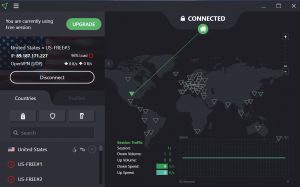
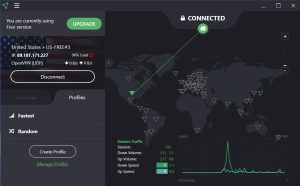
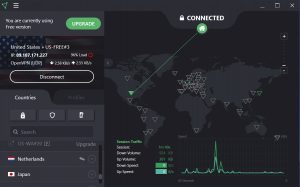
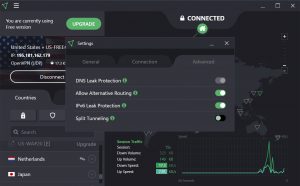
Below are screenshots of the ProtonVPN application on a Windows PC:
Sign up for ProtonVPN with Discount
ProtonVPN Free
As stated above, there is both a free version and a paid version of ProtonVPN available for use.
While many opt for ProtonVPN Free, users should be aware of the features left out when choosing this option.
Many use VPN applications on their favorite device including Firestick, Android, iPhone, and more.
If you prefer to use Torrent Websites to watch/download streams, you must ensure you are connected to a VPN to protect your privacy.
ISPs and more are cracking down on torrent website visitors who download content via the internet.
A recent example of this involved the popular site YTS:
YTS Torrent Site Handing Over User Data to Authorities.
The Free version of Proton does not include P2P/BitTorrent support. This means that your data may be exposed when using the free option of ProtonVPN.
However, you can access this feature with a paid subscription that will ensure your data is safe.
Another reason to use a VPN on your devices is to avoid “geo-blocking” in various parts of the country and the world.
This is often referred to as “unblocking websites” which is very popular among users of Netflix, YouTube, and sports fans who are often geo-restricted in certain locations.

Unfortunately, ProtonVPN only provides 3 countries for server options when using the Free version.
Currently, the locations available include:
- United States
- Netherlands
- Japan
If using the ProtonVPN App on Firestick/Fire TV, you will find there are only five available servers within the US that you can connect to.

This means users who are trying to “unblock websites” can only access these locations with their VPN connection.
One other item of importance is the number of connections you can establish with your VPN.
Proton only allows for one connection at a time with the Free option and up to 10 with their Premium package.

In order to install and use ProtonVPN, even for Free, users must create a Proton account.
Register for ProtonVPN with Discount
ProtonVPN Pros and Cons

Prior to going into the details of this review, let’s get a quick overview and evaluate the pros and cons of ProtonVPN.
What We Like
- Less known VPN service – This will help avoid blocks by ISPs and major streaming services
- Zero Log Policy
- 4 package/pricing options to choose from
- Unblocks Netflix, YouTube, Amazon Prime, Facebook and other services (Not available with Free or Basic Package)
- 30 Day money-back guarantee
- Kill Switch available
- Accepts Bitcoin for payment
What We Don’t Like
- Not Compatible with Firestick/Fire TV
- No P2P/BitTorrent Support with Free Version
- Can’t select specific server within designated location
- Limited to 3 locations with Free version
- No option to change VPN Protocols
- Fewer servers compared to other VPN providers
- Slower VPN speeds when compared to IPVanish
- Customer support via support ticket only
- Must register for an account even for the Free version
- High price for paid plans
ProtonVPN Review – Pricing
Price is always one of the most important factors when choosing a VPN service.
Besides the Free Version, Proton offers 3 other subscription options that vary in price.
This includes a 2-year plan, 1-year plan, and monthly plan.
Currently, these subscription options are priced at the following:

There are notable differences when comparing the Free VPN Plan with the Proton VPN Plus Plan.

As you can see, when compared to paid versions, Proton’s free services are minimal.
You can find an updated pricing chart at Proton’s official website below.
When compared to other VPN Services such as IPVanish, ProtonVPN carries a heavier price tag.
Plus, these Providers have tons of features that users cannot find within Proton including Unlimited Device Connections at the same time.
We will dive more into this comparison below.
ProtonVPN Review – Speed Tests
Speed is arguably the most important feature to consider when comparing VPN providers.
No matter which VPN service you use, you will experience a slight drop in download speeds because your traffic is routed through a separate VPN server and your connection is encrypted.

This is important when using Streaming Apps and IPTV Services on your device, as download speeds play a huge factor in buffering and playback.
We conducted several speed tests for our ProtonVPN review to see where this VPN ranks among the other popular services like IPVanish VPN.

Below you will find speed test results on a Firestick and Windows PC.
Although there are hundreds of Internet speed tools available, for this example I am using the Analiti Speed Test app on the Firestick, and our TROYPOINT Speed Test tool on Windows PC.
Analiti is available on Firestick/Android devices which you can install through both Amazon App Store and Google Play.
For our tests on PC, we used the TROYPOINT Speed Test.
The following speed test was conducted on 100 Mbps max Internet plan.
Wireless tests were conducted through ASUS AC3100 Router which is approximately 20 feet away from the device.
Firestick VPN Speed Tests
After installing the ProtonVPN APK on our Firestick, we ran a few speed tests for comparison purposes.
As mentioned previously, we used Analitit Speed Test and also connected to the free server located within the USA by default.
ProtonVPN Free US Server

Wi-Fi: 6 Mbps down & 2 Mbps up
If you’re trying to stream video, you will have buffering problems with this slow connection.
IPVanish VPN Chicago Server

Wi-Fi: 65 Mbps down & 17 Mbps up
Next, we tested ProtonVPN speeds on a Windows PC.
Windows PC VPN Speed Tests
Below are the results of our ProtonVPN Free Speed Test results on a Windows PC.
In this instance, we chose US Server within Proton’s settings which auto-connected to New York City.
We used the TROYPOINT Internet Speed Test to measure our results.
ProtonVPN Free US Server

Wi-Fi: 13.2 Mbps down & 4.9 Mbps up
Without VPN Activated
After testing with Proton’s VPN enabled, we tried a speed test without a VPN connection to compare results:
Wi-Fi: 96.3 Mbps down & 45.0 Mbps up
As you can see from our results shown above, our internet speed is nearly 7x faster when it is not connected to ProtonVPN.
You can compare this with IPVanish at our IPVanish Review Guide below:
IPVanish Review – World’s Fastest & Most Secure VPN
ProtonVPN vs. IPVanish VPN

Many TROYPOINT visitors will be wondering how we rank ProtonVPN in comparison to IPVanish, which has been our top recommended VPN for five years.
Proton is a suitable VPN service if you plan on using the app on only one device at a time.
Plus, with a price tag of absolutely FREE, it works well and ensures a secure connection.
However, if you are a Firestick user or cord-cutter with Real-Debrid, you may want to consider another option.
Internet Speed is a vital aspect of our everyday lives and most of us hate suffering any loss of connection speed.
Most VPNs will typically decrease your internet speed but when compared to IPVanish, Proton’s free VPN was much slower in both download and upload speeds.
IPVanish recently announced a network upgrade that improves their VPN speeds by 2.5 times which makes it the fastest VPN Service available.
IPVanish Boasts Major VPN Speed Improvement

Many of us use up to 10 or more internet-connected devices simultaneously and Proton lacks multiple device compatibility.
Unless you want to pay $30/month for Ten Device connections (Visionary Plan), IPVanish is the better choice for unlimited connections at once.
You can use their service on as many gadgets as you would like.
IPVanish also has a special offer that will provide you with all of IPVanish’s features for about the same price as Proton’s basic package.
CLICK HERE FOR IPVANISH DISCOUNT
This includes:
- Unlimited connections with one account
- Unblocks Netflix, YouTube, and other services
- Cooperative with Real-Debrid and other debrid services
- Easy to install apps for all of the popular devices (Including Firestick)
- Over 2,400 VPN servers in 105 countries across the world
- Over 40,000 encrypted IP addresses to choose from
- Blazing fast download speeds worldwide
- and more
It’s important to point out that some VPNs perform better than others based on network setup, Internet service provider, etc.
While ProtonVPN does have a useful customer support function, it is only via Support Ticket at their website:

IPVanish offers 24/7 support through their Website if you have questions about your account, billing, or need technical support.
You will notice a Help button on the bottom of the IPVanish VPN Website for live chat. Customer support via email is also available.
Both ProtonVPN and IPVanish offer a 30-day money-back guarantee so you can try both and have the option for a refund if one doesn’t work properly.
For our full IPVanish VPN review where we analyze speeds, features, settings, pricing, and more, click the link below.
ProtonVPN Review – Final Verdict
In conclusion, ProtonVPN is a well-known VPN Company and is trusted by thousands of people worldwide.
It works great for many users who just want to secure their connection when connecting to the internet one device at a time.
However, it lacks major features that other VPN services provide.
For our overall ProtonVPN Review, TROYPOINT gives this VPN service 3.6/5 stars.
3.6 out of 5 Stars
This page includes affiliate links where TROYPOINT may receive a commission at no extra cost to you. Many times, visitors will receive a discount due to the special arrangements made for our fans. Learn more on my Affiliate Disclaimer page.


I think what you do is fantastic, been watching and listening to most of your information for years now. Proton Vpn which I purchased for Android Tv is not the same as the other software for their Vpn, been working with their people, 2 days now with emails, come to find out they know about the problem with the ad blocker and are working on it, when the fix will be made is unknown.
2 Comments regarding Proton VPN. Compared to other VPNs like IPVanish, ExpressVPN, and Surf Shark speeds are far superior on the paid vetsion, giving anyone access to the + Servers. Speed increase for me was an average 30MBps. On top of that malware protection as well as ad blocking and redirect protection was flawless. Unfortunately for me the problem is tha on most streaming devices you do not have access to the full suite of options. This on a 4K Max firestick. I have contacted them tegarding this and I’m sad to say that they keep spouting a corporate mantra of ” we’re working on it, but at this time, we do not have a timeline on when an update will be released”.