
This guide provides an updated list of the Best Nuvio Addons and Plugins/Repositories for streaming on your favorite device.

Nuvio has quickly become one of the most popular streaming applications today, with cord-cutters turning to this powerful APK to access a wide range of content.
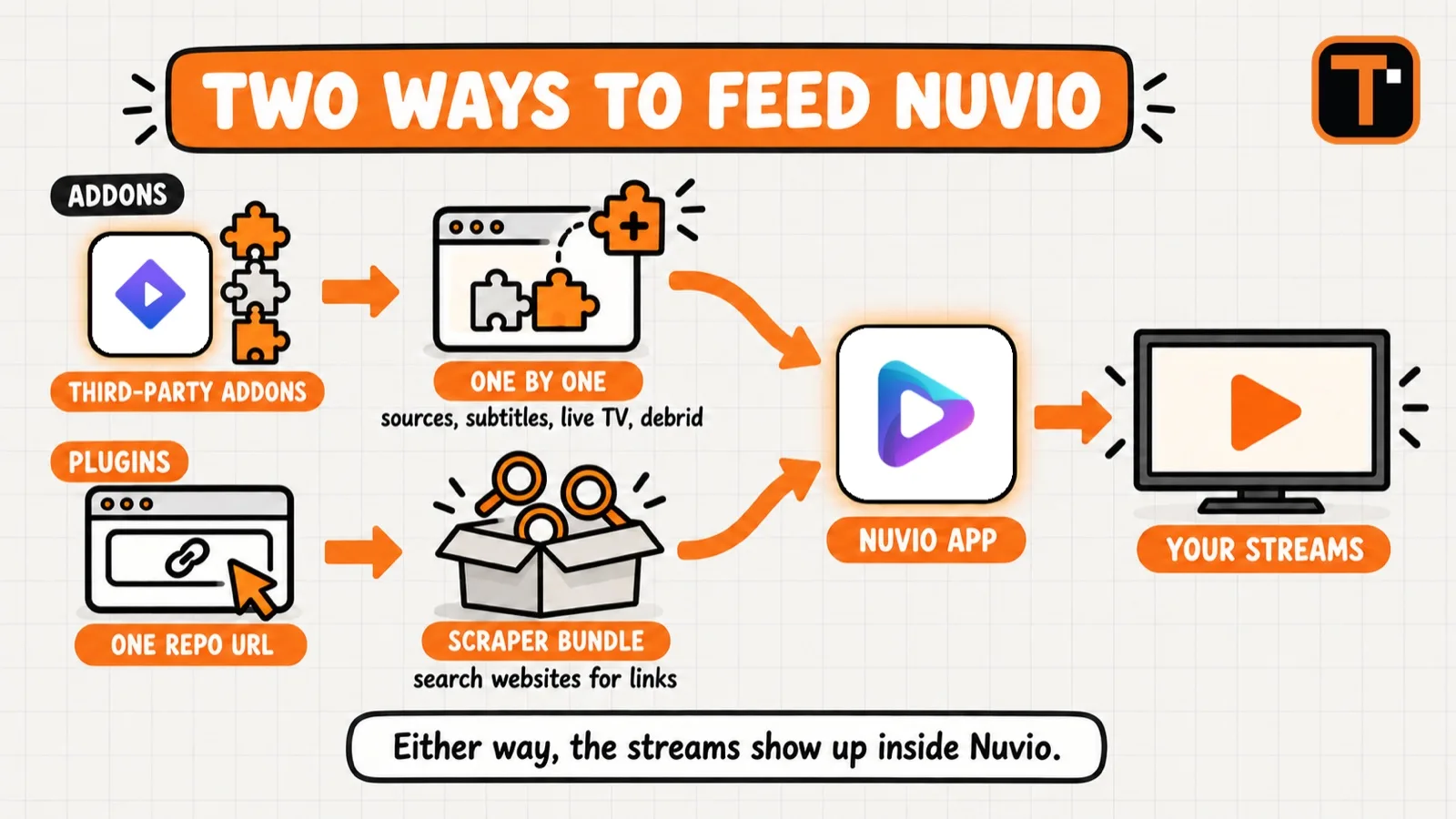
One of the standout features that makes Nuvio unique is its support for both third-party addons and built-in Plugins, however, each serves a different purpose.
While both can be used to provide streaming links for Movies, Shows, and more, they differ in how they are installed, managed, and integrated within the app.
Plugins typically serve as alternative content providers that can be added via repositories, often offering a more optimized experience for viewers.
This is because they come packaged as a “bundle” with numerous scrapers/providers that will pull links from the web for the source you are looking for.
If you do not use a popular debrid service, Nuvio Plugins may be your best bet to find streaming links, as these outlets go directly to the source.
In the guide below, we break down the best available Addons, Plugins, and repositories to help you get the most out of this feature-rich streaming app.
Nuvio Plugins vs Addons
One of the biggest advantages of the Nuvio application is its support for both Nuvio Plugins and 3rd-party Addons.
While many users group these, they actually serve different purposes within the platform. Addons are typically used to pull in content sources, metadata, subtitles, live TV streams, or debrid integrations from third-party developers.
Plugins, on the other hand, act as a bundled package of “repositories” that are specifically installed as sources to pull streaming links through HTTP platforms (websites).

This is the same type of integration we see with the CloudStream App that also uses Plugins/Repositories, which are referred to as Extensions.
In fact, Nuvio now supports CloudStream Extensions so if you have a favorite one that you use with this APK, you can also add it to your Nuvio library!

Ultimately, Nuvio users who want a more enhanced experience will likely want to use your typical addons that can be installed one by one.
However, if you want a streamlined process with less configuration and a simpler streaming experience, Nuvio Plugins are a great choice!
Best Nuvio Addons in 2026
Addons are installed one at a time using a manifest URL, and most are built for Stremio and work within Nuvio because the app supports the same format.
We verified each option below was live and working at the time of publishing.
Most users will only need a few. One source addon, one catalog addon, and a subtitle addon will cover nearly everything.
Exclusive Surfshark Discount
Warning: Your online activity is currently monitored by your ISP, app/addon/IPTV developers, government agencies, and the websites you visit.
- Become 100% anonymous while streaming and downloading.
- Use on Unlimited Devices & share 1 account with the entire family.
- Save 85% with the 24-Month Plan + Get 3 FREE Months.
AIOStreams
AIOStreams is the addon we suggest most Nuvio users install first. Rather than scraping sources on its own, it bundles multiple addons together and returns the results in a single list.
This matters because individual source addons go offline regularly. When one fails, AIOStreams will continue working through the others.
It can be used with or without a debrid service, although pairing it with one will provide faster playback.
Addon URL: https://aiostreams.elfhosted.com/stremio/configure
Torrentio
Torrentio is the most widely used source addon within the Stremio and Nuvio ecosystem, and it remains the quickest way to pull torrent links into the app.
It works without a debrid account, but results are much better with one. Without debrid you are streaming directly from peers, which often means buffering on titles that are not well seeded.
Torrentio does see occasional downtime when traffic spikes, which is another reason to run it within AIOStreams rather than on its own.
Addon URL: https://torrentio.strem.fun/configure
Comet
Comet is a lighter and faster alternative to Torrentio that works especially well alongside debrid services.
Users who find Torrentio slow to return sources tend to prefer Comet, and running both together costs you nothing.
Addon URL: https://comet.elfhosted.com/configure
MediaFusion
MediaFusion covers more ground than most source addons. Along with Movies and Shows, it also handles live TV and sports, which the torrent-focused options do not.
Big Tech is Scanning Your Emails
Stop letting free providers read your private messages to build advertising profiles on you. Take back your digital privacy with a secure, ad-free inbox.
It works with debrid services as well as direct P2P links, so it remains useful whether or not you subscribe to one.
Addon URL: https://mediafusion.elfhosted.com/configure
PenguPlay
PenguPlay pulls direct HTTP links rather than torrents, which makes it one of the better choices for those streaming without a debrid subscription.
It has become a community favorite for that reason, as HTTP addons will keep playing when debrid sources are down.
PenguPlay does not use a fixed address. You will need to sign in on its website first, which then generates the personal addon URL you paste into Nuvio.
Ultra MAX
Ultra MAX is a catalog addon rather than a source. It builds the rows on your Nuvio home screen, which lets you replace the default layout with trending titles, genres, and your own lists.
It will not find you a single stream on its own, so this is one to add after your sources are working. Ultra MAX is run from a community-hosted instance rather than a single official address, so use the setup guide above for the current link.
OpenSubtitles
Subtitles are the one category most users forget about until a stream starts without them.
There are two versions worth knowing about. We suggest starting with the PRO version, as it is ad-free and its setup page does not run pop-ups. The standard v3+ option works just as well for finding subtitles, but its configure page carries ads.
Addon URL (PRO): https://opensubtitlesv3-pro.dexter21767.com/configure/
Addon URL (Standard v3+): https://opensubtitles.stremio.homes/configure
Nuvio Addons Compared
Use the table below to determine which addons fit your setup before installing.
| Addon | Type | Debrid Needed? | Best For |
|---|---|---|---|
| AIOStreams | Bundled Sources | Optional | Most users, start here |
| Torrentio | Torrent Sources | Optional | Largest source library |
| Comet | Torrent Sources | Optional | Faster results with debrid |
| MediaFusion | Sources, Live TV | Optional | Sports and live channels |
| PenguPlay | Direct HTTP | No | Streaming without debrid |
| Ultra MAX | Catalogs | No | Customizing your home screen |
| OpenSubtitles | Subtitles | No | Subtitles in any language |
Best Nuvio Plugins in 2026
Plugins are worth adding when you want more sources without configuring each addon individually, or when you stream without a debrid service.
Use the following URLs to add Nuvio Plugins to your account dashboard.
For each plugin, we’ve listed the available scrapers included in its repository bundle. These scrapers determine which sources are searched for streaming links, so review each option to find the plugins that provide the sources you prefer.
Once installed, you will see each Provider listed within your app dashboard.

D3eadlyRocket
Popular Scrapers: HiAnime, Castle, CinemaCity, DooFlix, Netmirror, Purstream, VidLink, Torrentio, ShowBox, MovieBox
Repo URL: https://raw.githubusercontent.com/NuvioPlugin/All-in-One-Nuvio/refs/heads/main/manifest.json
This is the largest bundle on our list with over 60 scrapers included, making it the one to install first if you only want to add a single Plugin.
Phisher
Popular Scrapers: MoviesDrive, HiAnime, XDMovies, Animepahe, Kisskh, Idlix, Toonhub, Multimovies
Repo URL: https://raw.githubusercontent.com/phisher98/phisher-nuvio-providers/refs/heads/main/manifest.json
Phisher carries roughly 50 scrapers with heavy anime and international coverage, and it was the most recently updated repository on our list.
Yoru
Popular Scrapers: 4KHDHub, MovieBox, DVDPlay, YFlix, Vidlink, Cinevibe, ShowBox, DooFlix, MovieBlast, Netmirror
Repo URL: https://raw.githubusercontent.com/yoruix/nuvio-providers/refs/heads/main/manifest.json
Michat88
Popular Scrapers: Kisskh, Hdrezka, Idlix, Moviesmod, Myflixer-extractor, Vidrock, Watch32, Xprime, Yflix
Repo URL: https://raw.githubusercontent.com/michat88/nuvio-providers/refs/heads/main/manifest.json
MoonCrown
Popular Scrapers: DiziYou, SinemaCx, FullHdFilmizlesene, SineWix, JetFilmizle, WebteIzle, FilmModu
Repo URL: https://raw.githubusercontent.com/mooncrown04/nuviotr/refs/heads/main/manifest.json
MoonCrown focuses on Turkish sources, so this is one to skip unless that is content you watch.
Spidey
Popular Scrapers: Tamilblasters, TamilMV, Moviesda, ToonHub, XDmovies, DramaFull, Movies4u
Repo URL: https://raw.githubusercontent.com/Abinanthankv/NuvioRepo/refs/heads/master/manifest.json
The Spidey repository still installs, but the developer has since archived it, which means it is no longer being updated. Its scrapers will continue working until the sites behind them change.
How to Add Nuvio Addons
Addons and Plugins are installed in different areas within Nuvio, which is where many users get tripped up.
Addons use a manifest URL. Most addon websites provide a configure page where you select your options first, then copy the finished URL.
1. Open the addon’s configure page in a browser and select your preferences.
2. Copy the manifest URL that the page generates for you.
3. Open Nuvio and paste the URL into your addons list.
4. Enable the addon and return to your home screen.
If you are pasting URLs onto a TV, our guide that shows how to Copy & Paste on Android TV/Fire TV from your phone will save you a great deal of time.
How to Add Nuvio Plugins
Installing Nuvio Plugins varies a bit from adding 3rd Party Addons (such as Stremio Addons).
There are two main ways to install Plugins, either through your Account Dashboard or directly within the app on your streaming device.
Use the steps below to install a Nuvio Plugin to your Nuvio application. In this guide, we will do so via our Account Dashboard as it is easier to copy and paste Repo URLs.
1. Visit nuvioapp.space/account and Log In with your Nuvio Account Credentials.

2. Click Plugins on the left-hand menu.

3. Click Add your first plugin.

4. Input the Repo URL (from our list above) for the Plugin of your choice and a name. Click Save.

5. You will then see your Plugin has been installed.

Now, when viewing content within the Nuvio App you will see sources from your Plugins/Scrapers for your preferred title.

As noted, you can also manage Plugins within App Settings.

Moving From Stremio to Nuvio
Because Nuvio supports the Stremio addon format, the majority of the addons you already use will work after switching over.
You can move them across manually by copying each addon’s manifest URL from its configure page and pasting it into Nuvio.

Those with larger setups will find third-party migration tools that move a library and supported addons across. These are community projects rather than official Nuvio software, and they ask you to connect an account, so we would only use one after reviewing exactly what access it requests.
Our Perfect Setup Wizard for Stremio & Nuvio walks through building a configuration from scratch if you would rather start clean.
Nuvio Addons FAQ
What are some good add-ons for the Nuvio app?
AIOStreams is our suggested starting point, as it bundles several source addons together and will keep returning results when one of them goes offline. Add Torrentio or Comet for additional sources, MediaFusion for live TV and sports, and OpenSubtitles for subtitles. PenguPlay is worth adding for those who do not use a debrid service, as it pulls direct HTTP links.
What is the difference between Nuvio Addons and Plugins?
Addons are installed one at a time using a manifest URL and cover sources, catalogs, metadata, and subtitles. Plugins install through a single repository URL and add a bundle of scrapers at once that pull links directly from streaming websites. The torrent-based source addons work best alongside a debrid service, while Plugins go directly to streaming websites and are the better option without one.
What are the best Nuvio repositories?
The D3eadlyRocket All-in-One repository is the largest with over 60 scrapers included, while Phisher is the most recently updated with roughly 50. Yoru and Michat88 both carry around 30 scrapers covering general Movies and Shows, while MoonCrown focuses on Turkish sources.
How do I install addons in Nuvio?
Open the addon’s configure page in a browser, choose your options, and copy the manifest URL it generates. Paste that URL into your addons list within Nuvio and enable it. Plugins are installed separately through your Nuvio account dashboard using a repository URL rather than a manifest URL.
Do Nuvio addons require a debrid service?
No. Torrentio, Comet, MediaFusion, and AIOStreams all work without one, and PenguPlay is built for streaming without debrid. That said, a debrid service will provide faster and more reliable playback from the torrent-based source addons, which is why many users add one.
Do Stremio addons work in Nuvio?
In most cases, yes. Nuvio supports the same addon format as Stremio, so the majority of Stremio addons will install and work normally. Copy the manifest URL from Stremio and paste it into Nuvio.
Final Notes & Thoughts
As Nuvio continues to grow in popularity, many will be interested in using Nuvio Addons and Plugins to source media from this fabulous application.
We aim to keep our list updated with the latest and greatest selections for your streaming enjoyment.
The addon and Plugin ecosystem moves quickly, and repositories come and go without warning. While updating this guide we found that two repositories we previously featured, Nvmindl and Easystreams, had been taken down by their developers, so we have removed both. We also found that the Spidey repository has been archived, meaning it still installs but is no longer maintained.
If a source stops returning links, the repository behind it has usually gone offline rather than anything being wrong with your setup.
We suggest starting with AIOStreams and one or two Plugins, confirming playback works, then adding more from there.
If we missed one or you know of a better option, let us know what it is in the comment section below!
This page includes affiliate links where TROYPOINT may receive a commission at no extra cost to you. Many times, visitors will receive a discount due to the special arrangements made for our fans. Learn more on my Affiliate Disclaimer page.


